Showing posts with label Gaming. Show all posts

Tuesday, June 4, 2024

Making My Entryway Into Modern Gaming?

John B. Marine | 6/04/2024 07:53:00 PM | | Be the first to comment!
I am still in the PlayStation 3 era, folks. I look to break into the modern gaming realm with one of three choices. I'll explain my situation and choices in this blog post. I feel like trying to finally crack into the modern gaming realm after a considerable amount of time stuck in the PlayStation 3 era. Because I am not any serious gamer, I am not hesitant to join the modern gaming landscape. I am instead just wanting to finally get to this level after so long with my PlayStation 3. I also don't plan on selling my PS3 and the games I have for it, though it could help in financing for a better system.

Anyhow, let me share with you what I am thinking of as a gamer wanting to be current.


Making My Entryway Into Modern Gaming?


Modern gaming is rather expensive and convoluted. As an old-fashioned kind of person, my gaming interests are different from most other people. In older times, online gaming on PS3 was free. You now need PlayStation Plus to play online for PlayStation gamers. I've been a lifelong Nintendo gamer before I eventually moved on to Sony PlayStation. I still want to finally become current gaming-wise. So therefore, there are three options of mine. These options are in the order of recent plans of mine.

Before I begin, I have already eliminated XBOX because I have no plans to join the XBOX realm right now except for maybe get a used XBOX 360 to play some XB360 games and some reverse-compatible original XBOX games. So there will be no talk of me getting an XBOX One, an XBOX Series S, or an XBOX Series X in this blog post. Now for my modern gaming options...

Option 1: Nintendo Switch.


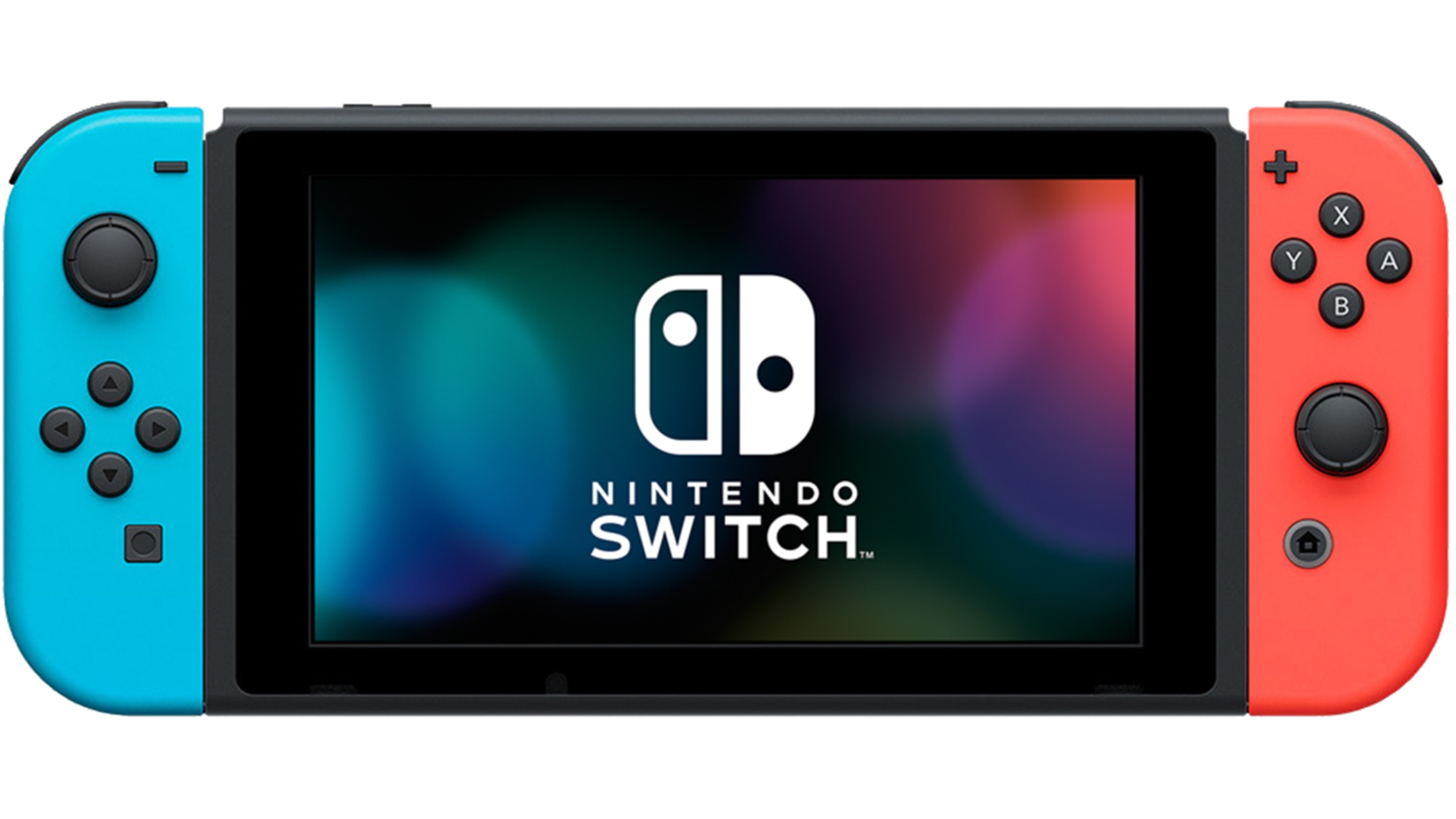
nintendo switch regular
^ from: Nintendo.com - Switch gaming up at home or on the go with the Nintendo Switch.

The Nintendo Switch was originally what I wanted to get once I saved enough money. I figured this would finally be my entry into today's gaming realm. The Nintendo Switch is very much the best value for gaming and online. Cheapest you can go is the Nintendo Switch Lite for $199 USD. You can still snag the regular Switch unit at $299 USD. If you want the best Switch right now, it's the Switch OLED for about $340 USD.

I want to get the regular Nintendo Switch. There are a few pitfalls for me with the Switch. I do want to consider getting the Switch to play the classic games online. The regular Switch Online is good for that, but the Expansion Online includes also Game Boy Advance and Genesis/Megadrive games. So I want to get the Switch and the Expansion online deal. I have no interest in the Switch Lite because I want to be able to play games not tied down to Handheld exclusive. I could get a Switch Lite, but I feel like I'd miss out on a full Switch experience. I don't care for ultra-awesome graphical detail, so the Switch OLED is not in my interests also. Even if the Switch OLED delivers a slightly better performance, I still prefer the regular Switch.

Another issue with the Switch is for a rather old console, many of the games are still full-price. Usually, a lot of the top-selling games are often times sold for a lower price. That isn't the case with a lot of Switch games. Long-timers like Super Mario Odyssey, Super Smash Bros. Ultimate, Mario Kart 8 Deluxe, The Legend of Zelda: Breath of the Wild, and The Legend of Zelda: Tears of the Kingdom all still sell for about $59.99 USD. A lot of the lesser titles and the indie/independent gamer titles are priced lower. So to play a lot of the major titles for the Switch still cost a good bit. Also, some games aren't available for the Switch currently, such as Street Fighter 6.

The last such issue I have with the Switch has nothing to do with the current state of the system. Instead, it is about its future. There is word of a possible (hypothetical name) Switch 2. Some people I talked to suggested I hold out on buying a Switch until we know as much as possible about the next Switch. We may know more about it in September 2024. If this next generation Switch is reverse compatible with original Switch games, then it would probably make more sense to get the newer Switch than go with the currently-available Switch models. That delay up to that decision is still a deterrent for me getting the Switch regardless of what the next Switch may provide.


Option 2: Get a Used PlayStation 4.


sony playstation 4 ps4
^ from: (Amazon) - The PlayStation 4 is still worth it, even nearly since its debut in 2013 or 2014 (based on market).

I was convinced by online videos and some online forums that the PlayStation 4 is not dead... yet. Some people even swear by using the PlayStation 4 because they don't have the fancy 4K or better TVs of today. I could live without not having a super-powerful console for which to enjoy gaming on. Therefore, I considered getting a used PlayStation 4. The best I could do is find a good or excellent condition PlayStation 4 Pro within my budget. If I don't see a PS4 with a one terabyte drive, I may consider upgrading the PS4 for some more storage. A PlayStation 4 used can either be fairly cheap or near regular MSRP price. Also, you may not know what you're getting and in what condition a used PlayStation 4 can be. You are kind of taking your chances in this regard.

My pitfalls with the PlayStation 4 are kind of the same with the Switch, only more towards the aging process. The PlayStation 4 has been released in America since 2013 and since 2014 in Japan. There was always talk of that 5-year cycle of PlayStation consoles. Even the PlayStation 4 has a lot of games that may no longer be developed for it in the near future. A lot of the PS4 games can still be enjoyed even if/when the PS4 games will be no longer sold instead of PS5 titles on store shelves.

One person suggested I'd be better off getting a PlayStation 5, since the PS4 could possibly have some lag with some games. Games run smoother on the PlayStation 5. I'd even take that chance with a PS4 until I somehow have enough to get a PlayStation 5.

Since I am still into the Sony ecosystem, I feel want to stay in it. I surely could still enjoy PlayStation 4 and not have to worry about saving up too much to get the PlayStation 5. Speaking of...

Option 3: Get a PlayStation 5.


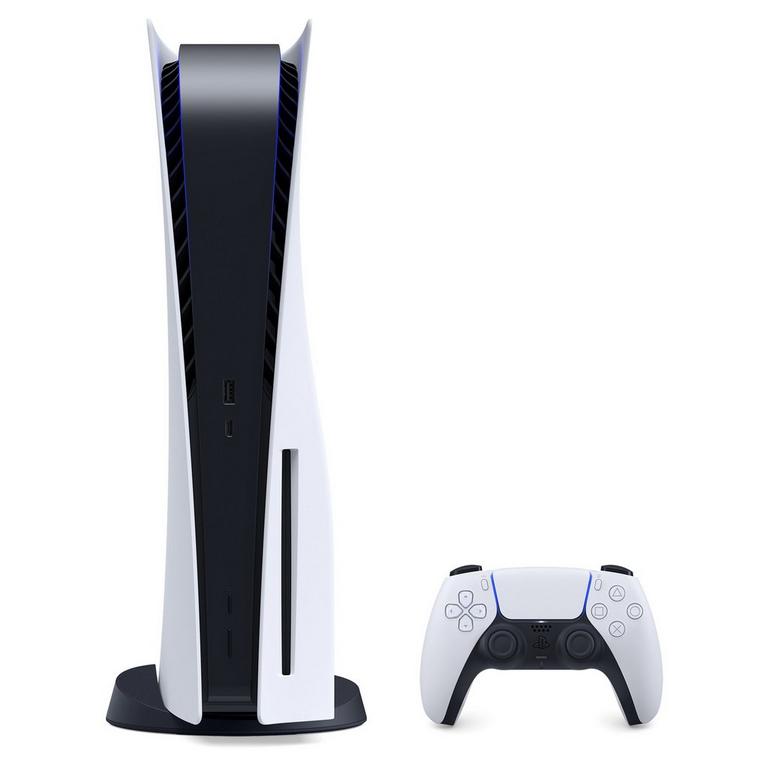
sony playstation 5 ps5
^ from: (GameStop) - The PlayStation 5 is a powerhouse of a gaming console. Features like 4K and such make this a powerful console for those who have the finances to get one.

Now on to the final option- get a PlayStation 5. This is the long-term solution. Once development ends for the PlayStation 4, a lot of people eventually will move on to the PlayStation 5. The PlayStation 5 has been around since 2020 or 2021 depending on the certain market. Having a PlayStation 5 is the best idea long-term despite the lofty current prices to own one. At least you could reverse-compatible play PS4 games and even upgrade their graphics for PS5 if you wish. This means you get the PS5-quality graphics for 4K or better televisions and such.

It is important to note that the PlayStation 5 comes in two different kinds- the Digital Version and the Disc Version. If I get a PlayStation 5, I want it to be the Disc Version. I am still someone who prefer hard copies of games and being able to play older PlayStation games on a modern PlayStation system. The Digital Version is the cheaper-priced option at $449.99 USD. The Disc Version costs $50 USD more, at $499.99 USD. According to videos I've seen, you can actually swap out the disc drive on the PlayStation 5 in case is doesn't work anymore. So in theory, I could get the PS5 Digital Edition and then pay to add the disc drive to it. That to me, though, is still money wasted; so I'm better off simply getting the Digital Version. I would consider getting a replacement PS5 disc drive if the current one fails.

The obvious pitfalls for me are with getting the PS5 in general. It would be weird for me to entirely skip the PlayStation 4 and go to the PS5 from the PS3. A lot of the games aren't too expensive for PS5. Since a lot of store shelves have more PS5 games than PS4 games, I'd be completely current on the gaming front bestowed with a PlayStation 5. It also means I could make my Gran Turismo 7 debut on the top console currently in Sony's lineup. I feel I will be a bit futureproof gaming-wise with getting a PlayStation 5. That is... until the PlayStation 6 surfaces.

INTERESTING FACT: My first game with each PlayStation console has been a Gran Turismo game. PS1 = Gran Turismo 1 (and later Gran Turismo 2), PS2 = Gran Turismo 3 A-Spec, PS3 = Gran Turismo 5, PS4/PS5 = Gran Turismo ???.


Now you know what I am looking at in terms of being among modern gamers.


Which Way Should I Go?


My ultimate decision is going to vary on a number of factors. On the other hand, I have already thought about what would be the ideal case. I am currently considering to save up for a PlayStation 5 Disc Version. I could try my hand at secondhand PS5 consoles, but I am not as confident I'll get my money's worth trying to get a cheaper-priced PlayStation 5.

In a perfect world, I'd have a PlayStation 5 Disc Version and a regular Nintendo Switch (not Lite or OLED). If it turns out the next Nintendo Switch is reverse compatible with the current Switch, I probably can trade my regular Switch for the newer generation one.


That's it for this one. If you care to discuss, then...

What option that I mentioned should I take?

I want to thank you for joining me with this blog post. I also appreciate if you could offer some advice and sway my interest. Subscribe/Follow my blog(s) in any capacity if you love my work. Share my blog post(s) with others if you enjoy my work. Support me further by connecting with me on social media; and if you are inclined, feel free to donate to me (donations are voluntary but would be appreciated). Thank you for reading! Take care and be well.

Visit my JohnMarineDesigns Weebly site, subscribe to My Blog(s), and/or Follow on Bloglovin! Let's connect:
Contact Me via E-Mail Contact Me via Discord

(donations are voluntary)
Visit and Subscribe to My Blogs...
Subscribe to John's Blog Space (JBS) Subscribe to John's Creative Space (JCS) Subscribe to John's Race Space (JRS) Subscribe to StyleSpace (SS) Subscribe to John's Life Space (JLS)
Get Social With Me!
Facebook (Friends) Facebook (Fans) Twitter YouTube
Pinterest LinkedIn (professionals only) Discord ???
Support My Creative Works!
JMDesigns John on Envato
Patreon Soundcloud Bandcamp
Twitch OpenGameArt TurboSquid
read more...

Friday, April 19, 2024

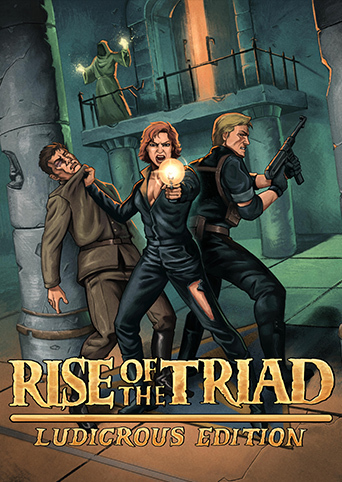
Rise of the Triad: Ludicrous Edition

John B. Marine | 4/19/2024 12:02:00 AM | | Be the first to comment!
Rise of the Triad may be from 1995 old, but this DOS game is a very unique first-person shooter experience. You represent an operateive of the counter-terrorist group known as HUNT exploring San Nicolas Island. You and your team were set to investigate an old monastery on San Nicolas Island. Reports indicated that a cult was hellbent on destroying the world. As you found what you were looking for, the boat was blown up. Now the only way out... is in. So begins your mission to kill the cult leader, El Oscuro, and all of the many minions that inhabit this crazy monastery. While this post was originally about base "Rise of the Triad," this post will now about about "Rise of the Triad: Ludicrous Edition."


Rise of the Triad: Ludicrous Edition


Rise of the Triad Ludicrous Edition
^ from: GOG.com - "They'll bury you in a lunch box!" Get ready for first-person shooter madness never before seen with Rise of the Triad, and its Ludicrous Edition.

"Rise of the Triad" is a game whose origins date back to 1994. It originally began life as an enhanced "Wolfenstein 3D." Its storyline even was an extension of the Wolfenstein 3D storyline whereas three powers came together to form the ultimate evil. Hence- the Triad namesake. Over time, though, the story changed up to something completely not associated with Wolfenstein 3D.

The Ludicrous Edition of ROTT is the ultimate ROTT experience featuring four campaigns in one package. It also features a handful of extras and enhanced material for the best possible ROTT experience. Some of those extras include alternate actors as well as remixed songs. As with most modern games, this package includes a handful of achievements you must try to accomplish.


The Campaigns.

These are the four campaigns of ROTT's Ludicrous Edition:

• The HUNT Begins: The shareware campaign of ROTT.
• Dark War: The registered campaign of ROTT.
• Extreme ROTT: an add-on package that can be difficult to near impossible to beat.
• The HUNT Continues: the exclusive campaign with brand-new levels.

The HUNT Begins allows you to play the original shareware missions from 1994. You won't get all of the stuff included with the registered version, but you will get a basic introduction to the ROTT storyline. It has one episode and at least 10 levels.

Dark War features four episodes and over 40+ episodes. This is the story where you go against El Oscuro and his three top bosses. You also get to use newer weapons and battle newer enemies.

Although Extreme ROTT is an add-on campaign, it is an add-on package featuring difficult (and sometimes unfair) levels. It will test your patience at times.

The HUNT Continues is the exclusive campaign of ROTT Ludicrous Edition with four episodes and about five to seven less episodes compared to Dark War. You get to battle the forces of El Oscuro once again but in completely new settings.

You're going to be quite busy here. ROTT Ludicrous Edition also lets you create your own levels.


Characters.

There are five characters to choose from. Each character has their own advantages and disadvantages. Take a look:
• Taradino Cassatt - fairly average in all departments.
• Thi Barrett - the female equivalent of Taradino but with less stamina. Pronounced "Tee."
• Doug Wendt - built like a tank and can take a beating, but is very slow.
• Lorelei Ni - very quick and speedy, but she is very fragile. She is not good at taking beatings.
• Ian Paul Freeley (yes, I.P. Freeley) - fairly average character overall. Can't really tell what makes him much different from the other five.


Weapons.

To save the world, you have a handful of weapons. The coolest aspect of this game is that you don't have to go around picking up ammo from dead enemies just to have enough bullets left. Your bullet ammunition is UNLIMITED! You are armed with simply a pistol to begin with. You can pick up an extra pistol for two-handed goodness. The best bullet weapon is your MP40. It will save you lots of trouble when you don't have any missile weapons. Speaking of which... there are a number of them. Here is more about each:

NOTE: Items only in the full version are in braces ({}).

• Bazooka - a straight-shooting missile weapon. You get ten shots with these. In the hardest setting, some Lightning Guard enemies use bazookas that you can pick up if you kill them. More experienced and daring players can "bazooka boost" to lift themselves over some obstacles and reach some unreachable points.

• Heatseeker - a homing missile weapon. You get only seven shots. This can come in very handy when trying to hide or attack from a fixed distance.

• Drunk Missile - a weapon that shoots several heat-seeking missiles at once. You have up to seven shots.

• Flamewall - a weapon that shoots a wall of flames. A heavy missile falls to the ground, leaving a trail of flames upon impact to the ground. You can also fire the Flamewall at the ground to quickly take care of a pack of enemies. You get only five shots.

• Firebomb - a straight-shooting missle that explodes a cross-like pattern of flames. This is by far the most powerful missile weapon. You only get five shots with this weapon. Absolutely NOT recommended for close-quarters combat!

• {Split Missile} - a two-way weapon used to take out one enemy or two in the area. Hold down the Fire button for a single straight shot, and tap for the Split Missile to attack the two nearest targets. It has about the quickest firing rate of all missile weapons.

• {Excalibat} - a baseball bat enchanted with evil energy, this can be a good weapon to use to take out multiple enemies in a lot of space. Swings of the Excalibat are unlimited. However, hold down the Fire button to charge to 10 shots of its spread attack that shoots multiple baseballs around the area. It is not a good idea to use this area in confined spaces.

• {Dark Staff} - the Dark Staff delivers powerful magic strikes in a straight line. Each of its charges emits a powerful magic strike. This is not recommended a weapon if you are quickly trying to take out enemies.


Items and Powerups.

There are a number of items and powerups to help you out. Here are some or all of them:

• Monk Meal - recovers one unit of health.

• Priest Porridge - told to be porridge made from the remains of murdered priests, these bowls of porridge recovers two units of health. However, there if you find a way to heat up the porridge, you can recover much more health.

• Healing Basin - drink water from these basins to recover energy. However much energy you recover varies.

• Small Monk Crystal - these crystals will recover a small amount of health upon pickup.

• Large Monk Crystal - the largest heal outside of a Full Health powerup can be had with the large monk crystal.

• Asbestos Armor - temporarily projects you from fire and projectile attacks. You can still take damage from projectile attacks, but they won't hurt you as much.

• Bulletproof Armor - temporarily projects you from gun fire. Find one of these before going into an area with a lot of gun-toting enemies or against gun turrets.

• Ankh - every Ankh symbol collected is good towards adding extra lives. There are four different ankh symbols- the basic silver one with a ring outside of it grants one life point. A bronze ankh with a granite background grants five life points. A bronze ankh outlined with beaded accents grants ten life points. Finally, a red ankh with two rings encircling it grants 25 life points.


Now some (or all) of the powerups...

• Mercury Mode - allows you to float into the air. This can help you reach high up places or get over obstacles like lava pits.

• Blue Ankh - gives full health. If already with a lot of health or full health, it grants an extra life.

• Green Ankh - gives full health. If already with a lot of health or with full health, it grants three extra lives. If not at full health, it recovers full health and gives two extra lives. These are rare to find.

• Elasto Mode - you bounce around the level! It sounds fun until you realize you're in a room filled with dangerous obstacles...

• Shrooms Mode - your vision shifts wildly, and your accuracy becomes distorted. On the other hand, using this powerup can help you get some hints about getting through a level. For example, some of the columns you can push while in Shrooms Mode will be highlighted to let you know what to push.

• God Mode - temporary invulnerability, and you can fire blasts that home in on enemies and kill enemies on impact.

• {Dog Mode} - you are invulnerable, and also pretty powerful. Use this fierce power to viciously rip apart your enemies. You can also use this mode to access narrow openings.


Hazards.

Many hazards (besides the enemies themselves) get in your way in kicking El Oscuro's butt. Here are some (or maybe all) of them:

* Fire Jets - flames shoot up from the ground or from the top. Run through it, and you'll become barbequed on the spot.

* Flame Walls - run into these, and you get burned up. Simple enough? Funny thing is, some of these flame walls can be pushed as push walls. Some of these walls even move randomly, making the trail through each level even more treacherous.

• Fire Chutes - walls that shoot flames will hit anything and everything in their way. Switches and/or Touchplates can disable (or enable) them.

* Spear Rack - a rack of spears shoot up from the ground, piercing into you upon arrival. They may also shoot downward from a ceiling.

* Spinblades - run into these to get your own complimentary flesh wounds. Some of these even shoot up from the ground or ceiling.

* Lava pits - avoid these at all costs! Stepping on these hot coals will slowly chip into your health.

* {Boulders} - rolling boulders fall from the ceiling, down to the ground, and rolling over.

* {Pits} - running over these areas will cause you to fall in. It takes a keen eye to find the pit areas on the ground. It isn't too hard to find these pits on the ground once you really notice the floor.

• {Boulders} - Boulders fall from the ceiling and roll straight, running over anything and everything they touch.


Enemies: Basic.

In this section, you will be introduced to some of the enemies in this game. This a description of some of the enemies you will be facing. They will be described by their appearance:

• Low Guard - a basic grunt that carries a pistol, wearing a gray jacket and black pants. Some play dead and awaken when the player draws near.

• Lightning Guard - an enemy in a dark green coat that carries a pistol. On the hardest setting, some fire bazooka rounds at you. Some may beg when they're about to die. If so, finish them off quickly! Some may drop their bazookas if there is still some ammo left in them (only on the hardest setting).

• High Guard - a bearded enemy in a dark green coat that carries an MP40. Waste them quickly because their MP40 shots can do some damage.

• Strike Force - an athletic enemy in a beige outfit, carrying a pistol. They can roll out of the way of missile fire and can be pesky to take down. It's best to take them down quickly with your MP40 (if you have one).

• Patrol Robot - a robot enemy that shoots drones. It can only be destroyed with missile weapons.

• Ballistikraft - a robot that fires drones and missiles. They cannot take damage or be destroyed. So if you see one, run.

• Triad Enforcer - a man in a gray/grey suit with a chaingun. It takes many hits to take him down. He also attacks by throwing grenades. Rely on missile weapons to defeat him quickly. This is the toughest enemy in the game and the toughest enemy in the Shareware version.


Here are a few more in the full game: • Overpatrol - an officer in a black outfit. Overpatrols fire a pistol but also can shoot nets at you. If caught in the net, you'll need to have a knife to cut your way through or find some other way out.

• Turrets - There are two kinds of gun turrets: (1) a gun turret that rises up and quickly attacks you with relentless gunfire, and (2) a gun turret that fires in four directions when you approach it or enter its firing sight.

• Death Monk - these monks are mostly quiet and do not do any damage until they get close to you. They can take a lot of shots before being finally defeated, so you may want to use any missile weapons if you want to make quick work of them.

• Deathfire Monk - a small monk that fires energy at you. Kill them quickly because their monk fireballs can do some serious damage.


Enemies: Bosses.

You can only damage these bosses with missile weapons. I'll just describe them for the most part. Don't expect any advice on beating them here.

• General John Durian - A boss in a green jacket and white pants that totes a bazooka.

* Sebastian Krist - a man that rides in some sort of motorized chair that is armed with mines and bazookas.

* NME - a formidable and large robotic enemy that is very quick with powerful attacks. It is the toughest boss in the entire game with its great speed, homing missile attacks, and fireballs.

* El Oscuro - El Oscuro. Yes- that's all I'll say about him! You're on your own for this one.


A fun fact is that each of the enemies are actually Apogee employees that lend their image as enemies in this game.


Multiplayer.

The game features lots of Comm-Bat modes ranging from Deathmatch to various triad-collecting modes. There is support for as many as 11 different players.


My Opinions...


Rise of the Triad is a fantastic game. And from a guy who's played two different Shareware versions, it was a great joy to play this full game after years of not getting this game in the past. A lot of people say that this game wasn't all that spectacular for one reason- 90-degree walls. This game can be thought of as Super Wolfenstein 3D the way everything is executed. Instead of wasting Nazis in World War 2 at Castle Wolfenstein, you're trying to eliminate a religious cult and its minions at a monastery on San Nicolas Island in the future.

While it is okay to dismiss this game as a Wolfenstein 3D clone, this game is a first-person masterpiece with a very arcade feel. Its funny nature makes it stand out from the more iconic first-person shooters.


For More Information...

You can look up the original spec "Rise of the Triad" through 3D Realms' site here: Rise of the Triad - Original Spec. To buy "Rise of the Triad: Ludicrous Edition" on Steam, please visit: "Rise of the Triad: Ludicrous Edition" on Steam. Or get it on GOG here: "Rise of the Triad: Ludicrous Edition" on GOG.


Give this game a try and immerse yourself in a very fun first-person shooter. It is from 1994, so don't expect any modern things most first-person shooters today have to them. Subscribe/Follow my blog(s) in any capacity if you love my work. Share my blog post(s) with others if you enjoy my work. Support me further by connecting with me on social media; and if you are inclined, feel free to donate to me (donations are voluntary but would be appreciated). Thank you for reading! Take care and be well.

Visit my JohnMarineDesigns Weebly site, subscribe to My Blog(s), and/or Follow on Bloglovin! Let's connect:
Contact Me via E-Mail Contact Me via Discord

(donations are voluntary)
Visit and Subscribe to My Blogs...
Subscribe to John's Blog Space (JBS) Subscribe to John's Creative Space (JCS) Subscribe to John's Race Space (JRS) Subscribe to StyleSpace (SS) Subscribe to John's Life Space (JLS)
Get Social With Me!
Facebook (Friends) Facebook (Fans) Twitter YouTube
Pinterest LinkedIn (professionals only) Discord ???
Support My Creative Works!
JMDesigns John on Envato
Patreon Soundcloud Bandcamp
Twitch OpenGameArt TurboSquid
read more...

Monday, June 5, 2023

Sony PlayStation 3

John B. Marine | 6/05/2023 12:18:00 AM | | | Be the first to comment!
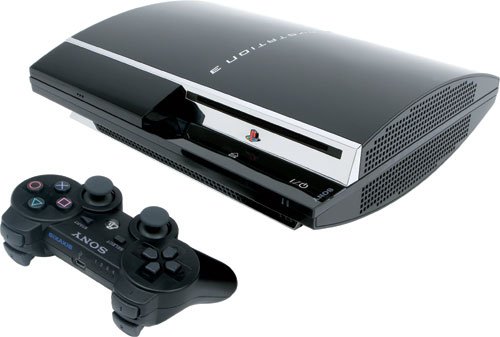
The Sony PlayStation 3 only does everything! Introduced to the world circa 2006, the PS3 went far and beyond to be its own gaming powerhouse. The PS3 also had to be not just a "gaming console." So the PS3 had some features to it to make it one of the best SYSTEMS out there, not just a gaming console. I take my own look at the PlayStation 3 in this blog post on "John's Blog Space." Let's get it!


Sony PlayStation 3


Meet the PlayStation 3:

Sony PlayStation 3
^ from: Amazon - The PlayStation 3 only did everything. Honest!


Already established as a multimedia giant, Sony's foray into the rapidly-changing and evolving realm of gaming came in the form of the Sony PlayStation 3. It was time for the PlayStation to further evolve and make more marks in gaming. It did just that in its proliferation in 2006 were the Nintendo Wii and the XBOX 360. The PlayStation 3 was further evolution in a rapidly-changing realm of gaming. Gaming is now a realm where one could play games that get updated and can be enhanced all the further. This wasn't possible much with the PlayStation 1 or PlayStation 2. This also means the gamer can download digital-exclusive games to play. If one wants to connect with online friends, one can do so with PlayStation Network (PSN). During the time of the PlayStation 3, PSN and using the Internet was FREE.

More than ever, the modern gaming console has to be more than just a "gaming console." The PlayStation 3 had to adapt to this and make its own mark on the gaming landscape. You now could connect via WiFi or even ethernet to enhance your overall experience with the PlayStation 3. You could still listen to CDs as well as DVDs. Now, though, enter the realm of Bluray. This technology made not only gaming more powerful, but it also made watching movies amazing. The PlayStation 3 also included its own built-in web browser. You could also install apps to view a variety of apps to connect with friends or access media services like Netflix. You could also access YouTube on a PlayStation 3.

Games were becoming larger and more realistic with the PlayStation 3. Newer TVs were taking advantage of high-definition and HDMI. The PS3 was no stranger to this. Also coming to life was that of Bluetooth. This meant you were able to connect devices wirelessly to the PS3 to play or use.

Features such as these meant what was simply a gaming console has become much more and means much more than ever before. The PlayStation 3 was keeping up with times and was making its own mark on the gaming landscape. The PS3 would enjoy a lifespan that lasted from 2006 to 2017. It would also see three different generations in its lifespan from the big model to the later slim models.


My Introduction to the PlayStation 3.

I was somehow fortunate to save up enough money blogging to where I was able to buy myself a PlayStation 3 around 2011 or so. I had enough to buy a PlayStation 3, but I needed some extra money to buy my first game for it- Gran Turismo 5. I still made it happen and got to enjoy the experience. Some games I played got me to meet a lot of people worldwide on PSN.


Games and Gaming on the PlayStation 3.

Gaming has evolved around the time of the PlayStation 3. Games on PlayStation 3 are of the physical and digital variety. Many of the AAA-rank titles and Sony exclusives ruled the roost for the PlayStation 3. However, a lot of games from independent (or "indie") game developers also wanted their spotlight with the PS3's lineup. If anyone wanted to enhance games someone owns, they can do so by buying downloadable content (DLC).

When you actually get to play games on the PlayStation 3, you are now met with a stylish user interface called the XrossMediaBar (or XMB for short). This UI in its default form has a lovely wavy background with sparkles. This XMB features certain features you can use to set up your PlayStation 3, play games, view your PSN friend list, and more. You could also change the XMB to include a custom background. To exit a game or an app, you need to press-and-hold the PS Button on the DualShock 3 to access a menu and then choose to exit a game. Confirm your selection, and you're out. If your PS3 crashes, then you will need to press-and-hold down the PS logo button near the PS3's loading dock to shut down the system.

Also, there was a new way to keep track of your performance while also challenging you to do certain things. Enter the Trophy system for the PlayStation. Often times, it was a potentially negative thing or a spoiler to learn of Trophy goals for games. Learning of some Trophy goals could spoil details about certain games, making you want to play a game in certain ways outside of playing the way you want to play. These goals were broken up into levels of difficulty- Bronze, Silver, and Gold. If you manage to clear all of a game's Trophy objectives, you earn the coveted Platinum trophy for a game.

Gone are Memory Cards. Now, the PlayStation uses internal memory for you to store your game data, your own media, your own pictures, and more. You can also still place your media on USB flash drives to import/export to other devices (such as your PC). You could also use the space on your PlayStation 3 to download games to the device for faster loading of some games. It made a difference when I downloaded games like Ridge Racer 7, Gran Turismo 5, and Gran Turismo 6 to my PS3. Just make sure you have enough space to be able to put games on your PlayStation 3 for faster loading.

As for games themselves, some of the earliest titles were mostly showcased on kiosks at game stores and in the game section of retail stores. Some of these early titles include "Ridge Racer 7," "MotorStorm," and "Virtua Fighter 5." There were also later games like "Gran Turismo HD," which would give way to "Gran Turismo 5 Prologue," and eventually "Gran Turismo 5." Other PS3 games include the "Uncharted" series, the "Assassin's Creed" series, the "Saints Row" series (excluding Saints Row 1), "Ni No Kuni," "Grand Theft Auto 4," "Gran Turismo 5," "Gran Turismo 6," the GRID series, the DiRT series, "ModNation Racers," "Little Big Planet," "PlayStation All-Stars Battle Royale," and more. Besides physical games, some digital games of note for PS3 include "flower," "Minecraft," "Double Dragon NEON," "WipEout HD/Fury," and "Daytona USA." Some of the digital offerings even included games from other consoles configured for the PlayStation 3. For example, you could play "Sonic the Hedgehog 2" from the SEGA Genesis/Megadrive on a PlayStation 3.

If you buy PlayStation Plus, you will be able to purchase many more games and unlock many other content to play on your PlayStation 3. It was not required of you to have a PlayStation Plus subscription in the PS3 days to be able to game online. PS+ gave you the chance to enjoy a lot more content for the PlayStation 3. Nowadays, PS+ is required to access the PlayStation Store or to game online in general.

I bet you can enjoy playing PlayStation 2 games on the PlayStation 3, right? Well, no. PlayStation 1 games can be played on the PS3. You can even play these games with some enhancements to make them play better on your higher-end TV. However, PlayStation 2 games are NOT reverse compatible on the PS3.

The PlayStation 3 even had some non-gaming applications to enjoy. One of those was its avatar service, PSHome. PSHome allowed you the chance to meet people on PlayStation Network and even play games with your friends. I had no such luck meeting too many people with PSHome. There was also a Life With PlayStation program that let you view news and weather updates. It also had a unique "Folding@Home" feature that was helping to battle against Alzheimer's Disease.

Even though the PlayStation 3 was an awesome system in its own right, some say developing for it has been rather tedious. Developers still tried their best to utilize the PS3 as best as possible for their games.


Peripherals of the Sony PlayStation 3.

So you have a PlayStation 3. What do can you use to enhance your experience? Well, let's a look:

Sony PlayStation DualShock 3
^ from: Amazon - Meet the DualShock 3- your controller for PS3 goodness!

The DualShock 3 is more than just any average controller. To the delight of many a gaming fan, the DualShock 3 is not a production version of the "boomerang" controller for the PlayStation 3 in its prototype phases. The DualShock 3 has a handful of features that set itself apart from the earlier DualShock and DualShock 2. For one thing, the DualShock 3 is USB-powered and can be recharged. This means you could be able to use a PlayStation 3 as a plug-and-play device a lot of devices that have USB ports to them. The DualShock 3 is also wireless. Because of this, you could be able to play games wirelessly by simply disconnecting the DualShock 3 from the charging cable. You can play wirelessly granted the DualShock 3 has enough charge to play. The two biggest features of the PlayStation 3 are its SIXAXIS controls and a new PS Button. The SIXAXIS lets you play games from six different axes for a broad array of control in games. You use the PS Button to access the system menu to access a number of features or to pair your DualShock 3 to the PlayStation 3. You could purchase a charging station for which to charge up your DualShock 3 or multiple DualShock 3's at a time.

Here is a weird "peripheral" to use for your PlayStation 3:

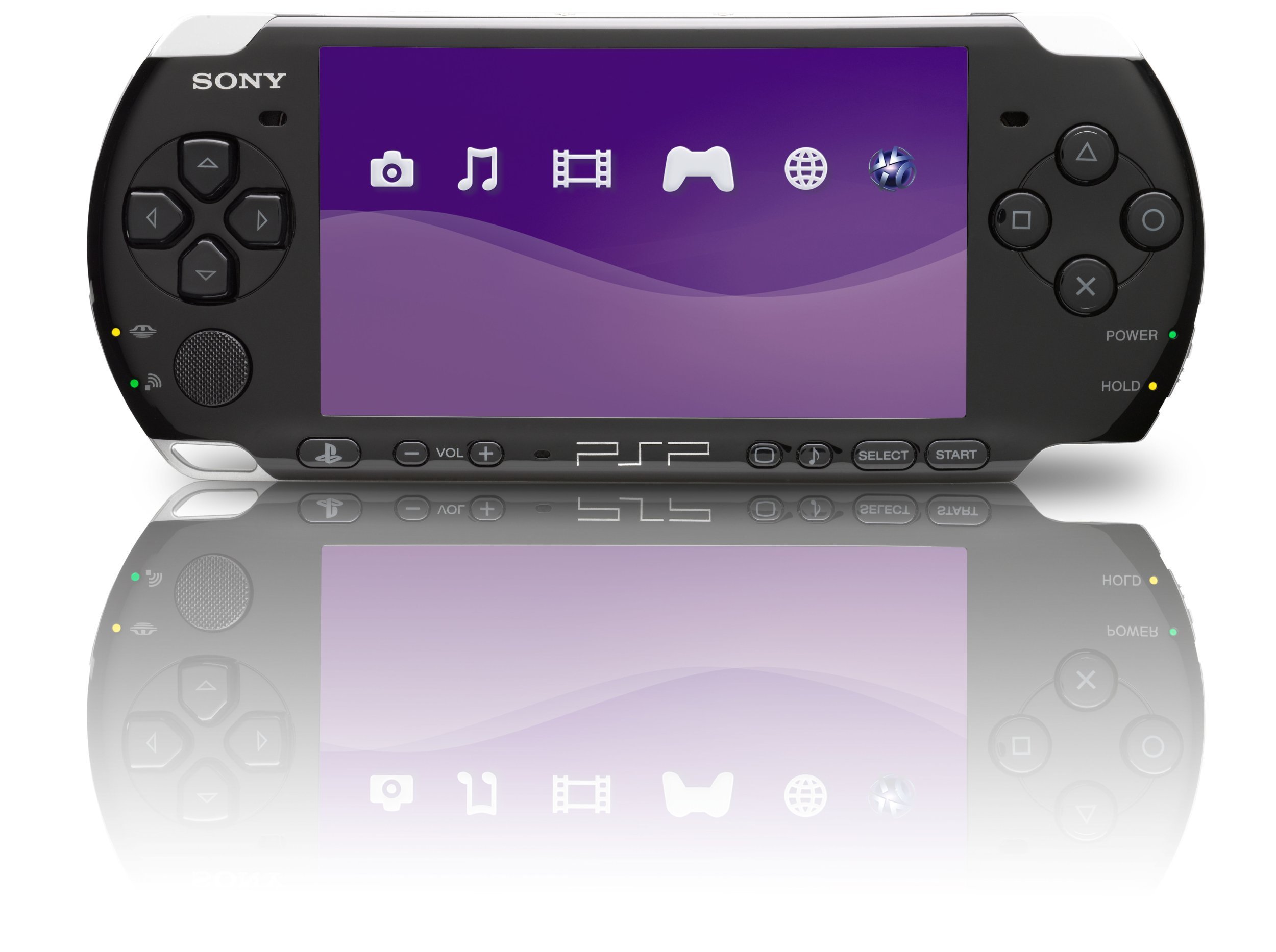
Sony PlayStation Portable PSP
^ from: Amazon - The PlayStation Portable can be used in conjunction with your PlayStation 3. To some people, though, why use a dedicated portable gaming system as an extra controller?

That's right. If you have one of these, a PlayStation Portable, you can use it as a controller on the PS3 or for some other PS3 content. Using a dedicated portable device makes for quite an expensive controller or control device for non-games!

Sony PlayStation Move
^ from: Amazon - Show me your MOVES with the PlayStation Move!

One of the most significant elements of gaming with the PlayStation 3 was that of the PlayStation Move. This allowed you to make yourself the controller in Move-enabled games. This could be thought of as Sony's answer to the Nintendo Wii and the Wiimotes. For example, using one of the elements of the Move allowed you to execute things like aiming and shooting an arrow from a bow and arrow. One of the first games to take advantage of the PlayStation Move was "Sports Champions."


How I Will Remember the PlayStation 3.

The PlayStation 3 is the last of using PlayStation Network for free. It was where I got to enjoy games of amazing quality. While I have only one Bluray movie ("The LEGO Movie"), I have yet to actually use it, and I owned this Bluray for quite a few years! The PS3 is still a special system to me even with today's landscape featuring the still-standing PlayStation 4 as well as the more expensive and more awesome PlayStation 5.


Sony PlayStation 3 Online


If you want to get yourself a PlayStation 3 and want to experience some PlayStation 3 moments, this section is your best friend. PlayStation 3 consoles, accessories, games, and more can be procured if you use the material I provide here:

PlayStation 3 on Amazon
PlayStation 3 on eBay


Happy shopping! :)


This one's done. I hope you enjoyed this post. I post blog entries on almost anything that crosses my mind. If you like this kind of thing, then I invite you to Subscribe or Follow my blog(s) in any capacity. Believe me- you can't go wrong doing so! :D If you enjoy my work, please Subscribe/Follow my blog(s) in any capacity if you love my work and want to support me any way you can. Share my blog post(s) with others if you enjoy my work. Thank you for reading! Take care and be well.

Visit my JohnMarineDesigns Weebly site, subscribe to My Blog(s), and/or Follow on Bloglovin! Let's connect:
Contact Me via E-Mail Contact Me via Discord

(donations are voluntary)
Visit and Subscribe to My Blogs...
Subscribe to John's Blog Space (JBS) Subscribe to John's Creative Space (JCS) Subscribe to John's Race Space (JRS) Subscribe to StyleSpace (SS) Subscribe to John's Life Space (JLS)
Get Social With Me!
Facebook (Friends) Facebook (Fans) Twitter YouTube
Pinterest LinkedIn (professionals only) TikTok Discord
Support My Creative Works!
JMDesigns John on Envato
Patreon Soundcloud Bandcamp
Twitch OpenGameArt TurboSquid
read more...

Sunday, June 4, 2023

Sony PlayStation 2

John B. Marine | 6/04/2023 10:05:00 PM | | | Be the first to comment!
Live in your world, play in ours. Sony blew minds again in the evolution of the PlayStation with the PlayStation 2. To carry gaming into the 21st Century and the new millennium, Sony made its PS2 as awesome as awesome can get. Beautiful graphics and more powerful technology made the PS2 quite the marvel. In vogue for this blog post is the Sony PlayStation 2. So come along with me as we reflect on the PlayStation 2!


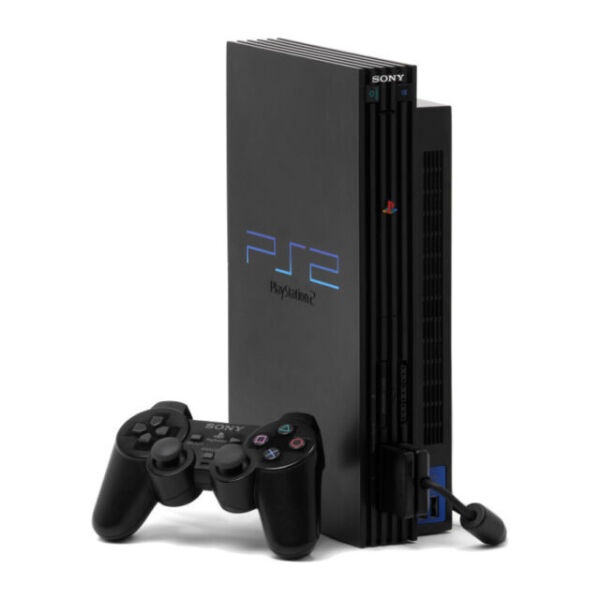
Sony PlayStation 2


As I mentioned in the introduction, the device in vogue for this blog post is this thing below:

Sony PlayStation 2
^ from: eBay - Get ready for an unreal gaming experience with the PlayStation 2.

Starting in 2000 in multiple markets, the Sony PlayStation 2 entered the world. The PS2 picked up where the PlayStation 1 left off but offered a much more incredible experience. Much more memory was granted to game discs to provide amazing graphics and gameplay with the PS2. The original PS2 had something the PS1 did not- the ability to stand it up. You could lay it down vertically or stand it up. If you prefer standing up your PS2, it helps to have some stands for it. The PS2 would be available in its big form, but it would later be available in a more slim package called the PS2 Slim (also known as the PS2 Slimline). The PlayStation 2 would be in competition with systems like the Nintendo Gamecube, the Microsoft XBOX, and the SEGA Dreamcast.

While the Sony PlayStation 2 was capable of gaming, it was also capable being its own multimedia power. You can still listen to your favorite music CDs, but you can also watch DVD movies on the PS2. This was one of the signs that gaming systems can be used for more than just gaming.

One of the best things about the PS2 was the ability to have certain plug-and-play devices through USB. This would make it possible for later devices such as USB Flash Drives and simulation racing wheels to be used to play games. You could also input devices such as USB microphones and even simulation racing wheels.

The PlayStation 2's lifespan was between 2000 and 2012-2013. What it brought to gaming was more than just gaming.


My Introduction to the PlayStation 2.

I got a PlayStation 2 for Christmas in 2001 along with "Gran Turismo 3 A-Spec" and a custom controller. I would later pick up a bunch of games to enhance my PS2 experience. I still use my PS2 to play a number of PS2 games primarily for blogging purposes.


(Some Of) The PlayStation 2's Games.

The PlayStation 2 allowed for greater performance capabilities than the PlayStation 1. It has a lot more processing power than that of the PlayStation 1. This gave developers an opportunity to create mind-blowing experiences. Even the earliest PS2 games are actually still pretty stylish today. To me, "Ridge Racer V" and "Tekken Tag Tournament" come to mind for me in this regard of early games still lovely today.

The enhanced power of the PlayStation 2 allowed for things like more expansive worlds and processor-pushing games. One such game that comes to mind is "Grand Theft Auto: San Andreas." If you played GTA3 and GTA Vice City, GTA San Andreas could be like combining both games... then doubling the playing field of both games. In the 74 hours I spent playing and beating GTA San Andreas (before my Save Game corrupted), never before have I felt like I was in a world where I would easily run out of things to do or places to visit. In addition, all of the effects and graphics were far beyond what a lot of PS1 games wish they could replicate or better.

RPGs and action games are not the only examples of expansive worlds. Racing/Driving games had much more depth to them, and many of them based on real-world areas were re-created in amazing detail. Let's look at Gran Turismo 4. This game had some graphic-intensive city courses like with New York City or Hong Kong. However, it also had detailed long courses in the 8.5-mile Circuit de la Sarthe and in the over 12-mile long Nürburgring Nordschleife. All venues were created in greater detail than even the most impressive PS1 games. If you want to take this a bit further, then look at games like the "Suzuki TT Superbikes" series, which feature all 37.73 miles of the Sneafell Mountain Circuit, home to the Isle of Man TT.

As technology got better, we would see a handful of new things in games and new ways to enjoy them. For example, "Gran Turismo 3 A-Spec" had its own Logitech wheel for more precise driving dynamics. That basically was the start in the evolution of simulation racing. "Gran Turismo 4" would introduce the Logitech Driving Force Pro, which I still own despite it being so ancient and borderline archaic these days.

Perhaps the best thing about the PlayStation 2 was that it was reverse-compatible with PlayStation 1 games. So you could even play your old PS1 games on a PS2 as well as use PS1 Memory Cards. This further expanded the range of games you could play on a PlayStation 2.


Games and Gaming on the PlayStation 2.

Some of the earliest games, such as "Ridge Racer V" and "Fantavision" had game discs with indigo backsides to them. They also would make certain whir sounds when played in older PlayStation 2 units. Later games would be capable of utilizing more memory for fantastic graphics and deep game play. These later games would also do away with the indigo backs of the discs. Later titles to utilize more advanced details include (but not limited to) "Gran Turismo 4," "Final Fantasy X," "Grand Theft Auto: San Andreas," "Prince of Persia: The Sands of Time," "God of War," and more.


Peripherals of the Sony PlayStation 2.

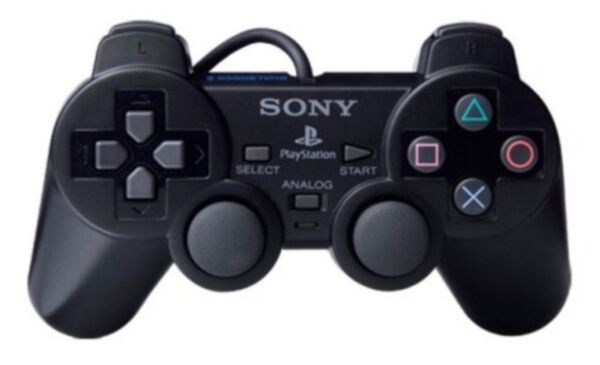
Sony PlayStation 2 DualShock 2
^ from: eBay - Get ready for an enhanced PlayStation experience with the DualShock 2.

It was the DualShock 2 where the magic happens. This evolution of the original DualShock includes its own analog sticks as well as its own vibration system to provide intense gaming goodness.

Memory Cards return for the PlayStation 2. This time, though, the Memory Card now goes from 15 blocks of memory to 8 MB of memory. This means you can store a lot more content. Just make sure you have enough memory for some games that use up a lot of memory.

Sony PlayStation 2 Network Adaptor
^ from: eBay - Connect to cyberspace for enhanced PlayStation action with the Network Adaptor.

Early on, the PlayStation 2 did not have online gaming capabilities. That would change later as a Network Adapter for the PlayStation 2 was introduced for it. This is what you could use for the PlayStation 2's Expansion Bay. Examples of SOE (Sony Online Entertainment) games include "SOCOM U.S. Navy Seals" and "Metal Gear Solid 3: Snake Eater." "Gran Turismo 4," which had promised online play, had online play dropped officially. Later builds of Gran Turismo 4 had its own online play system.

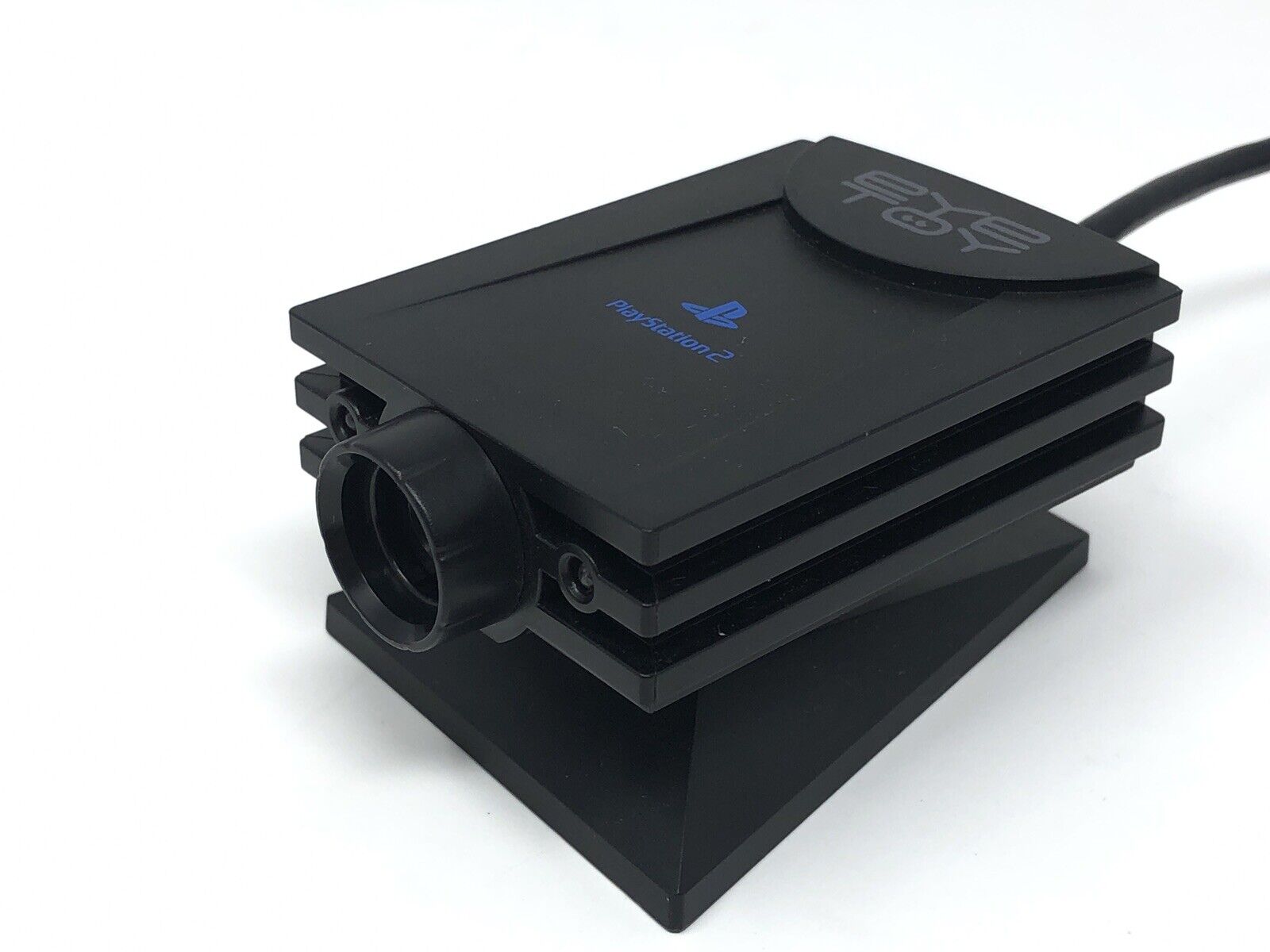
Sony PlayStation 2 Eyetoy
^ from: eBay - Eye... uh, I see you, Eyetoy...

If you want to enjoy some webcam-type action on your PS2, a later peripheral called the Eyetoy has you covered. This devices was used for some games that detected your movements and allowed you to do several things.

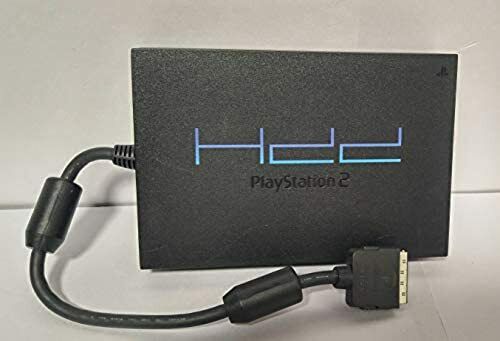
PlayStation 2 Hard Disk Drive HDD
^ from: eBay - Get yourself some added space by buying the Hard Disk Drive (HDD).

The PlayStation 2 Hard Disk Drive (HDD) allowed you to hold some extra content. However, so few games later in the PS2's lifespan took advantage of it. The only game I could think of was "Final Fantasy XI."


How I Will Remember the PlayStation 2.

I think the PlayStation 2 helped to set the early tone of gaming for the 21st Century and the current millennium. It helped in establishing gaming as its own lucrative category. Games on PS2 were no longer "just games." Granted we didn't have much in the way of HD graphics, impressive online performance, and the like; at least the PlayStation 2 is a step in the proper direction in regards to where we came from in going to gaming in 2023. If you are about gaming without having to be connected online constantly or buying add-on after add-on to enhance games, then get yourself a PlayStation 2 and enjoy the gaming ride it provides!


Sony PlayStation 2 Online


Maybe I convinced you about the PlayStation 2 to where you want to get one or learn more about it. If this describes you, then let me help you! The link I have included will help you towards getting some PlayStation 2 systems, games, and a lot more. I may add more resources based on traffic and attention to this post. For now, here's what I got for you (NOTE: These resources may include some non-PlayStation 2 items):

PlayStation 2 on Amazon
PlayStation 2 on eBay

Game on, PS2 style! :)


My look at the Sony PlayStation 2 is over. Thank you for visiting "John's Blog Space!" If you enjoy my work, please Subscribe/Follow my blog(s) in any capacity if you love my work and want to support me any way you can. Share my blog post(s) with others if you enjoy my work. Thank you for reading! Take care and be well.

Visit my JohnMarineDesigns Weebly site, subscribe to My Blog(s), and/or Follow on Bloglovin! Let's connect:
Contact Me via E-Mail Contact Me via Discord

(donations are voluntary)
Visit and Subscribe to My Blogs...
Subscribe to John's Blog Space (JBS) Subscribe to John's Creative Space (JCS) Subscribe to John's Race Space (JRS) Subscribe to StyleSpace (SS) Subscribe to John's Life Space (JLS)
Get Social With Me!
Facebook (Friends) Facebook (Fans) Twitter YouTube
Pinterest LinkedIn (professionals only) TikTok Discord
Support My Creative Works!
JMDesigns John on Envato
Patreon Soundcloud Bandcamp
Twitch OpenGameArt TurboSquid
read more...

Sony PlayStation

John B. Marine | 6/04/2023 05:35:00 PM | | | Be the first to comment!
In 1994 or 1995 (depending on market), a gaming revolution was coming. The evolution of graphical and processing performance would come from Sony, and that system would be called the PlayStation. While this is not a comprehensive look at the PlayStation 1, it is my own post about the PlayStation 1. So if you're game, let's talk about the Sony PlayStation 1!


Sony PlayStation


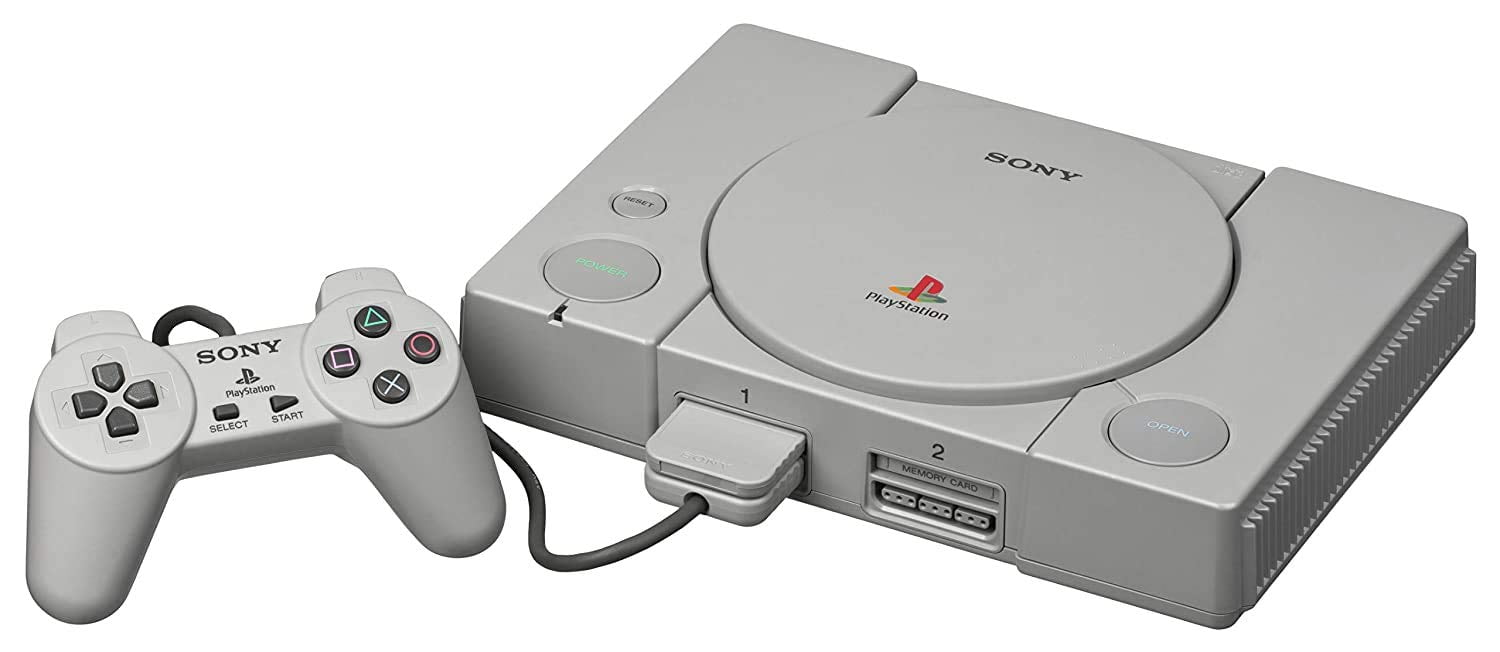
This blog post is all about this thing in this picture:

Sony PlayStation 1
^ from: Walmart - The Sony PlayStation led a new generation of gaming in its time.

The Sony PlayStation came into the world in December 1994 in Japan, North America in September 1995, and Australia in November 1995. The system had the original PS1 unit, but there would be a later slimmer model dubbed as the PSOne. The PS1's lifespan was between 1994 and 2006. A number of retail stores and video game rental stores (like Blockbuster Video and Hollywood Video) had kiosks with PS1 units for you to play the latest games or demos of upcoming games. The hallmark of the PlayStation 1 was in providing some of the earliest and greatest in 3D gaming. Some say PlayStation 1 did 3D best compared to its rivals, the Nintendo 64 and the SEGA Saturn.

The PS1 had its games on discs with black undersides to them. You could also play your favorite music CDs on the PlayStation 1. Some games even had CD audio you could play on a basic CD player. Just like America Online back in the day, there were a lot of PS1 demo discs featuring a good amount of games to sample. Some PS1 games were too big to contain on just one disc, so some PS1 games came on more than one disc.


My Introduction to the PlayStation 1.

My own story of getting my PlayStation 1 began at a pawn shop. I paid about $60 USD for my PS1 at that pawn shop. The first games I'd get for it were "Gran Turismo" and later "Gran Turismo 2." I would later expand my collection of titles with a lot of different games. I would even get to play some of the PS1 games my cousin bought.

Though I was a lifelong Nintendo player, I do admit the PlayStation 1 did things the Nintendo 64 probably wished it could do. I was probably not cool with having to deal with loading times back then. Still, the PS1 did a lot.


Some of the PlayStation 1's Games.

Through the history of the PlayStation 1, a number of classic titles would materialize from its lifespan including (but not limited to) "Warhawk: The Red Mars Missions," the "Ridge Racer" series, the Jumping Flash series, the Crash Bandicoot series, the Tekken series, the "Syphon Filter series," Final Fantasy VII through Final Fantasy 9, the Twisted Metal Series, the Vigilante 8 series, the Resident Evil/Biohazard series, and more.


Peripherals of the PlayStation 1.

The PlayStation 1 was capable of having a lot of peripherals.

Sony PlayStation DualShock
^ from: Walmart - Whip out one of these DualShocks and enjoy the PS1 experience!

The playing magic begins with its controller, the DualShock. The early DualShock did not have analog sticks to them. It also did not have vibrating features. The later DualShocks for the PS1 allowed you to play with analog controls and vibration. Just make sure to turn on the analog features on later DualShocks to take advantage of the analog controls.

Sony PlayStation 1 memory card
^ from: Amazon - Save your progress on PS1 memory cards. Don't use up all 15 blocks of memory, though.

Rather than have to play games in one sitting or have to remember some complicated password, you could simply save your progress on Memory Cards. As long as you had 15 blocks of data to save, you can save your progress in any number of games. You may need additional Memory Cards for your games if you need space for your game data.

Sony PlayStation 1 Multitap
^ from: Amazon - Need more than two players? Get one of these- a multitap.

If you wanted to play multiplayer, you could play locally with the system's two ports. You can have more players play if you have a Multitap. A Multitap can be plugged into one PS1 port to have as many as four players play along with four individual Memory Card slots. This made it possible to even have up to eight players if you bought two Multitaps. Or if you wanted to play without being so close by, there was the funky option of the Link Cable. Link Cable play required two PlayStations, two copies of whatever game was being played, and the Link Cable. It sounded like an unnecesary waste of money, but this was long before we had even local LAN play or any exaggerated online gaming.

You could play lightgun games with the Justifer or the Guncon. You could dance the day/night away with the Dance Pad. There was also the quirky NAMCO (now Bandai-NAMCO) controller called the NegCon.


How I Will Remember the PlayStation 1.

The PlayStation 1 was a generational leap in not only gaming but multimedia in general. A lot of game developers wanted to take advantage of providing a premium gaming experience down to full motion video (FMV). Gone were the days of chip-generated material and graphical power that can only go so far. In comes textured polygons, elaborate 2D graphics (even with some pre-rendered graphics), and a lot more. There was also a lot of high-quality (for its time) audio ranging from music to lots of voice acting. The PlayStation 1 would help set the tone for gaming in the future. It also meant Sony could further flex its muscle in developing some of the finest gaming experiences for the future. The PlayStion 1 is no doubt one of the most important systems in the evolution of video gaming. I would also say the PlayStation 1 helped set the tone for home system to be as powerful and capable, if not more so, over arcade units.


PlayStation 1 Online


The Sony PlayStation 1's production was ceased in 2006, but you can still try your luck at finding original hardware and such for the PS1. I included some material that may help you in your PS1 adventures if you are interested. Your involvement here is voluntary (meaning: not required), but your support would be appreciated. So check it out (NOTE: These resources may include some non-PlayStation 1 items):

The PlayStation Classic/Mini « Enjoy a lot of the PlayStation 1's classic gaming titles in one package!)
PlayStation 1 on Amazon
PlayStation 1 on eBay


Happy shopping (if doing any)! :)


If you enjoy my work, please Subscribe/Follow my blog(s) in any capacity if you love my work and want to support me any way you can. Share my blog post(s) with others if you enjoy my work. Thank you for reading! Take care and be well.

Visit my JohnMarineDesigns Weebly site, subscribe to My Blog(s), and/or Follow on Bloglovin! Let's connect:
Contact Me via E-Mail Contact Me via Discord

(donations are voluntary)
Visit and Subscribe to My Blogs...
Subscribe to John's Blog Space (JBS) Subscribe to John's Creative Space (JCS) Subscribe to John's Race Space (JRS) Subscribe to StyleSpace (SS) Subscribe to John's Life Space (JLS)
Get Social With Me!
Facebook (Friends) Facebook (Fans) Twitter YouTube
Pinterest LinkedIn (professionals only) TikTok Discord
Support My Creative Works!
JMDesigns John on Envato
Patreon Soundcloud Bandcamp
Twitch OpenGameArt TurboSquid
read more...

Sunday, November 20, 2022

Flashpoint

John B. Marine | 11/20/2022 10:41:00 PM | | | Be the first to comment!
On December 31, 2020; Adobe ended support of Flash-based games played in Internet browsers. A lot of the past Flash games moved on to HTML5. What if you wanted to play those old Flash games again or watch Flash videos? Well, unlike games for the OUYA you actually CAN play old Flash games again! Meet Flashpoint. Flashpoint was developed by BlueMaxima to get you to play old Flash games again. I learned of Flashpoint when I was looking for YouTube videos and saw a video about Flashpoint. I will discuss Flashpoint to you all and what I think about it. So come along for this voyage!


BEFORE I BEGIN...

As of the time of this blog post (November 20, 2022), the latest version is Version 11, "Oops! All Plugins!". Future updates may be different from the version that will be discussed in this blog post.


Flashpoint


BlueMaxima's Flashpoint will allow you to play just about any Flash game conceived. If you can remember the name of an online Flash game you played before or a certain developer or publisher of that game, there is a good chance you will find it in Flashpoint. There is a good chance you will find a game you once played, considering there is a database of over 162,000 Flash games listed in Flashpoint! This program will also allow you to view various animations. So maybe if you remember (for example) a funny animation you saw on Newgrounds, you might find it again through Flashpoint and be able to see it again. All you need to enjoy these past titles (or play a game for the first time ever) is Flashpoint and the latest version of Adobe Flash Player you have.

Flashpoint is available for Windows, but there are steps to use Flashpoint for Mac and maybe even Linux. The program is completely free.


How to Use Flashpoint and How Flashpoint Works.

What you must do first is download Flashpoint to your PC. The download size will be rather large, and larger once you unpack the program. A lot of the individual games will just take up more space on your drive of choice. So it's best to put these files on an external hard drive or something. It is recommended you download the Infinity version because the download requires much less memory on your device- 790MB for Infinity as opposed to 1.31TB for the Ultimate version.

Flashpoint comes in two versions- Flashpoint Infinity and Flashpoint Ultimate. Infinity is the base program that links you to loads of the aforementioned online games as well as animations. An Internet connection is required to access and download each game you want to download. Ultimate is the entire collection of just about every single Flash game and Flash animation in one mega package with no Internet connection required. Any game and/or animation you download will be available for you to play whether or not you have an online connection. An Internet connection is only required for downloading games/animations or to update the program.

What Flashpoint will do is search for whatever game or games you are looking for. Limiting searches to individual names, developers, or publishers will whittle down this massive database to something more manageable. Any game you find will feature more information about it. Download the given game/animation, and it is yours to play at any time without requiring an online connection. A game/animation you download can be played immediately using Flashpoint along with the latest version of Adobe Flash Player you may have.


Thoughts on Flashpoint.

For one thing, I am pleased to be able to play these games again without needing an Internet browser open! I haven't noticed much in the way of glitches or performance hitches using Flashpoint and Adobe Flash Player. The fact I am accessing pretty much every proper Flash game ever and/or animation is astonishing. This is something casual gamers can certainly get into because the games are not intensive or require a powerful computer to play properly. I would surely recommend Flashpoint if you want to play these older Flash games and other web-browser games and animations.

All credit to BlueMaxima for making this all happen.


For More Information...

For more information about BlueMaxima's Flashpoint and to download it, please visit BlueMaxima's Flashpoint. You can also watch this video for more information about Flashpoint:


^ BlueMaxima's Flashpoint Trailer

That pretty much covers all I need to cover about this program. I hope this helps you out!


Thank all of you for reading and for your support! I hope you got to learn something and get to enjoy some gaming. If you enjoy my work, please Subscribe/Follow my blog(s) in any capacity if you love my work and want to support me any way you can. Share my blog post(s) with others if you enjoy my work. Thank you for reading! Take care and be well.

Visit my JohnMarineDesigns Weebly site, subscribe to My Blog(s), and/or Follow on Bloglovin! Let's connect:
Contact Me via E-Mail Contact Me via Discord

(donations are voluntary)
Visit and Subscribe to My Blogs...
Subscribe to John's Blog Space (JBS) Subscribe to John's Creative Space (JCS) Subscribe to John's Race Space (JRS) Subscribe to StyleSpace (SS) Subscribe to John's Life Space (JLS)
Get Social With Me!
Facebook (Friends) Facebook (Fans) Twitter YouTube
Pinterest LinkedIn (professionals only) TikTok Discord
Support My Creative Works!
JMDesigns JMDesigns on Payhip John on Envato
Patreon Soundcloud Bandcamp
Twitch OpenGameArt TurboSquid
read more...

Monday, December 6, 2021

Stardew Valley

John B. Marine | 12/06/2021 07:49:00 PM | | Be the first to comment!
Stardew Valley has been one of the most successful indie/independent games ever produced. The farm life and a tight-knit community await you. What do I think about this game after playing it for a few weeks? Find out in my blog post here on "John's Blog Space!"


Stardew Valley


Stardew Valley made its debut in 2016. This game was produced by a solo developer known as ConcernedApe. "Stardew Valley" is a farming RPG where you inherit your grandfather's farm in Stardew Valley. Your previous grind was with Joja Corporation, which is looking to threaten and modernize the area. They have a store set up in Pelican Town. You make all kinds of decisions that can impact your relations with others as well as change the flow of the game. How will you live your farm lifestyle? Will you go far and beyond to have the best farm in the city? Could you possibly find love? These and more await you in Stardew Valley!

"Stardew Valley" is available on GOG, Steam, XBOX One, PlayStation 4, Nintendo Switch, iOS, and Android. The ESRB rates this game "E" for everyone. It includes fantasy violence, mild blood, mild language, simulated gambling, and use of alcohol and tobacco. PEGI rates this game a PEGI 7.


Getting Started.

You inherit a farm, but you can do much more than just farm. You may do a lot of forestry. Chopping down trees nets you some extra resources you can use. You may see certain wild items scattered about. This will allow you to go into foraging. Want some seafood? Try fishing! You could also make a living mining for all kinds of minerals and ores. If you are the adventurous type, try combat! All of your basic skills can be upgraded and yield some fine perks.

Farming allows you to grow various resources for personal use and for selling. You have to till land with a hoe and then do some watering. You may use certain gardening supplements to help expedite the gardening process. Most importantly, be sure to plant seeds for items in season. Winter is nearly impossible to farm in unless you have a Greenhouse. Certain crops can be harvested in different times of year. For example, you can't plant Corn seeds in the Spring. You will even be told certain crops are out of season if you tried to plant them in your main farm.

Later, you will have the opportunity to purchase animals to occupy Coops and Barns. These will give you some more resources to take advantage of. Animal products like eggs and milk can be had from these animals. Such items can be further refined into other things that sell for good money. You have to also take care of your animals to make sure they don't get overly hurt.

It pays to interact with the people of Stardew Valley and beyond. Building relationships with people will allow you to gain respect and even learn more about others. The NPCs have personalities and don't feel like lifeless drones saying the same things over and over again. Your relationship with others can yield to bigger and better things- even including marriage (especially if one is single). Giving people gifts and completing tasks can help build better bonds with others. Giving people disliked or hated gifts can hurt relationships with others. Even being caught digging into trash cans can put a dent in your relations with others. So be careful.


Talking Points.

From my experiences, "Stardew Valley" is one of the most engaging games I've ever played. You actually feel connected to your world along with its NPCs. Money will be mostly tight when you start off. Over time, though, you will begin to find ways to make decent money without feeling like you need to grind. "Stardew Valley" never feels frustrating or impossible. The music is wonderful. Taking part in all of the activities around Stardew Valley continues to help you feel connected. Even too, the people are kind enough to offer you resources from time to time, making the experience that much better.

The only thing I haven't been good at is fishing. I've trapped a lot of items, but never successfully caught a fish except for the tutorial one. I have gotten better at it. Though, I am still far from being a fishing pro.

This game offers co-op multiplayer as well, but I have not taken part in any co-op. You can share resources and farm land in co-op mode.

If you make mistakes in trying to accomplish all you want to do in a single day, you may want to develop a habit of re-loading some of your latest Save game files. There were times where I did the wrong thing or died battling in the mines or anything, and I needed to re-load to avoid losing all of my earned material or to do everything I chose to do properly.


Now for some final thoughts...


Stardew Valley: Final Thoughts


GET. THIS. GAME. If you have the resources to play this game, go get "Stardew Valley." It is one of the most satisfying and most gratifying experiences in all of gaming. It is enjoyable for all audiences. Only things to be concerned with are some mild language and then all the animated violence for when you do the combat elements. Other than that, it is a game enjoyable for a vast audience. The fact all of this was made by a solo game developer makes it even more impressive. Unless you dislike RPGs, this is a must-buy. I have very few complaints about this game. If any complaints, maybe I should have bought this game earlier in my life than just recently.


For More Information...

To learn more about Stardew Valley, please visit: www.stardewvalley.net.


Video Preview.

Here is a trailer of Stardew Valley. This will help show you what this game has to offer:


^ Stardew Valley Trailer


Hopefully you enjoyed this blog post!


I hope you enjoyed my review of "Stardew Valley." Maybe you will find this game to be as enjoyable as I found it to be. Thank you for reading! Take care and be well.

Visit my JohnMarineDesigns Weebly site, subscribe to My Blog(s), and/or Follow on Bloglovin! Let's connect:
Contact Me via E-Mail Contact Me via Discord

(donations are voluntary)
Visit and Subscribe to My Blogs...
Subscribe to John's Blog Space (JBS) Subscribe to John's Creative Space (JCS) Subscribe to John's Race Space (JRS) Subscribe to StyleSpace (SS) Subscribe to John's Life Space (JLS)
Get Social With Me!
Facebook (Friends) Facebook (Fans) Twitter YouTube
Pinterest LinkedIn (professionals only) TikTok Discord
Support My Creative Works!
JMDesigns JMDesigns on Payhip John on Envato
Patreon Soundcloud Bandcamp
Twitch OpenGameArt TurboSquid
read more...
JohnMarineDesigns on TurboSquid

Would you like to donate to support my creative work for my creative works studio JohnMarineDesigns? If so, please show your support using this PayPal item:
I am now on Patreon! Support my creative work on Patreon today at: www.patreon.com/johnbmarine!
 
Copyright © 2015 John's Blog Space • All Rights Reserved.
Template Design by BTDesigner • Powered by Blogger