Showing posts with label Technology. Show all posts

Tuesday, October 1, 2024

Arturia MiniLab 3

John B. Marine | 10/01/2024 12:52:00 AM | | | Be the first to comment!
French music company Arturia makes instruments for musicians on many levels. At one point, I wanted to step up my music production. So what I did was order an Arturia MiniLab MK3 MIDI controller. It has helped me make music better. I will explain how I feel about this device for you all.
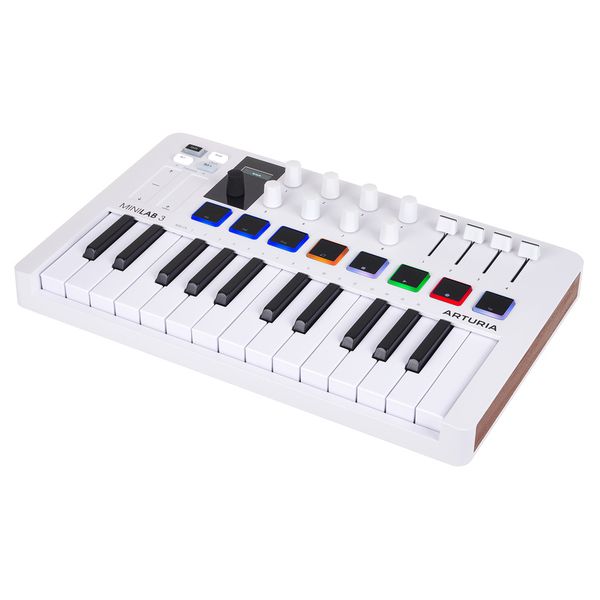


Arturia MiniLab MK3


Arturia MiniLab MK3
^ from: (Thomann) - This is the latest in Arturia's MiniLab series- the MiniLab MK3.

Before I go any further, let me start with a testimonial before I discuss this MIDI controller. The Arturia MiniLab MK3 was not the first choice for me in picking a MIDI controller. I was originally considering getting an AKAI Professional MPK Mini MK3. I was going to buy the AKAI MIDI controller... until a YouTube channel convinced me to get another one otherwise. That "another one" happened to be the Arturia MiniLab MK3.

A Quick Note About MIDI Controllers...

A MIDI keyboard and a MIDI controller are two different things. A MIDI keyboard can operate on its own and can generate sounds. A MIDI controller, however, can not generate its own sounds, and it must be plugged into a computer or something for it to work. Your PC must also have proper cables and such to fully utilize. The Arturia MiniLab 3 is a MIDI Controller.


More About the Arturia Minilab 3.

The Arturia MiniLab 3 is the third generation of Arturia's MiniLab series of MIDI controllers. This MIDI controller comes in three colors combinations from the device and its keys: white/white (the one I have), black/white, and black/black. It comes with its own USB MIDI cable through a USB Type-C connection. It has a Control port good for if you are using a MIDI device such as a pedal. Even though the Arturia MiniLab 3 has its own MIDI connection, this device also has a standard MIDI Out port for use for MIDI output.

The Arturia MiniLab MK3 has 25 pressure-sensitive keys along with eight pads for percussion effects. It also has a host of knobs and sliders to adjust the music, along with a unique touch slider that dynamically affects the pitch of played notes. The MIDI controller can be easily set up for any digital audio workstation (DAW) you can get it to work for. This MIDI controller even includes Ableton Lite for you to use. If you want to use the paid version of this program, get yourself Ableton Live.


How I Use the Arturia MiniLab 3.

I am not good at using a MIDI controller for a DAW. However in the past, I have used a MIDI keyboard to input keys into a MIDI music program to make music. The Arturia MiniLab 3 is what I use to plan out notes to use for the Piano Roll in FL Studio. I play out the song in my mind and then input the proper notes to use for instruments in FL Studio.

More advanced MIDI Controller users can record notes and beats using FL Studio or any other DAW. I have successfully configured my Arturia MiniLab 3 for FL Studio, Ableton Lite, and OpenMPT (to an extent). I have not gotten this to work with Linux MultiMedia Studio (LMMS). This keyboard should work with nearly any modern program that utilizes MIDI.


Now that you have a basic idea about this MIDI controller, let me offer you my thoughts on it next.


Arturia MiniLab 3: Final Thoughts


As someone who has never owned a MIDI controller before, using the Arturia MiniLab 3 was a new experience. The


For More Information.../Shopping

To learn more about the Arturia MiniLab 3, here is a link to it from Arturia's website: Arturia - MIDI Controller - MiniLab 3.

If you want to buy an Arturia MiniLab 3, visit any of the links I've provided to you in this section. They will take you to retailers that offer this MIDI controller. So take a look around:

Amazon
eBay
Walmart
Sweetwater
Thomann

Happy shopping! :)


I do like the Arturia MiniLab 3, and it does help me in producing music. Maybe I should try to enhance my skills with it to be great with this MIDI controller. Anyhow, Subscribe/Follow my blog(s) in any capacity if you love my work. Share my blog post(s) with others if you enjoy my work. Support me further by connecting with me on social media; and if you are inclined, feel free to donate to me (tips/donations are voluntary but would be appreciated). Thank you for reading! Take care and be well.

Visit my JohnMarineDesigns Weebly site, subscribe to My Blog(s), and/or Follow on Bloglovin! Let's connect:
Contact Me via E-Mail Contact Me via Discord

(tips/donations are voluntary)
Visit and Subscribe to My Blogs...
Subscribe to John's Blog Space (JBS) Subscribe to John's Creative Space (JCS) Subscribe to John's Race Space (JRS) Subscribe to StyleSpace (SS) Subscribe to John's Life Space (JLS)
Get Social With Me!
Facebook (Friends) Facebook (Fans) Twitter YouTube
Pinterest LinkedIn (professionals only) Discord ???
Support My Creative Works!
JMDesigns John on Envato
Patreon Soundcloud Bandcamp
Twitch OpenGameArt TurboSquid
read more...

Google Nest Hub

John B. Marine | 10/01/2024 12:08:00 AM | | | Be the first to comment!
The Google Nest Hub is what I got for Christmas in 2023. I was unsure what I wanted to get, so I wanted to try out getting the Google Nest Hub. I figured now would be a time to offer thoughts on this device with this blog post. So what you're about to see are my thoughts about the Google Nest Hub.


Google Nest Hub


Meet the Google Nest Hub:


Google Nest Hub
^ from: Google Nest Help - Let Google Nest Hub be your Google-powered assistant for your home.

The Google Nest Hub is a connected device that can serve as your own assistant. You can request it to get weather updates, watch YouTube videos, play songs and sounds, and more. This is Google's answer to the Amazon Echo; and of course, it uses the Google ecosystem. The Google Nest Hub comes in two varieties- the Nest Hub and the Nest Hub Max. I have the former. The base Nest Hub is a 7-inch screen device, while the Nest Hub Max is a 10-inch screen device. The Hub Max can handle things like voice chatting and video calls with sound. The device must be plugged in to work, and you must have an active WiFi connection for it to work. It has no battery to operate on its own.

You can program certain commands to handle certain tasks or remind you of calendar effects. Throughout the months I tried out the Google Nest Hub, I experimented using certain commands for the device. A lot of things you can program it to mention can be trial-and-error. Some things require extra stuff. For example, you can't have it tell you Major League Baseball schedules or National Hockey League schedules without a subscription to YouTube. It used to have a feature that would monitor your sleep and give sleeping advice. Nowadays, I think you have to pay for having this feature.

While the Google Nest Hub uses the Google ecosystem, this device can not be used as a Google browser. For commands it can not process, it will instead link you to certain topics you suggest it. It also can use only so many external applications. You also can not use it to store data. So while you can do a lot with the Google Nest Hub, there are limitations.

I use Google Nest Hub like another clock in my room as well as asking it things from time to time.


Commands to Try.

Should you get a Google Nest Hub and not be sure what you can request it to do, I've created this section to give you some command ideas. To initiate Google Nest Hub to give commands, you must say "Hey Google" followed by what you want it to look up. Remember there are many more things you can suggest than what is in this section. These are just a few ideas, though. Each example is what you can say after telling it "Hey Google":

• ...tell me (sport) scores
• ...tell me (product) stock prices
• ...tell me today's weather (or "tell me tomorrow's weather") (you can also specify what city you want a weather report for. For example, "tell me today's weather in New York City.")
• ...tell me sunrise times; ...tell me sunset times
• ...tell me next game for (sports team)
• ...tell me a motivational quote
• ...tell me a fun fact
• ...tell me a joke
• ...turn up/down the temperature to (temperature) (this would require a smart thermostat)
• ...play a delightful chime
• ...play "happy birthday" (for if it is someone's birthday)

Try out different Routines and commands to enhance your experience with the Google Nest Hub. I told Google Nest Hub to play "Happy Birthday" for my mother, and it did a nice birthday wish to her! :) On a more serious note, if you want to change the routines for Google Nest Hub, it is recommended you do so online by accessing the Google Assistant page online. You can also use the Google Home application; but to handle Routines for the Google Nest Hub, I've had better luck using the webpage for Google Assistant and going to "Routines."


Google Nest Hub: Final Thoughts


The Google Nest Hub can serve as a great smart device to connect you to the world and connect your living space. While it connects you to the Internet and handles your media consumption needs, it is NOT like your smartphone or tablet PC. There are some things I wish it could handle better or without needing any kind of subscription. For the most part, the Google Nest Hub will serve you well for a number of different uses.

If I convinced you to get a Google Nest Hub, you can order one online using any of the following online stores and retailers (read the Affiliate section and/or Affiliate Notes for disclosure on the provided links):

Amazon
eBay
Best Buy
Walmart
Target


Happy shopping (if doing any)! :)


That concludes another blog post of mine. Hopefully you found some value and insight in what I have discussed. Make sure to stay with my blog(s) if you enjoy my work. Subscribe/Follow my blog(s) in any capacity if you love my work. Share my blog post(s) with others if you enjoy my work. Support me further by connecting with me on social media; and if you are inclined, feel free to donate to me (tips/donations are voluntary but would be appreciated). Thank you for reading! Take care and be well.

Visit my JohnMarineDesigns Weebly site, subscribe to My Blog(s), and/or Follow on Bloglovin! Let's connect:
Contact Me via E-Mail Contact Me via Discord

(tips/donations are voluntary)
Visit and Subscribe to My Blogs...
Subscribe to John's Blog Space (JBS) Subscribe to John's Creative Space (JCS) Subscribe to John's Race Space (JRS) Subscribe to StyleSpace (SS) Subscribe to John's Life Space (JLS)
Get Social With Me!
Facebook (Friends) Facebook (Fans) Twitter YouTube
Pinterest LinkedIn (professionals only) Discord ???
Support My Creative Works!
JMDesigns John on Envato
Patreon Soundcloud Bandcamp
Twitch OpenGameArt TurboSquid
read more...

Thursday, June 6, 2024

Chromebook Confessions

John B. Marine | 6/06/2024 02:46:00 AM | | Be the first to comment!
I have enjoyed my Chromebook since getting one in 2021. It has served my basic online needs for some time. It even improved my productivity while using it. Lately, though, I have come up with a revelation. I will share my thoughts and my revelation in this blog post. If you are interested fully in my latest thoughts on Chromebooks, be sure to stick around for my thoughts!


Chromebook Confessions


Before I get to my main points, let me share some basic thoughts.


Chromebook Thoughts.


Chromebook
^ from: (Amazon) - A Chromebook is capable of so much and does not require much to get basic operation going. However...

My Lenovo Chromebook has served me well. I was sad I did not get the Samsung Chromebook I wanted to get, because it got discontinued. I enjoyed using ChromeOS. It is snappy whereas you just turn it on and won't have to wait minutes to get everything fully up and running. It is equally snappy to shut down. It is a not-cluttered experience for anyone simply wanting to use the Internet.

If all you want to do is use the Internet and do a good bit of productivity, a Chromebook is an inexpensive way to simply traverse through cyberspace.


Chromebook Confessions.

Now for the meat of this blog post and why you are interested. The revelation I have is that owning and using a Chromebook is not for me long-term. There is a reason I never fully committed long-term towards using a Chromebook. I am so used to Windows programs that I feel my productivity is only slightly greater with a Chromebook when it could be greater with a Windows laptop. Would it be worth getting a proper laptop in the future? Possibly. It may be worth getting a decent-spec laptop with about the same performance numbers of my Lenovo Chromebook. Or if I am fortunate, get a great laptop with great specifications (doesn't have to be a gaming laptop) on the cheap.


Why Laptops are Better.

Technically, a Chromebook IS a laptop. What I am referring to here, though, is a regular laptop. A laptop can be a more viable solution over a Chromebook. Even so that laptops can be upgraded. A laptop can last longer and be more capable. Especially if you use a bunch of programs that a Chromebook may be unable to execute to the same level of a proper laptop, you may feel a Chromebook can be a waste of money. Take me, for instance. I do things like blogging, image editing, music making, video editing, also programming. I can find a handful of programs for which to handle all or most of these tasks for my Chromebook. Sometimes, though, my programs for my Chromebook may not be enough.

Also, do you realize that some devices may not work properly with Chromebooks? Just because a device is plug-and-play does not guarantee it will work properly with a Chromebook. You will need to find certain hardware that have been tested to be compatible with Chromebooks. It is part of a designation called WWCB, or "Works With Chromebook. One such example of devices that may not work immediately with Chromebooks are webcams. Chromebooks already have their own integrated webcam, but external webcams and external microphones do a better job of capturing video and sound than what a Chromebook offers. Using a webcam not compatible with a Chromebook can be a waste of money.

Since I have certain needs that a Chromebook may not be able to properly address and be as compatible with my needs, a Chromebook isn't enough for me, especially long term. So I almost feel like in the future wanting to get a decent enough laptop to replace my Chromebook a few years from now.

There is one more fault of Chromebooks that you have to take into consideration. Chromebooks have an end-of-life cycle where they will no longer receive updates from Google. The EOL (also called "auto-update expiration" or AUE) usually happens after 8-10 years with a Chromebook you buy. You can still use your Chromebook after the AUE/EOL date, but don't expect updates from Google. It could even make your Chromebook vulnerable. Some Chromebooks can be able to support using Linux. Though, Linux could give you some security concerns.


Get a Proper Laptop Instead?

All I have been suggesting in this blog post is a Chromebook is not a bad thing to invest in. If your needs involve much less than basic computing and using the Internet, a Chromebook is not a waste of money. I am just suggesting a Chromebook is just not for me long-term after I thought of what a laptop can do over a Chromebook. If you want to be able to utilize basic computing and an Android app or two, get a Chromebook. Just be mindful of what you can do with a laptop vs. what you can do with a Chromebook. Understand your computing needs and decide for yourself if you are better off long-term with a laptop or a Chromebook.


Thank you for reading my confessions regarding Chromebooks. I hope you are able to understand where I am coming from and my own thoughts after Chromebooks lately. Maybe I have given you some insight on the long-term side of Chromebooks. Do you agree or disagree with my points? You are welcome to comment. Subscribe/Follow my blog(s) in any capacity if you love my work. Share my blog post(s) with others if you enjoy my work. Support me further by connecting with me on social media; and if you are inclined, feel free to donate to me (donations are voluntary but would be appreciated). Thank you for reading! Take care and be well.

Visit my JohnMarineDesigns Weebly site, subscribe to My Blog(s), and/or Follow on Bloglovin! Let's connect:
Contact Me via E-Mail Contact Me via Discord

(donations are voluntary)
Visit and Subscribe to My Blogs...
Subscribe to John's Blog Space (JBS) Subscribe to John's Creative Space (JCS) Subscribe to John's Race Space (JRS) Subscribe to StyleSpace (SS) Subscribe to John's Life Space (JLS)
Get Social With Me!
Facebook (Friends) Facebook (Fans) Twitter YouTube
Pinterest LinkedIn (professionals only) Discord ???
Support My Creative Works!
JMDesigns John on Envato
Patreon Soundcloud Bandcamp
Twitch OpenGameArt TurboSquid
read more...

Saturday, July 8, 2023

Refurbished Electronics

John B. Marine | 7/08/2023 01:31:00 AM | | Be the first to comment!
If you do not fancy the latest technology and lack sufficient funds, then refurbished electronics may just be for you. Refurbished electronics may not be "new," but they are appointed to be as good as new. Some refurbished electronics may even have specifications that are on par with (or sometimes exceeding) a lot of modern electronics. It is possible to get quality electronics for much less than modern electronics by buying refurbished. I will discuss refurbished electronics in this blog post.


Refurbished Electronics


Let me explain refurbished before I go any further.

refurbished electronics
^ from: (Quora) - Want electronics? Don't have sufficient funds? Consider refurbished electronics. After all, it was said the refurbished electronics market was $10B USD in 2018!

Understanding Refurbished.

It is a misconception to think of refurbished electronics as "used." Sure, maybe one device or devices may have had previous owner(s), but it does not mean you are buying a used product. However, a refurbished electronic product does not mean you are buying what someone else once used. Rather than recycle or destroy such electronics, a refurbished product is instead extensively revived and upgraded to the point where it feels like new. Refurbished electronics are more like products that are old or reached the end of their cycle and are reborn and enhanced. In some cases, older technology that is refurbished can sometimes be even better than it was previously.

Think of a refurbished product more like taking a rusted-out car and bringing it back to life with extensive modifications and modern parts. Is this restored car "new?" No. It is simply taking something old and giving it new life to where it is as good as new. This restored car in this analogy would not be sold as a "new" car, but its specifications would make it as good as any modern car sold at a car dealer.

Could you be taking a chance investing in something refurbished? While refurbished electronics may be enticing and thrifty, there is no guarantee that a refurbished electronics product will hold up long enough or be of great quality. You may buy a refurbished product that may fall apart after a few uses. Reputable dealers of electronics products will extensively test refurbished products for quality and endurance. Refurbished products have standard warranties to them and can be returned if they do not meet your specifications or satisfaction. Some dealers and retailers will allow you to purchase additional protection plans to cover the cost of things such as repair and maintenance. In addition, refurbishing electronics can result in increasing sustainability and cutting down on land waste.


Refurbished Price Difference.

If you were to compare a refurbished electronics product next to a modern one, would you take an older model over a modern one? A lot of people would probably take the modern one over the refurbished one. Not many people have the finances for most modern things. Just like with vehicles, people will buy used vehicles since they can not afford anything new. That is even if people do not engage themselves in financing plans that help alleviate the financial pain of buying anything new.


Latest vs. Refurbished in Perspective: PC Example.

Let me provide you some perspective. I want you to follow my lead. Assume the cheapest-priced desktop computer you can buy new from one dealer is priced at $300 USD. An online retailer offering refurbished computers for near the same price as the budget PC within about $250 USD to $285 USD. Which would you take?

If money were no object, a consumer would want the latest electronics because they are up-to-date, and you could have them serviced easily should you have a problem with the device. You also may get a better warranty of that latest electronic device than you would with something refurbished.

On the other hand, and especially in the case of something like a refurbished desktop PC, you might determine that you do not need the most modern technology for your money. Maybe you just want something that will suit you just fine at around the same price point. As long as you have decent finances and a decent base, you may elect to buy the refurbished product to save money and maybe even have a more capable item than the modern one at the same price point. It can be okay to take a chance with a refurbished product if you feel it is within your means.


Latest vs. Refurbished in Perspective: Smartphone Example.

Let me provide you more perspective. This time, I am looking at mobile devices such as smartphones. Assume a modern budget smartphone costs $150 USD when bought from a specific carrier or with a certain plan. For that same price point, you could get a refurbished smartphone that you can still use with any carrier you so choose.

Unlike the previous example, most mobile devices can not be easily upgraded to modern specifications with the most modern features. This means you may be stuck with (for example) an older operating system or older specifications than a modern version of its features. It would be best to go with a modern smartphone in this case so you can have the latest applications for it.

Some applications and/or games (if you are a mobile gamer) may not be compatible with older operating systems. Think about Android for a moment. A program that may be available for the "Ice Cream Sandwich" interface may not be compatible with the latest Android operating system. If you are willing to live with having some incompatible modern apps or games, then go the refurbished route. You may also be okay with a refurbished smartphone if you do not care for features like face recognition, NFC (near-field communications), heart monitors, and things of that nature. A refurbished mobile device also may not allow you to expand its memory. In other words, a one terabyte microSD card may not work for an older smartphone or tablet PC. You are still getting a smartphone that will handle its smartphone duties.

The main point of this section is to show that you will have to live with whatever you decide to buy between one of the latest smartphones and a refurbished smartphone. It will still handle its duty and serve its purpose. You are only deciding whether you want to go with modern material or be okay with older material.


Refurbished Electronics: My Journey


There is a reason why I created this blog post besides discussion of refurbished electronics. The reason I brought up this topic is because I have wanted to get a more capable PC. It would be best for me to get one from a brick-and-mortar store so I can have the latest material. However, I been searching online for a refurbished PC. Certain refurbished PCs are within a certain budget I have, and some of the ones that have most interested me seem more than enough for my needs. I normally am not an online shopper. Though, some of these deals are best shared online.


My Refurbished Experiences.

Refurbished products are nothing new to me. I bought a Samsung Galaxy Player 3.6 model and the Samsung Galaxy Player 4.2 model as refurbished. Both products lasted me for some time and were well enjoyed by me. So I have experience with refurbished products and knowing the pros and cons of such devices. This was at a time where I was convinced about the Samsung Galaxy Player over the iPod Touch I considered back then.


My Next Refurbished Experience.

Now lies a more ambitious plan for me- buying a refurbished PC. My current PC has 4 GB of RAM and a 1.99 GHz processor with four cores. I looked at what PC specifications would have to be met for me to enjoy computing in more modern times. Through my research, for me to get a better PC, it has to have at least 8 GB of RAM and at least a 2.9 GHz processor (regardless of how many cores). A PC with 16 GB of RAM would be recommended, and 32 GB of RAM would futureproof me for some time. I saw some refurbished PCs on Amazon that have anywhere between 3.2 GHz processors or up to 3.9 GHz processors. Some of the ones within budget I saw had about 3.4 GHz processors max with 16 GB of RAM.

The one thing I would have to get adjusted to is using a SSD (solid-state drive) aside from the old fan-driven hard drives. Since I have two external hard drives with 1 terabyte of memory and another with 4 terabytes of memory respectively, extra memory will not be too much a problem for me.

Besides memory and processor considerations, I also wouldn't mind an HD monitor with a better refresh rate than the one I am using currently. I may just have to adjust the frames per second settings for some programs to better take advantage of my current monitor. It would be great if I could do this more consistently with all or most of certain programs.

A better refurbished PC can even bring me into modern times gaming. Despite the fact some refurbished PCs may not be able to play most modern AAA-level games out the box, some people upgrade their refurbished systems with newer hardware. Some gamers buy certain graphics processing units (GPUs) able to take advantage of modern gaming titles. Additionally, they may upgrade the RAM, processors, and power supply to take advantage of the better hardware. I do not have plans to get a GPU in case whatever refurbished PC I get unless I was gifted a compatible GPU or feel a GPU is necessary to use for gaming. I am also not a real gamer anyhow. So I don't really care about playing certain intense games like "Elden Ring."

I do not go into considering a refurbished device without the fear that whatever refurbished products I get may not last or hold for as long as I would like. A computer is a big investment. Most computers will last most people between 5-8 years before wanting to get something better. You had better get your money's worth when considering a purchase like a computer (let alone refurbished). That is why I am looking to trusted retailers, which is why I am considering shopping on Amazon for a refurbished PC. eBay and other places seem more risky for me online than Amazon.


Refurbished Electronics: Final Thoughts


Consider all factors before thinking about buying refurbished electronics. Refurbished electronics allow you to enjoy quality electronic products without paying high dollar for the latest technologies. Refurbished electronics may also be on par with or better than a lot of the latest products. The one thing to be mindful of is that certain refurbished goods might not be of complete quality, and you may risk buying something that may fall short of what you were hoping for. Consider the refurbished electronics market if your finances disallow you from having the latest technology. Some refurbished products can exceed some of the latest products despite being old and reborn regardless of price points.

What should be most appreciated about refurbished products is in seeing older products bring brought back to new life and enhanced rather than entirely recycled or trashed. The fact you could get even better electronics from an older product at a certain price point than similar items is worthy of love. Even when a lot of people are penny-pinching, refurbished electronics can be a great option to consider for those who may not have the finances for any of the latest technologies.


Refurbished Electronics Online.

Are you interested in refurbished electronics? Here are some online retailers I curated for you to purchase certified refurbished electronics. Visit these sites:

Amazon Renewed
eBay Refurbished
Walmart Restored
Newegg Refurbished
Micro Center Refurbished
Microsoft Certified Refurbished
Certified Refurbished Products - Apple
Back Market

Happy shopping! :)


I hope you have found some great value in this blog post. Good luck to you all if you are interested in refurbished electronics shopping. Hopefully you find the electronics you are looking for. If you enjoy my work, please Subscribe/Follow my blog(s) in any capacity if you love my work and want to support me any way you can. Share my blog post(s) with others if you enjoy my work. Thank you for reading! Take care and be well.

Visit my JohnMarineDesigns Weebly site, subscribe to My Blog(s), and/or Follow on Bloglovin! Let's connect:
Contact Me via E-Mail Contact Me via Discord

(donations are voluntary)
Visit and Subscribe to My Blogs...
Subscribe to John's Blog Space (JBS) Subscribe to John's Creative Space (JCS) Subscribe to John's Race Space (JRS) Subscribe to StyleSpace (SS) Subscribe to John's Life Space (JLS)
Get Social With Me!
Facebook (Friends) Facebook (Fans) Twitter YouTube
Pinterest LinkedIn (professionals only) TikTok Discord
Support My Creative Works!
JMDesigns John on Envato
Patreon Soundcloud Bandcamp
Twitch OpenGameArt TurboSquid
read more...

Thursday, July 6, 2023

Revisiting Portable Media Players

John B. Marine | 7/06/2023 11:36:00 PM | | Be the first to comment!
I am tech-savvy, but old-fashioned. I still prefer some devices not being replaced by my smartphone. Such examples include portable media players (PMP). For this blog post, I want to reflect back on some of the portable media players I used before. Maybe some of you may remember some of the devices I will mention in this blog post. So let me take you back in time!


Portable Media Players at a Glance


There used to be a time where we would have portable music devices to carry around our music with us. Some of us would get to carry portable radios to listen to local radio stations. We even enjoyed having boomboxes to enjoy stereos and cassette players. We would then see the advent of portable cassette players. Later, you could take your fancy compact discs with your portable CD player. We would eventually see the advent of MP3s and MP3 players.

Some of the more popular portable media players include the likes of the Sony Walkman. The Walkman would be successful with cassette tapes and then later MP3s. Also finding popularity were the line of PMPs from Sandisk like the Clip and Fuze. With Wi-Fi becoming a thing, there were even PMs such as the Sandisk Sansa Connect and the Microsoft Zune. So this meant you could listen to Internet radio stations on your PMP if you were in a place with WiFi access.

What many consider the Gold Standard of portable media players is the iPod. The iPod would revolutionize the way we carry around music. The classic iPod would exist between 2001 and 2022. It would see four different models in its time- Classic, Nano, Shuffle, and Touch. I wasn't fortunate enough to buy or afford an iPod in my time. At one point, I wanted to get one of the iPod Nanos for music and video. I even once considered the iPod Touch until I found something else. Another key to the iPod Touch was in its ability to play iOS games without needing an online connection. The iPod Touch would be a device for those who want to enjoy the perks of an iPod but without the phone functionality of the iPhone.

Even with the iPod Touch and the iPhone gaining popularity, some other companies wanted to make Android a thing. One such company to put forth an Android-powered portable media player was Samsung. Samsung made four versions of their Samsung Galaxy to exclusively play media and Android apps. All of their Samsung Galaxy Players were designated by their screen size- 3.6, 4.0, 4.2, and 5.0 models. There was even a model exclusively in South Korea which America never got- the Samsung Galaxy Player 5.8 player. I think there was also a seven-inch one also only in South Korea, but don't hold me to that.

Today, a lot of any portable media is stored on our smartphones. Either we have our own media stored on them, or we may have them stored on certain memory devices like SD cards. Feel free to try to carry as much media as your device will allow.


Revisiting Portable Media Players I Owned


Now for some of the portable media players I used to use.


RCA Lyra.

RCA Lyra
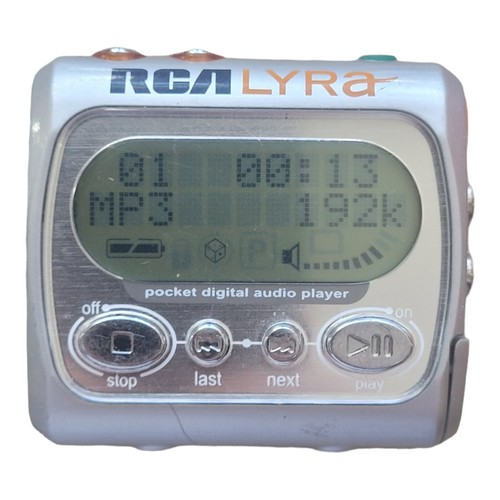
^ from: eBay - This was the first portable media player I remember owning- the RCA Lyra.

My first real portable media player was an RCA Lyra. I don't know which model I had specifically, but it is the RD1021/1071/1075 series. This device allowed you to put on as much as between 64MB to 128MB of music with the top of the line model. This was a very good MP3 player for me... except for one thing. That thing is the program you have to use to put music on it, a crash-happy, trash application called Musicmatch. Still, for what it could do, it served me to listen to my music on the go. Of the devices I feature, I think this is the only one powered by batteries you must replace.


Sandisk Sansa Clip.

Sandisk Sansa Clip
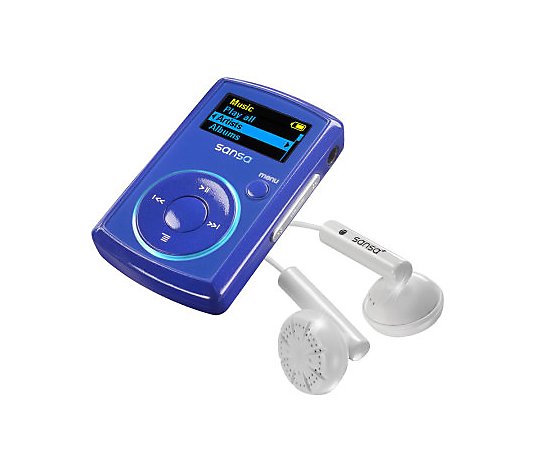
^ from: QVC - This previous model Sandisk Sansa Clip was great to have and so convenient to enjoy hearing music.

I felt so liberated when I picked up a Sandisk Sansa Clip around 2008 or so. No more of that janky trash Musicmatch to put on music. This MP3 player can be charged through a cable connected to your PC. In fact, you could put on songs simply through Windows Explorer. The Clip had beautiful sound quality whether listening to local radio or MP3s. The one I had was a blue Sansa Clip with 2GB of storage. Going through songs was not a painstaking process. Saving radio stations wasn't bad either. It served me well in my final semester in Community College. Later, I'd be sad because this device would not update my collection of songs or fully charge. So I needed something better down the road for my music consumption.


Sandisk Sansa Fuze.

Sandisk Sansa Fuze
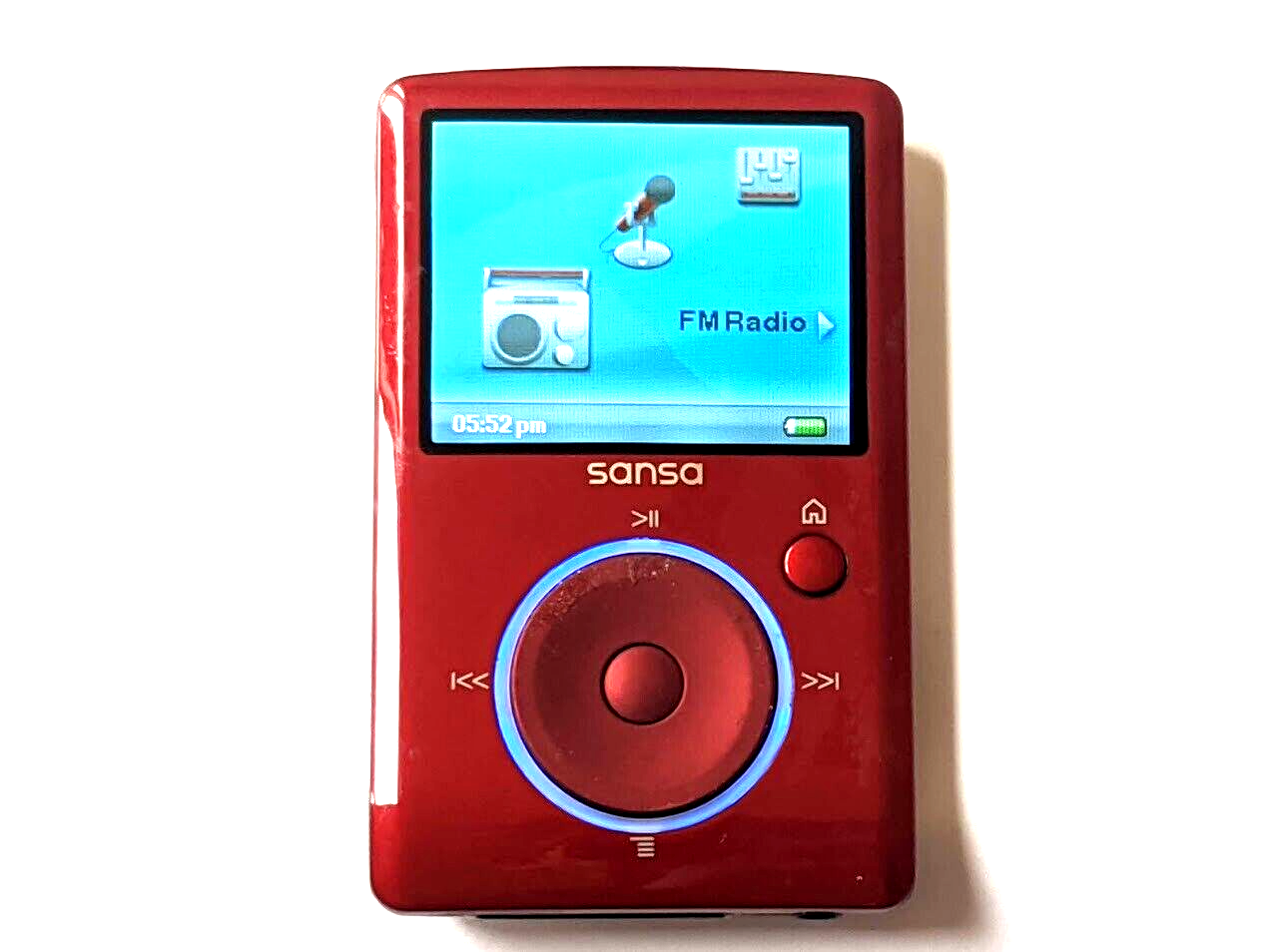
^ from: eBay - The Sandisk Sansa Fuze offered great sound quality for radio and personal media.

It was a happy time when I got a Sandisk Sansa Fuze. I got a red Fuze with 4GB os space (maximum was 8GB). I liked the pretty color display. Previously, I had one of these to watch videos on the go. However, I don't think I ever got to put videos on it or see too many of them. If you had a microSD card, you could increase the storage of your Fuze.


Samsung Galaxy Player (3.6 Model).

Samsung Galaxy Player 3.6
^ from: Amazon - The Samsung Galaxy Player 3.6 is my first Android device of any kind I owned.

I wanted an iPod Touch when I felt like I wanted something better than my Sandisk Sansa Fuze circa 2012. I felt like I was finally able to own my first Apple product of any kind. I then learned of Android. I then learned of the Samsung Galaxy Player series and Android. I thought the Samsung Galaxy Player 4.2 would be perfect for me. Back then, though, my finances would only allow me to get the 3.6 for the time. While the iPod Touch is infinitely better than the Samsung Galaxy Player 3.6, I was still happy to by a refurbished one on Amazon. This device was the first device where I got to take pictures, play music and video, and use a handful of compatible applications and games. I was still happy with my Amazon purchase and utilized its picture taking abilities. I could fit in a microSD card for some more storage. I could also charge it through a USB cable and not need to have a PC on to power it.


Samsung Galaxy Player (4.2 Model).

Samsung Galaxy Player 4.2
^ from: Amazon - The Samsung Galaxy Player 4.2 was nearly perfect for me at the time.

My dream portable media player was finally in my possession! The Samsung Galaxy Player 4.2 really served me well from picture taking to using applications. It felt much better than the 3.6 and had overall better specifications than the 3.6 model. Slowly, I wasn't regretting getting an iPod Touch or even a classic iPod using this Samsung Galaxy Player 4.2. Like the 3.6 model, you could put in a microSD card for some more storage.


These were about the portable media players I remember most using and liking.


Portable Media Players Since Smartphones


Ever since getting my first smartphone, I am reminded that the Android portable media players I used did not have the phone capabilities. I still prefer having a portable media player apart from my phone. I want my smartphone to be just that- my phone. Even still, I do not want to rely on my smartphone to be my carry-around computer. I do think my smartphone basically is a fancy portable media player... with phone features.

It's sort of the inescapable reality as far as media consumption goes these days. So even if you don't want your smartphone to be this all-in-one device, you almost basically have to accept it as your all-in-one device handling everything from calls to messages to all of your applications and games. Again- this is old-fashioned me speaking.

Portable media players aren't going to go away entirely; but if you still prefer a portable media player for your media consumption, you can find a lot of them on the cheap these days. Or you may have to elect getting a smartphone but without using the phone features, getting a phone plan, or a SIM card for it. Just be sure to enjoy portable media players for what they are and what they provide.


Have you any memories on portable media players? I shared mine with all of you. I appreciate you being part of this throwback! If you enjoy my work, please Subscribe/Follow my blog(s) in any capacity if you love my work and want to support me any way you can. Share my blog post(s) with others if you enjoy my work. Thank you for reading! Take care and be well.

Visit my JohnMarineDesigns Weebly site, subscribe to My Blog(s), and/or Follow on Bloglovin! Let's connect:
Contact Me via E-Mail Contact Me via Discord

(donations are voluntary)
Visit and Subscribe to My Blogs...
Subscribe to John's Blog Space (JBS) Subscribe to John's Creative Space (JCS) Subscribe to John's Race Space (JRS) Subscribe to StyleSpace (SS) Subscribe to John's Life Space (JLS)
Get Social With Me!
Facebook (Friends) Facebook (Fans) Twitter YouTube
Pinterest LinkedIn (professionals only) TikTok Discord
Support My Creative Works!
JMDesigns John on Envato
Patreon Soundcloud Bandcamp
Twitch OpenGameArt TurboSquid
read more...

Monday, June 5, 2023

Sony PlayStation 3

John B. Marine | 6/05/2023 12:18:00 AM | | | Be the first to comment!
The Sony PlayStation 3 only does everything! Introduced to the world circa 2006, the PS3 went far and beyond to be its own gaming powerhouse. The PS3 also had to be not just a "gaming console." So the PS3 had some features to it to make it one of the best SYSTEMS out there, not just a gaming console. I take my own look at the PlayStation 3 in this blog post on "John's Blog Space." Let's get it!


Sony PlayStation 3


Meet the PlayStation 3:

Sony PlayStation 3
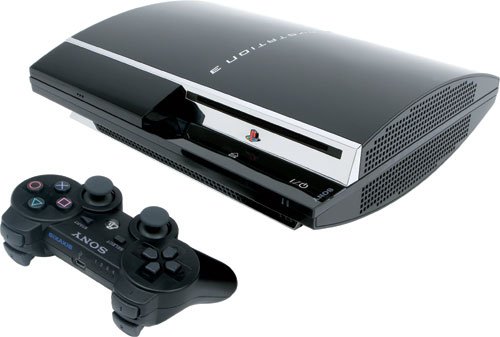
^ from: Amazon - The PlayStation 3 only did everything. Honest!


Already established as a multimedia giant, Sony's foray into the rapidly-changing and evolving realm of gaming came in the form of the Sony PlayStation 3. It was time for the PlayStation to further evolve and make more marks in gaming. It did just that in its proliferation in 2006 were the Nintendo Wii and the XBOX 360. The PlayStation 3 was further evolution in a rapidly-changing realm of gaming. Gaming is now a realm where one could play games that get updated and can be enhanced all the further. This wasn't possible much with the PlayStation 1 or PlayStation 2. This also means the gamer can download digital-exclusive games to play. If one wants to connect with online friends, one can do so with PlayStation Network (PSN). During the time of the PlayStation 3, PSN and using the Internet was FREE.

More than ever, the modern gaming console has to be more than just a "gaming console." The PlayStation 3 had to adapt to this and make its own mark on the gaming landscape. You now could connect via WiFi or even ethernet to enhance your overall experience with the PlayStation 3. You could still listen to CDs as well as DVDs. Now, though, enter the realm of Bluray. This technology made not only gaming more powerful, but it also made watching movies amazing. The PlayStation 3 also included its own built-in web browser. You could also install apps to view a variety of apps to connect with friends or access media services like Netflix. You could also access YouTube on a PlayStation 3.

Games were becoming larger and more realistic with the PlayStation 3. Newer TVs were taking advantage of high-definition and HDMI. The PS3 was no stranger to this. Also coming to life was that of Bluetooth. This meant you were able to connect devices wirelessly to the PS3 to play or use.

Features such as these meant what was simply a gaming console has become much more and means much more than ever before. The PlayStation 3 was keeping up with times and was making its own mark on the gaming landscape. The PS3 would enjoy a lifespan that lasted from 2006 to 2017. It would also see three different generations in its lifespan from the big model to the later slim models.


My Introduction to the PlayStation 3.

I was somehow fortunate to save up enough money blogging to where I was able to buy myself a PlayStation 3 around 2011 or so. I had enough to buy a PlayStation 3, but I needed some extra money to buy my first game for it- Gran Turismo 5. I still made it happen and got to enjoy the experience. Some games I played got me to meet a lot of people worldwide on PSN.


Games and Gaming on the PlayStation 3.

Gaming has evolved around the time of the PlayStation 3. Games on PlayStation 3 are of the physical and digital variety. Many of the AAA-rank titles and Sony exclusives ruled the roost for the PlayStation 3. However, a lot of games from independent (or "indie") game developers also wanted their spotlight with the PS3's lineup. If anyone wanted to enhance games someone owns, they can do so by buying downloadable content (DLC).

When you actually get to play games on the PlayStation 3, you are now met with a stylish user interface called the XrossMediaBar (or XMB for short). This UI in its default form has a lovely wavy background with sparkles. This XMB features certain features you can use to set up your PlayStation 3, play games, view your PSN friend list, and more. You could also change the XMB to include a custom background. To exit a game or an app, you need to press-and-hold the PS Button on the DualShock 3 to access a menu and then choose to exit a game. Confirm your selection, and you're out. If your PS3 crashes, then you will need to press-and-hold down the PS logo button near the PS3's loading dock to shut down the system.

Also, there was a new way to keep track of your performance while also challenging you to do certain things. Enter the Trophy system for the PlayStation. Often times, it was a potentially negative thing or a spoiler to learn of Trophy goals for games. Learning of some Trophy goals could spoil details about certain games, making you want to play a game in certain ways outside of playing the way you want to play. These goals were broken up into levels of difficulty- Bronze, Silver, and Gold. If you manage to clear all of a game's Trophy objectives, you earn the coveted Platinum trophy for a game.

Gone are Memory Cards. Now, the PlayStation uses internal memory for you to store your game data, your own media, your own pictures, and more. You can also still place your media on USB flash drives to import/export to other devices (such as your PC). You could also use the space on your PlayStation 3 to download games to the device for faster loading of some games. It made a difference when I downloaded games like Ridge Racer 7, Gran Turismo 5, and Gran Turismo 6 to my PS3. Just make sure you have enough space to be able to put games on your PlayStation 3 for faster loading.

As for games themselves, some of the earliest titles were mostly showcased on kiosks at game stores and in the game section of retail stores. Some of these early titles include "Ridge Racer 7," "MotorStorm," and "Virtua Fighter 5." There were also later games like "Gran Turismo HD," which would give way to "Gran Turismo 5 Prologue," and eventually "Gran Turismo 5." Other PS3 games include the "Uncharted" series, the "Assassin's Creed" series, the "Saints Row" series (excluding Saints Row 1), "Ni No Kuni," "Grand Theft Auto 4," "Gran Turismo 5," "Gran Turismo 6," the GRID series, the DiRT series, "ModNation Racers," "Little Big Planet," "PlayStation All-Stars Battle Royale," and more. Besides physical games, some digital games of note for PS3 include "flower," "Minecraft," "Double Dragon NEON," "WipEout HD/Fury," and "Daytona USA." Some of the digital offerings even included games from other consoles configured for the PlayStation 3. For example, you could play "Sonic the Hedgehog 2" from the SEGA Genesis/Megadrive on a PlayStation 3.

If you buy PlayStation Plus, you will be able to purchase many more games and unlock many other content to play on your PlayStation 3. It was not required of you to have a PlayStation Plus subscription in the PS3 days to be able to game online. PS+ gave you the chance to enjoy a lot more content for the PlayStation 3. Nowadays, PS+ is required to access the PlayStation Store or to game online in general.

I bet you can enjoy playing PlayStation 2 games on the PlayStation 3, right? Well, no. PlayStation 1 games can be played on the PS3. You can even play these games with some enhancements to make them play better on your higher-end TV. However, PlayStation 2 games are NOT reverse compatible on the PS3.

The PlayStation 3 even had some non-gaming applications to enjoy. One of those was its avatar service, PSHome. PSHome allowed you the chance to meet people on PlayStation Network and even play games with your friends. I had no such luck meeting too many people with PSHome. There was also a Life With PlayStation program that let you view news and weather updates. It also had a unique "Folding@Home" feature that was helping to battle against Alzheimer's Disease.

Even though the PlayStation 3 was an awesome system in its own right, some say developing for it has been rather tedious. Developers still tried their best to utilize the PS3 as best as possible for their games.


Peripherals of the Sony PlayStation 3.

So you have a PlayStation 3. What do can you use to enhance your experience? Well, let's a look:

Sony PlayStation DualShock 3
^ from: Amazon - Meet the DualShock 3- your controller for PS3 goodness!

The DualShock 3 is more than just any average controller. To the delight of many a gaming fan, the DualShock 3 is not a production version of the "boomerang" controller for the PlayStation 3 in its prototype phases. The DualShock 3 has a handful of features that set itself apart from the earlier DualShock and DualShock 2. For one thing, the DualShock 3 is USB-powered and can be recharged. This means you could be able to use a PlayStation 3 as a plug-and-play device a lot of devices that have USB ports to them. The DualShock 3 is also wireless. Because of this, you could be able to play games wirelessly by simply disconnecting the DualShock 3 from the charging cable. You can play wirelessly granted the DualShock 3 has enough charge to play. The two biggest features of the PlayStation 3 are its SIXAXIS controls and a new PS Button. The SIXAXIS lets you play games from six different axes for a broad array of control in games. You use the PS Button to access the system menu to access a number of features or to pair your DualShock 3 to the PlayStation 3. You could purchase a charging station for which to charge up your DualShock 3 or multiple DualShock 3's at a time.

Here is a weird "peripheral" to use for your PlayStation 3:

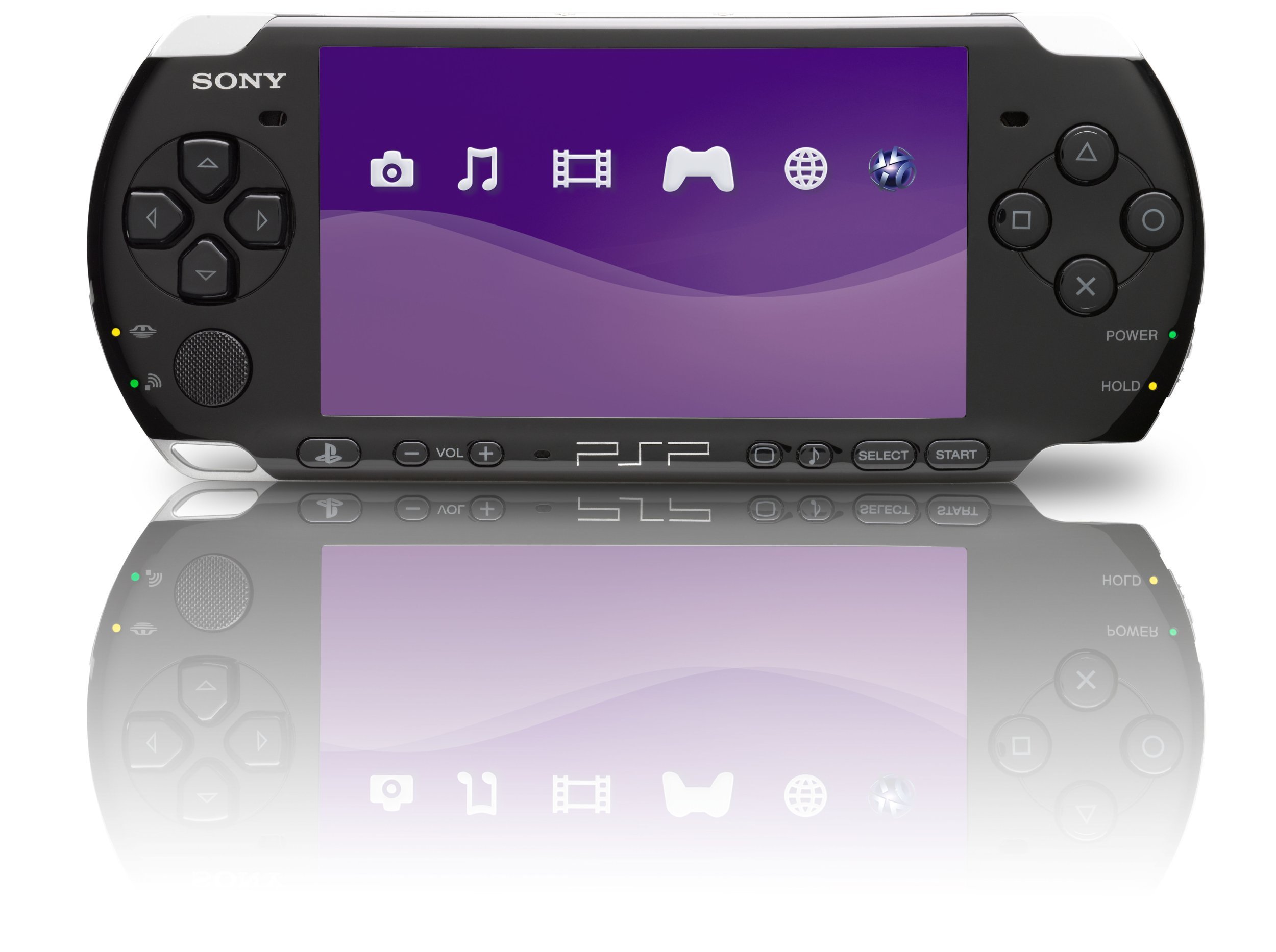
Sony PlayStation Portable PSP
^ from: Amazon - The PlayStation Portable can be used in conjunction with your PlayStation 3. To some people, though, why use a dedicated portable gaming system as an extra controller?

That's right. If you have one of these, a PlayStation Portable, you can use it as a controller on the PS3 or for some other PS3 content. Using a dedicated portable device makes for quite an expensive controller or control device for non-games!

Sony PlayStation Move
^ from: Amazon - Show me your MOVES with the PlayStation Move!

One of the most significant elements of gaming with the PlayStation 3 was that of the PlayStation Move. This allowed you to make yourself the controller in Move-enabled games. This could be thought of as Sony's answer to the Nintendo Wii and the Wiimotes. For example, using one of the elements of the Move allowed you to execute things like aiming and shooting an arrow from a bow and arrow. One of the first games to take advantage of the PlayStation Move was "Sports Champions."


How I Will Remember the PlayStation 3.

The PlayStation 3 is the last of using PlayStation Network for free. It was where I got to enjoy games of amazing quality. While I have only one Bluray movie ("The LEGO Movie"), I have yet to actually use it, and I owned this Bluray for quite a few years! The PS3 is still a special system to me even with today's landscape featuring the still-standing PlayStation 4 as well as the more expensive and more awesome PlayStation 5.


Sony PlayStation 3 Online


If you want to get yourself a PlayStation 3 and want to experience some PlayStation 3 moments, this section is your best friend. PlayStation 3 consoles, accessories, games, and more can be procured if you use the material I provide here:

PlayStation 3 on Amazon
PlayStation 3 on eBay


Happy shopping! :)


This one's done. I hope you enjoyed this post. I post blog entries on almost anything that crosses my mind. If you like this kind of thing, then I invite you to Subscribe or Follow my blog(s) in any capacity. Believe me- you can't go wrong doing so! :D If you enjoy my work, please Subscribe/Follow my blog(s) in any capacity if you love my work and want to support me any way you can. Share my blog post(s) with others if you enjoy my work. Thank you for reading! Take care and be well.

Visit my JohnMarineDesigns Weebly site, subscribe to My Blog(s), and/or Follow on Bloglovin! Let's connect:
Contact Me via E-Mail Contact Me via Discord

(donations are voluntary)
Visit and Subscribe to My Blogs...
Subscribe to John's Blog Space (JBS) Subscribe to John's Creative Space (JCS) Subscribe to John's Race Space (JRS) Subscribe to StyleSpace (SS) Subscribe to John's Life Space (JLS)
Get Social With Me!
Facebook (Friends) Facebook (Fans) Twitter YouTube
Pinterest LinkedIn (professionals only) TikTok Discord
Support My Creative Works!
JMDesigns John on Envato
Patreon Soundcloud Bandcamp
Twitch OpenGameArt TurboSquid
read more...

Sunday, June 4, 2023

Sony PlayStation 2

John B. Marine | 6/04/2023 10:05:00 PM | | | Be the first to comment!
Live in your world, play in ours. Sony blew minds again in the evolution of the PlayStation with the PlayStation 2. To carry gaming into the 21st Century and the new millennium, Sony made its PS2 as awesome as awesome can get. Beautiful graphics and more powerful technology made the PS2 quite the marvel. In vogue for this blog post is the Sony PlayStation 2. So come along with me as we reflect on the PlayStation 2!


Sony PlayStation 2


As I mentioned in the introduction, the device in vogue for this blog post is this thing below:

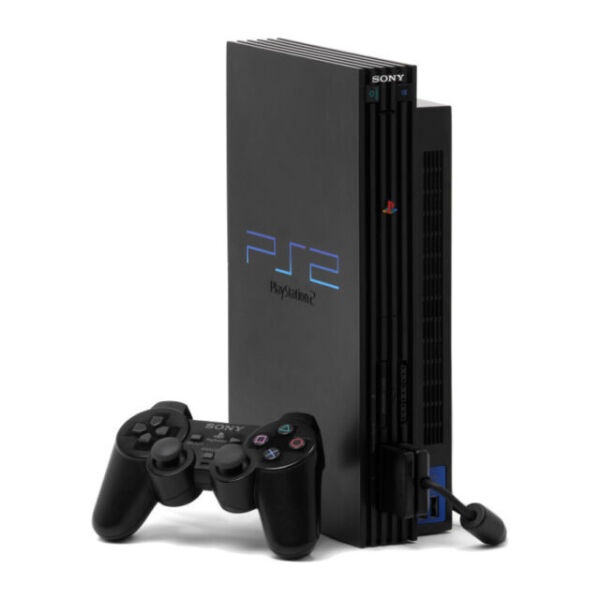
Sony PlayStation 2
^ from: eBay - Get ready for an unreal gaming experience with the PlayStation 2.

Starting in 2000 in multiple markets, the Sony PlayStation 2 entered the world. The PS2 picked up where the PlayStation 1 left off but offered a much more incredible experience. Much more memory was granted to game discs to provide amazing graphics and gameplay with the PS2. The original PS2 had something the PS1 did not- the ability to stand it up. You could lay it down vertically or stand it up. If you prefer standing up your PS2, it helps to have some stands for it. The PS2 would be available in its big form, but it would later be available in a more slim package called the PS2 Slim (also known as the PS2 Slimline). The PlayStation 2 would be in competition with systems like the Nintendo Gamecube, the Microsoft XBOX, and the SEGA Dreamcast.

While the Sony PlayStation 2 was capable of gaming, it was also capable being its own multimedia power. You can still listen to your favorite music CDs, but you can also watch DVD movies on the PS2. This was one of the signs that gaming systems can be used for more than just gaming.

One of the best things about the PS2 was the ability to have certain plug-and-play devices through USB. This would make it possible for later devices such as USB Flash Drives and simulation racing wheels to be used to play games. You could also input devices such as USB microphones and even simulation racing wheels.

The PlayStation 2's lifespan was between 2000 and 2012-2013. What it brought to gaming was more than just gaming.


My Introduction to the PlayStation 2.

I got a PlayStation 2 for Christmas in 2001 along with "Gran Turismo 3 A-Spec" and a custom controller. I would later pick up a bunch of games to enhance my PS2 experience. I still use my PS2 to play a number of PS2 games primarily for blogging purposes.


(Some Of) The PlayStation 2's Games.

The PlayStation 2 allowed for greater performance capabilities than the PlayStation 1. It has a lot more processing power than that of the PlayStation 1. This gave developers an opportunity to create mind-blowing experiences. Even the earliest PS2 games are actually still pretty stylish today. To me, "Ridge Racer V" and "Tekken Tag Tournament" come to mind for me in this regard of early games still lovely today.

The enhanced power of the PlayStation 2 allowed for things like more expansive worlds and processor-pushing games. One such game that comes to mind is "Grand Theft Auto: San Andreas." If you played GTA3 and GTA Vice City, GTA San Andreas could be like combining both games... then doubling the playing field of both games. In the 74 hours I spent playing and beating GTA San Andreas (before my Save Game corrupted), never before have I felt like I was in a world where I would easily run out of things to do or places to visit. In addition, all of the effects and graphics were far beyond what a lot of PS1 games wish they could replicate or better.

RPGs and action games are not the only examples of expansive worlds. Racing/Driving games had much more depth to them, and many of them based on real-world areas were re-created in amazing detail. Let's look at Gran Turismo 4. This game had some graphic-intensive city courses like with New York City or Hong Kong. However, it also had detailed long courses in the 8.5-mile Circuit de la Sarthe and in the over 12-mile long Nürburgring Nordschleife. All venues were created in greater detail than even the most impressive PS1 games. If you want to take this a bit further, then look at games like the "Suzuki TT Superbikes" series, which feature all 37.73 miles of the Sneafell Mountain Circuit, home to the Isle of Man TT.

As technology got better, we would see a handful of new things in games and new ways to enjoy them. For example, "Gran Turismo 3 A-Spec" had its own Logitech wheel for more precise driving dynamics. That basically was the start in the evolution of simulation racing. "Gran Turismo 4" would introduce the Logitech Driving Force Pro, which I still own despite it being so ancient and borderline archaic these days.

Perhaps the best thing about the PlayStation 2 was that it was reverse-compatible with PlayStation 1 games. So you could even play your old PS1 games on a PS2 as well as use PS1 Memory Cards. This further expanded the range of games you could play on a PlayStation 2.


Games and Gaming on the PlayStation 2.

Some of the earliest games, such as "Ridge Racer V" and "Fantavision" had game discs with indigo backsides to them. They also would make certain whir sounds when played in older PlayStation 2 units. Later games would be capable of utilizing more memory for fantastic graphics and deep game play. These later games would also do away with the indigo backs of the discs. Later titles to utilize more advanced details include (but not limited to) "Gran Turismo 4," "Final Fantasy X," "Grand Theft Auto: San Andreas," "Prince of Persia: The Sands of Time," "God of War," and more.


Peripherals of the Sony PlayStation 2.

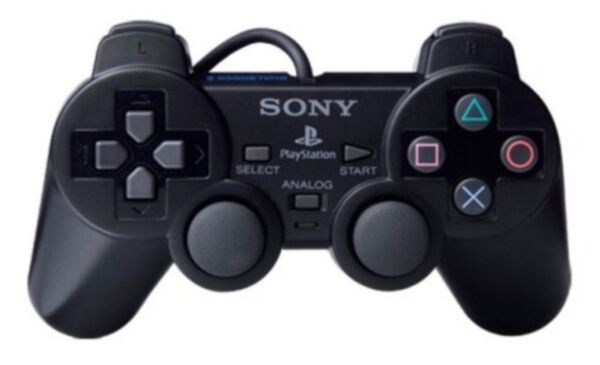
Sony PlayStation 2 DualShock 2
^ from: eBay - Get ready for an enhanced PlayStation experience with the DualShock 2.

It was the DualShock 2 where the magic happens. This evolution of the original DualShock includes its own analog sticks as well as its own vibration system to provide intense gaming goodness.

Memory Cards return for the PlayStation 2. This time, though, the Memory Card now goes from 15 blocks of memory to 8 MB of memory. This means you can store a lot more content. Just make sure you have enough memory for some games that use up a lot of memory.

Sony PlayStation 2 Network Adaptor
^ from: eBay - Connect to cyberspace for enhanced PlayStation action with the Network Adaptor.

Early on, the PlayStation 2 did not have online gaming capabilities. That would change later as a Network Adapter for the PlayStation 2 was introduced for it. This is what you could use for the PlayStation 2's Expansion Bay. Examples of SOE (Sony Online Entertainment) games include "SOCOM U.S. Navy Seals" and "Metal Gear Solid 3: Snake Eater." "Gran Turismo 4," which had promised online play, had online play dropped officially. Later builds of Gran Turismo 4 had its own online play system.

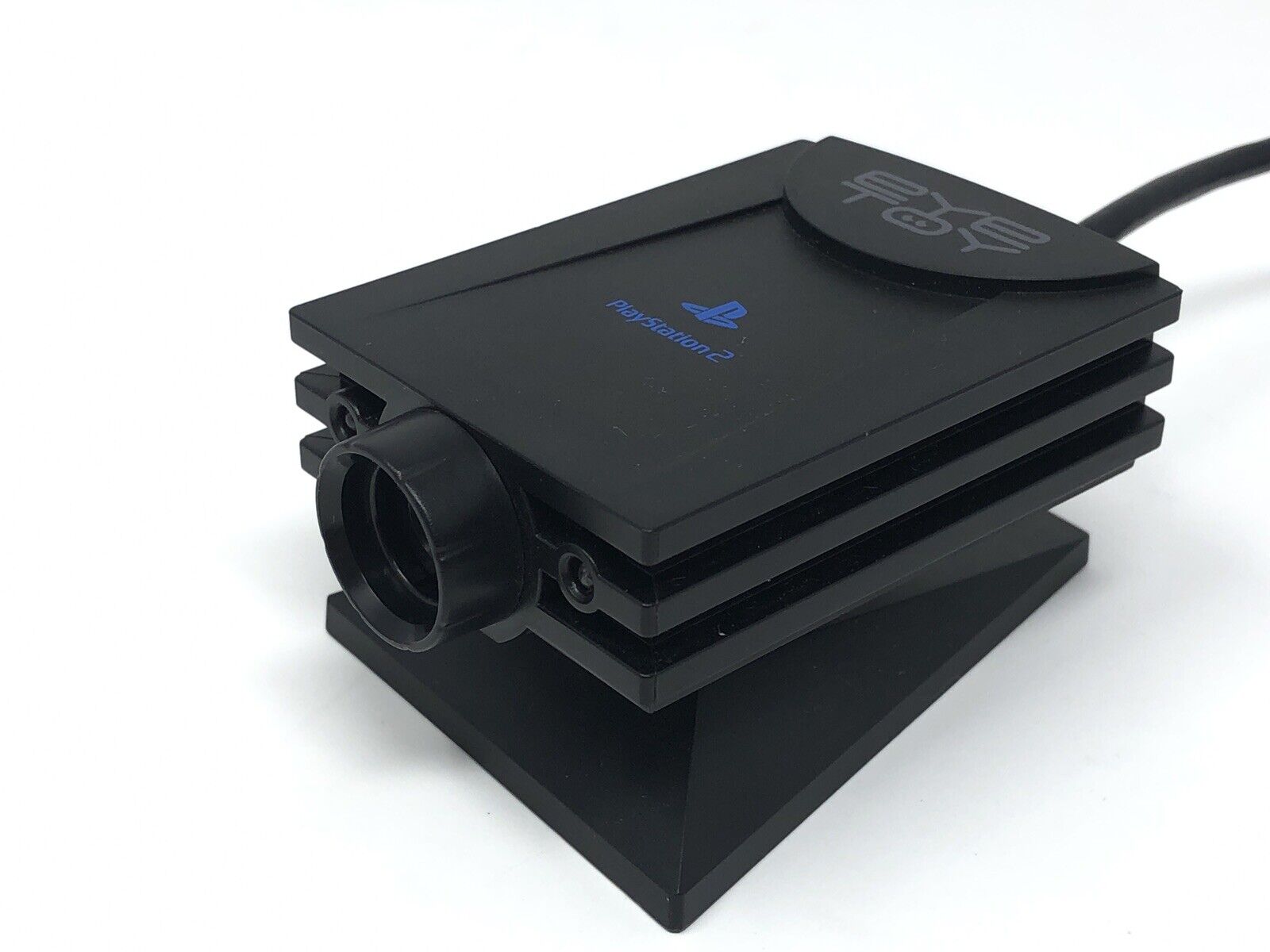
Sony PlayStation 2 Eyetoy
^ from: eBay - Eye... uh, I see you, Eyetoy...

If you want to enjoy some webcam-type action on your PS2, a later peripheral called the Eyetoy has you covered. This devices was used for some games that detected your movements and allowed you to do several things.

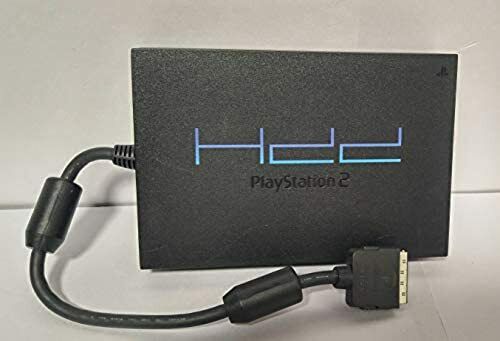
PlayStation 2 Hard Disk Drive HDD
^ from: eBay - Get yourself some added space by buying the Hard Disk Drive (HDD).

The PlayStation 2 Hard Disk Drive (HDD) allowed you to hold some extra content. However, so few games later in the PS2's lifespan took advantage of it. The only game I could think of was "Final Fantasy XI."


How I Will Remember the PlayStation 2.

I think the PlayStation 2 helped to set the early tone of gaming for the 21st Century and the current millennium. It helped in establishing gaming as its own lucrative category. Games on PS2 were no longer "just games." Granted we didn't have much in the way of HD graphics, impressive online performance, and the like; at least the PlayStation 2 is a step in the proper direction in regards to where we came from in going to gaming in 2023. If you are about gaming without having to be connected online constantly or buying add-on after add-on to enhance games, then get yourself a PlayStation 2 and enjoy the gaming ride it provides!


Sony PlayStation 2 Online


Maybe I convinced you about the PlayStation 2 to where you want to get one or learn more about it. If this describes you, then let me help you! The link I have included will help you towards getting some PlayStation 2 systems, games, and a lot more. I may add more resources based on traffic and attention to this post. For now, here's what I got for you (NOTE: These resources may include some non-PlayStation 2 items):

PlayStation 2 on Amazon
PlayStation 2 on eBay

Game on, PS2 style! :)


My look at the Sony PlayStation 2 is over. Thank you for visiting "John's Blog Space!" If you enjoy my work, please Subscribe/Follow my blog(s) in any capacity if you love my work and want to support me any way you can. Share my blog post(s) with others if you enjoy my work. Thank you for reading! Take care and be well.

Visit my JohnMarineDesigns Weebly site, subscribe to My Blog(s), and/or Follow on Bloglovin! Let's connect:
Contact Me via E-Mail Contact Me via Discord

(donations are voluntary)
Visit and Subscribe to My Blogs...
Subscribe to John's Blog Space (JBS) Subscribe to John's Creative Space (JCS) Subscribe to John's Race Space (JRS) Subscribe to StyleSpace (SS) Subscribe to John's Life Space (JLS)
Get Social With Me!
Facebook (Friends) Facebook (Fans) Twitter YouTube
Pinterest LinkedIn (professionals only) TikTok Discord
Support My Creative Works!
JMDesigns John on Envato
Patreon Soundcloud Bandcamp
Twitch OpenGameArt TurboSquid
read more...

Sony PlayStation

John B. Marine | 6/04/2023 05:35:00 PM | | | Be the first to comment!
In 1994 or 1995 (depending on market), a gaming revolution was coming. The evolution of graphical and processing performance would come from Sony, and that system would be called the PlayStation. While this is not a comprehensive look at the PlayStation 1, it is my own post about the PlayStation 1. So if you're game, let's talk about the Sony PlayStation 1!


Sony PlayStation


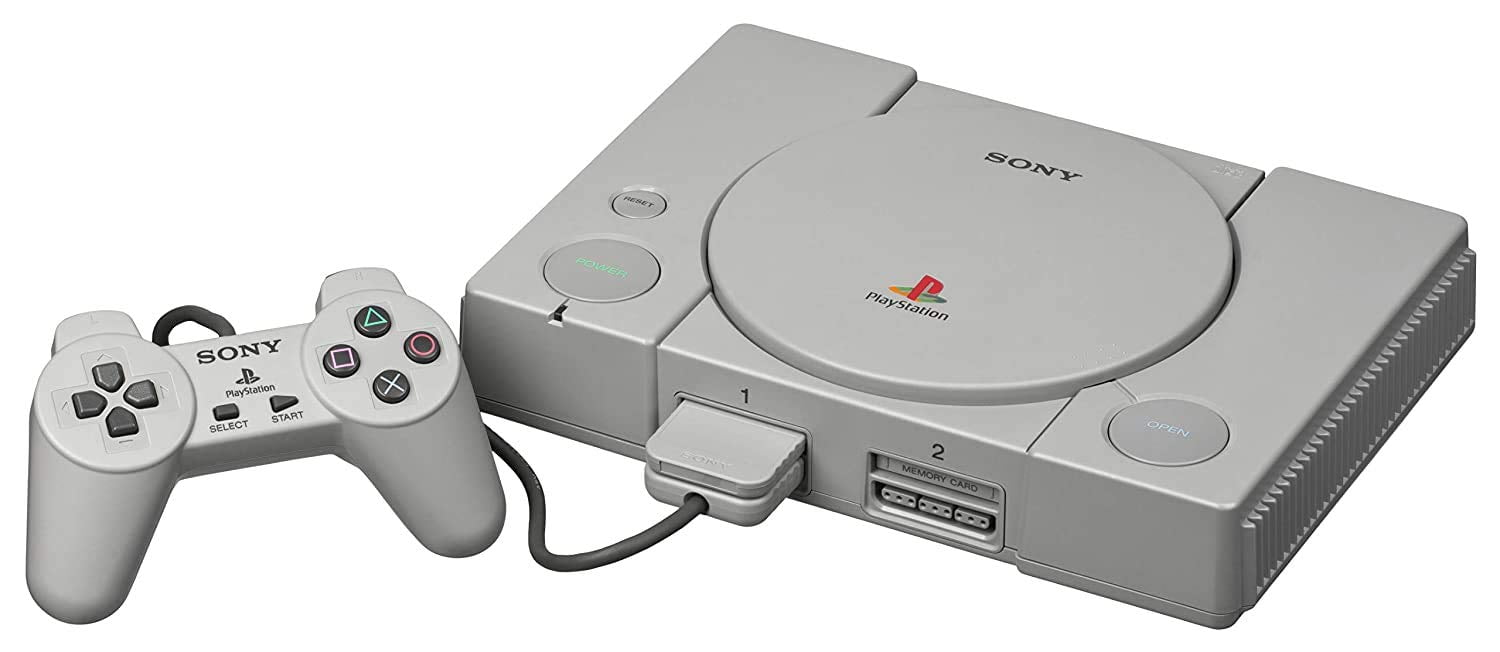
This blog post is all about this thing in this picture:

Sony PlayStation 1
^ from: Walmart - The Sony PlayStation led a new generation of gaming in its time.

The Sony PlayStation came into the world in December 1994 in Japan, North America in September 1995, and Australia in November 1995. The system had the original PS1 unit, but there would be a later slimmer model dubbed as the PSOne. The PS1's lifespan was between 1994 and 2006. A number of retail stores and video game rental stores (like Blockbuster Video and Hollywood Video) had kiosks with PS1 units for you to play the latest games or demos of upcoming games. The hallmark of the PlayStation 1 was in providing some of the earliest and greatest in 3D gaming. Some say PlayStation 1 did 3D best compared to its rivals, the Nintendo 64 and the SEGA Saturn.

The PS1 had its games on discs with black undersides to them. You could also play your favorite music CDs on the PlayStation 1. Some games even had CD audio you could play on a basic CD player. Just like America Online back in the day, there were a lot of PS1 demo discs featuring a good amount of games to sample. Some PS1 games were too big to contain on just one disc, so some PS1 games came on more than one disc.


My Introduction to the PlayStation 1.

My own story of getting my PlayStation 1 began at a pawn shop. I paid about $60 USD for my PS1 at that pawn shop. The first games I'd get for it were "Gran Turismo" and later "Gran Turismo 2." I would later expand my collection of titles with a lot of different games. I would even get to play some of the PS1 games my cousin bought.

Though I was a lifelong Nintendo player, I do admit the PlayStation 1 did things the Nintendo 64 probably wished it could do. I was probably not cool with having to deal with loading times back then. Still, the PS1 did a lot.


Some of the PlayStation 1's Games.

Through the history of the PlayStation 1, a number of classic titles would materialize from its lifespan including (but not limited to) "Warhawk: The Red Mars Missions," the "Ridge Racer" series, the Jumping Flash series, the Crash Bandicoot series, the Tekken series, the "Syphon Filter series," Final Fantasy VII through Final Fantasy 9, the Twisted Metal Series, the Vigilante 8 series, the Resident Evil/Biohazard series, and more.


Peripherals of the PlayStation 1.

The PlayStation 1 was capable of having a lot of peripherals.

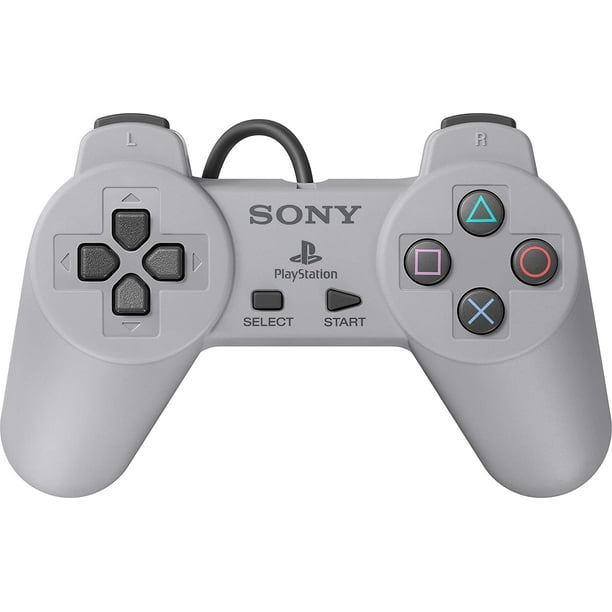
Sony PlayStation DualShock
^ from: Walmart - Whip out one of these DualShocks and enjoy the PS1 experience!

The playing magic begins with its controller, the DualShock. The early DualShock did not have analog sticks to them. It also did not have vibrating features. The later DualShocks for the PS1 allowed you to play with analog controls and vibration. Just make sure to turn on the analog features on later DualShocks to take advantage of the analog controls.

Sony PlayStation 1 memory card
^ from: Amazon - Save your progress on PS1 memory cards. Don't use up all 15 blocks of memory, though.

Rather than have to play games in one sitting or have to remember some complicated password, you could simply save your progress on Memory Cards. As long as you had 15 blocks of data to save, you can save your progress in any number of games. You may need additional Memory Cards for your games if you need space for your game data.

Sony PlayStation 1 Multitap
^ from: Amazon - Need more than two players? Get one of these- a multitap.

If you wanted to play multiplayer, you could play locally with the system's two ports. You can have more players play if you have a Multitap. A Multitap can be plugged into one PS1 port to have as many as four players play along with four individual Memory Card slots. This made it possible to even have up to eight players if you bought two Multitaps. Or if you wanted to play without being so close by, there was the funky option of the Link Cable. Link Cable play required two PlayStations, two copies of whatever game was being played, and the Link Cable. It sounded like an unnecesary waste of money, but this was long before we had even local LAN play or any exaggerated online gaming.

You could play lightgun games with the Justifer or the Guncon. You could dance the day/night away with the Dance Pad. There was also the quirky NAMCO (now Bandai-NAMCO) controller called the NegCon.


How I Will Remember the PlayStation 1.

The PlayStation 1 was a generational leap in not only gaming but multimedia in general. A lot of game developers wanted to take advantage of providing a premium gaming experience down to full motion video (FMV). Gone were the days of chip-generated material and graphical power that can only go so far. In comes textured polygons, elaborate 2D graphics (even with some pre-rendered graphics), and a lot more. There was also a lot of high-quality (for its time) audio ranging from music to lots of voice acting. The PlayStation 1 would help set the tone for gaming in the future. It also meant Sony could further flex its muscle in developing some of the finest gaming experiences for the future. The PlayStion 1 is no doubt one of the most important systems in the evolution of video gaming. I would also say the PlayStation 1 helped set the tone for home system to be as powerful and capable, if not more so, over arcade units.


PlayStation 1 Online


The Sony PlayStation 1's production was ceased in 2006, but you can still try your luck at finding original hardware and such for the PS1. I included some material that may help you in your PS1 adventures if you are interested. Your involvement here is voluntary (meaning: not required), but your support would be appreciated. So check it out (NOTE: These resources may include some non-PlayStation 1 items):

The PlayStation Classic/Mini « Enjoy a lot of the PlayStation 1's classic gaming titles in one package!)
PlayStation 1 on Amazon
PlayStation 1 on eBay


Happy shopping (if doing any)! :)


If you enjoy my work, please Subscribe/Follow my blog(s) in any capacity if you love my work and want to support me any way you can. Share my blog post(s) with others if you enjoy my work. Thank you for reading! Take care and be well.

Visit my JohnMarineDesigns Weebly site, subscribe to My Blog(s), and/or Follow on Bloglovin! Let's connect:
Contact Me via E-Mail Contact Me via Discord

(donations are voluntary)
Visit and Subscribe to My Blogs...
Subscribe to John's Blog Space (JBS) Subscribe to John's Creative Space (JCS) Subscribe to John's Race Space (JRS) Subscribe to StyleSpace (SS) Subscribe to John's Life Space (JLS)
Get Social With Me!
Facebook (Friends) Facebook (Fans) Twitter YouTube
Pinterest LinkedIn (professionals only) TikTok Discord
Support My Creative Works!
JMDesigns John on Envato
Patreon Soundcloud Bandcamp
Twitch OpenGameArt TurboSquid
read more...
JohnMarineDesigns on TurboSquid

Would you like to donate to support my creative work for my creative works studio JohnMarineDesigns? If so, please show your support using this PayPal item:
I am now on Patreon! Support my creative work on Patreon today at: www.patreon.com/johnbmarine!
 
Copyright © 2015 John's Blog Space • All Rights Reserved.
Template Design by BTDesigner • Powered by Blogger