Showing posts with label First Impressions. Show all posts

Tuesday, October 25, 2016

Nintendo Switch Thoughts

John B. Marine | 10/25/2016 01:22:00 AM | | | | Be the first to comment!
The Nintendo Switch was unveiled recently. This machine is diverse, adaptable, and immensely intriguing. So I figured I discuss this baby here on "John's Blog Space." Nintendo is tight-lipped on any further details, so my thoughts are impression based. Will it be worth your time as a gamer or even as a general media consumer? We don't know yet. All I do know is that there is plenty of room for speculation. So let me offer some thoughts on this machine. Let's begin!


The Nintendo Switch: First Impressions/Speculations


This is the basic set of thoughts on the Nintendo Switch. But first, here are a few links for you to learn more about the Nintendo Switch.


Let me begin with a picture of the system:
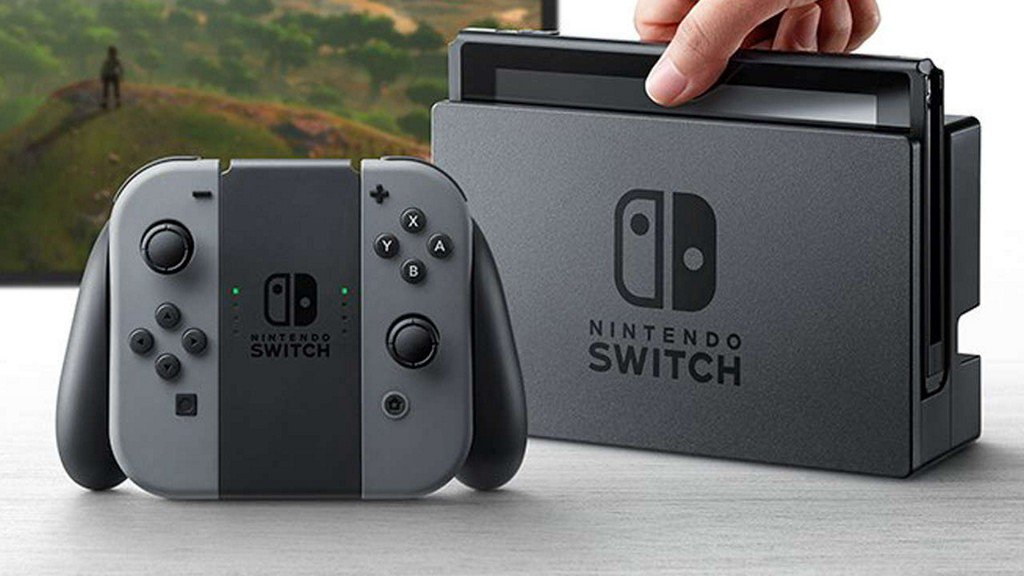
Nintendo Switch
^ from: Twitter; Gamespot - This is the Nintendo Switch- which may be the most adaptable gaming console ever with its multiple configurations.


the official video from Nintendo:


^ "First Look at Nintendo Switch"

Now for some links...
• Nintendo Official
• "Everything We Know About Nintendo Switch" (WIRED)
• "Everything we know about the new Nintendo Switch" (The Verge)
• "Nintendo Wants To Make It Clear The Switch Reveal Guaranteed No Specific Games" (Forbes)

And I found this article interesting:
• "Nintendo Switch is the spiritual successor to the Nvidia SHIELD" (TechCrunch)

Now that you have some general insight on the Nintendo Switch, allow me to share my impressions and thoughts.


My Basic Thoughts on the Nintendo Switch.

For one thing, I am NOT expecting the Nintendo Switch to spank the PlayStation 4 and/or the XBOX One. The performance numbers are so out of the league of the PS4 and XBOX One. Nintendo, however, was never known to be any powerhouse in this department. I think the Switch is seemingly designed to be a console that combines a home experience with a portable gaming style. Reportedly Nintendo and NVIDIA are together in helping put together this Nintendo Switch.

The Nintendo Switch was designed to be completely adaptable. I would say its biggest draw is the ability to have an uncompromised console gaming experience almost anywhere in the world. You don't need to be at home with all of the different nuances and features to enjoy gaming on the Switch. The Switch seems to have maybe five different configurations. You can separate the two ends and attach them to some device to have the gamepad for this system. Or, you can break off the two ends of the switch to enjoy gaming like with the Wii. The Switch even comes with its own kickstand. So you can dock the main screen someplace and connect it to your television unit or monitor. To me, I like to think of the Nintendo Switch kind of like a big Sony PlayStation Portable (PSP).

Games will reportedly be on these cards, kind of like Nintendo DS cards or maybe something like SD cards. Over 40 different developers have at least acknowledged wanting to work with and develop content for the Switch. These include a handful of game companies and different other developers. Some of the names include Sega, Atlus, Telltale Games, Unity, and more. Even if at the expense of trying to downsize games to make them better play on the Switch, Nintendo has itself the vastly important aspect of third-party support. More importantly on the gaming front, rather than make one console-quality game and then make a version of it better suited for portable gaming, and rather than exclusives for the respective console and portable markets, everything is all on one system made for the Nintendo Switch. So you don't get to have many exclusives for console-style gaming and portable-style gaming. Think of this more like having a middle ground between a console-style game and a portable-style game all in one package.

I want to imagine the Nintendo Switch to offer many popular applications and features to enhance the array of material outside of gaming. For example, I'm sure this system will provide applications such as Netflix, Hulu, Vudu, Amazon's services, Pandora, iHeartRadio, and more as part of the Switch package. I am sure this will have as more functionality than either the Wii or Wii U. I may even speculate the possibility of maybe expanding its memory by having SD cards or access to external drives. This can come in handy if the space for the Switch becomes insufficient for most gamers.


Superlatives?

You know people are going to eventually try to come up with some kind of console war or try to compare this to the PlayStation 4 and the XBOX One. Let me just say this right now- the Switch is NOT going to overtake the PlayStation 4 and/or the XBOX One. Even PC and Mac types will not feel threatened in the least sense gaming with the Switch. Then too, world domination (or at least the gaming world) is usually never the goal of Nintendo. Many people even still see Nintendo either as not being serious enough to push to be the best console maker on the market, or many others still see Nintendo is a shadow of its former self that stays alive banking on its exclusive characters and games. I think the Nintendo Switch will be a console that offers its own experience and probably couldn't care less if it doesn't have the same market share and appeal as anything of Sony or Microsoft. There is a real risk-reward in Nintendo trying to blaze its own trail going against the grain. Whether or not Nintendo succeeds in this department remains to be seen.

Then again...


What if the Nintendo Switch Becomes a Failure?

If the Nintendo Switch ends up being a failure, what's next for Nintendo? I asked this question to my friends on the message board GTPlanet. Some of the responses I got ranged from Nintendo having to bank on its portable game sales to stay financially afloat to responses like (and I can't imagine THIS happening, but...) maybe the chances of Nintendo becoming a 3rd Party developer like its former console rival SEGA. A lot of people thought the Gamecube was a failure when it went up against the likes of the PlayStation 2 and the original XBOX. Some others may remember the Virtual Boy- that was a real failure. And believe it or not- I WANTED a Virtual Boy back then!


Final Thoughts (as of now).

The Nintendo Switch is incredibly intriguing for what it has to offer and for the gaming experiences it attempts to deliver to the gaming masses. For the most part, I am intrigued myself about it. All I can do is imagine what I think the system could provide and how I can use this system to play any number games. With details so tight-lipped and few and far between, we don't really know what to expect for the Nintendo Switch once it releases proper in March 2017 here in the United States.


This is surely a hybrid console that could either be a real game changer or a total flop. We'll see if the former or the latter will describe this system when we have more concrete details on it. For now, I'm pleased you found my blog and had a chance to read my material. You can Subscribe and Follow this blog (and my others) to get more thoughts of mine on a variety of things. Just follow the links in the below table. Thank you for reading! Take care and be well.

"Like" me on Facebook, Follow JBS, Follow me on Bloglovin', and/or Contact Me via E-Mail!
Subscribe to John's Blog Space (JBS) Subscribe to John's Creative Space (JCS) Subscribe to John's Race Space (JRS) Subscribe to StyleSpace (SS)
read more...

Friday, July 31, 2015

Windows 10 So Far...

John B. Marine | 7/31/2015 06:57:00 PM | | | | | Be the first to comment!
#Windows10 was released on July 29, 2015. People who had Windows 7, 8, or 8.1 could upgrade for free with Windows 10. I was one who took up on this offer. For this blog post, I'm going to offer my thoughts on this interface so far. I'd like to welcome my fellow Windows users to this blog and this blog post. These are all of my thoughts on Windows 10 so far as of the initial date of this post (July 31, 2015).


--- Windows 10 So Far... ---

Allow me to share my thoughts in my own unique way. But to identify this post, here is a picture I found online:

Microsoft Windows 10
^ from: www.top-windows-tutorials.com - Windows 10 looks to right the wrongs of Windows 8 and 8.1. Find out if I think Microsoft succeeded at doing this by reading my blog post.


Retrospective.

Before talking about Windows 10, let's look back. I have NO experience with Windows 7. I played around with Windows 8 once on a PC at a Sam's Club. My current Acer PC was shipped with Windows 8.1, and I have used it thoroughly. Windows 8.1 took some getting used to for me. The thing I was most pleased about Windows 8.1 was its speed. It ran very well on my PC and looked stylish. I used the old monitor from my previous PC before eventually stepping up to a 1080p-capable monitor. One fear I had was that this interface wouldn't look so sharp on a 1024x768 monitor. Worked just fine and looked just fine.

I initially had a positive outlook on Windows 8.1's Start Menu interface and the various apps for it. Over time, I basically missed the functionality the Start Button used to have. The Metro layout was met with lukewarm reception by certain Windows veterans. I even at one point installed something that brought back the Start Menu functionality seen with Windows 7 and most other interfaces before it. Sometimes, I even wondered by Windows 8.1 would struggle to load every file and folder when searching for something. Those were frustrating elements.

To me before getting Windows 10, I began to believe that Windows 8 and 8.1 were simply trying to make computing more beautifully than functionally. It is like building a beautiful car that lacks in the departments of functionality and practicality. I became curious as to what Windows 10 would provide. Previously, my thoughts on Windows 10 were reserved only to impressions from other people as well as YouTube videos. So imagine my curiosity when I decided to take up on the Windows 10 offer to upgrade for free.


Bracing for Windows 10.

I set my reservation back in June 2015 and awaited the chance to download Windows 10. Since I thought this reservation wasn't going to come in time or anything, I eventually decided to download Windows 10 manually. I took advice from CNET and followed the instructions to download that Media thing to download Windows 10. It comes in as a 3GB download. So what I did was download Windows 10 and then burn it onto a DVD (FUN FACT: I NEVER burned a DVD ever until this past Thursday. I had bought a DVD-RW pack years ago hoping to use it on my former PC. However, I never had any DVD-writing software or a DVD-writing drive to take advantage of those blank DVDs). I went ahead and did the installation on my computer for Windows 10. The whole process took about an hour and five minutes (1:05:00.000) to go from loading everything to installing all the needed files. One thing noted was that it said the PC would restart several times trying to install everything. At one point, I was spending a good bit of time staring at a blank screen and having no idea that everything installed. I was fearful that if I restarted my PC manually, I would lose all that installation data. And after one attempt, my PC reverted back to Windows 8.1, so I had to try it all again. On the second try, I was successfully able to get all the files back on my PC for Windows 10. The PC rebooted properly. Yet once again, I stared at a blank screen. After about two and a half hours after my second attempt at having Windows 10 work, I eventually restarted my PC manually. When I turned it back on, the blank screen was no more! I saw all of the fancy graphics for Windows 10. All of the settings and such that was saved from my Windows 8.1 experience were carried over almost seamlessly. I didn't have to reinstall anything or change any sort of settings.

That's all good. How did it all work for me?


Using Windows 10.

Now for some thoughts on Windows 10 as I've used it so far.

• Windows 10 does feel more like an upgrade than some revolutionary quantum leap from 8 and 8.1 Windows. For one thing, I loved being able to have a functional Start button again that is much better than what 8/8.1 offered for its Start menu. The various interfaces are cleaner and more functional than before. I even like there is a Search bar in the Taskbar to find items on your PC and online. The new Start Menu links to your most frequently used files and folders along with some of your more recent files. You have better access and accessibility to all the applications installed in your Start Menu than with 8 and 8.1 Windows.

• Having those Charms in 8.1 was a cute touch, but it could get annoying knowing you reach the edges of a screen and unintentionally pull up those Charms. What I like about Windows 10 is that you have the Action Center active all the time rather than use the Charms from the previous Windows.

• There is a little tab on the bottom-right that when you click on it, all windows are minimized so you easily can access the Desktop. This is a TREMENDOUS help because I hated having to minimize every window manually just to reach the Desktop.

• Windows 10 does a better job handling folders and files than on Windows 8.1. It also features a picture viewer that finally lets you see animated GIF files without needing some native GIF animation player (like IrfanView). Unfortunately, you can't zoom into animated GIFs like you could with non-animated images. Also, you will not get the same level of crispness with smaller images as you did with Windows 8.1.

• If one thing confuses me about Windows 10, it is the handling of different windows. The program atop the focus is usually the one with the colored window. All windows in Windows 10 have white headings. And unless you know what program you're using atop the focus, it is unusual to know what program is active and atop the focus.

• One thing I hated the most about Windows 8.1 was how right clicks would not register sometimes. I've had this problem a lot less frequently with Windows 10 so far.

Those are just a few things to note regarding Windows 10.


--- Windows 10 So Far: My Thoughts ---

Windows 10 is what Windows 8.1 could have been... only with more functionality than style. W10 is lovely, but it has much better functionality and performance than the former 8.1 interface. No past programs or anything have had to be altered in any such way to take advantage of Windows 10. All I mostly did was adjust some of the window heights and widths for a few programs. That's it. In some ways, you could say that Windows 10 makes you feel sorry sticking with Windows 8 and 8.1. At least from my experiences so far, Windows 10 is a much better and much more functional OS than 8 and 8.1. So if your computer can handle Windows 10, I would recommend you install Windows 10 on your PC. I was the fish that took the bait of getting Windows 10 (for all intents and purposes) as a free upgrade from 8.1, and taking this bait was wonderful as I feel much more comfortable with Windows 10 than I almost ever did with Windows 8.1.

When preparing this review, I didn't fully try things like the new Microsoft Edge browser or Cortana (Microsoft's answer to Apple's Siri). Again- this is basically a first impressions blog post regarding Windows 10.


For More Information...

For more information on Windows 10, please visit www.microsoft.com/en-us/windows/features.

Or you may buy Windows 10 with this resource I have provided:
Windows 10 on Amazon

Search around there for the version of Windows 10 you wish to install on your system.


That concludes my first impressions look at Windows 10.

What do you think about Windows 10? Is it any better for you than Windows 8/8.1? Would you recommend Windows 10?

Thank all of you for supporting me and my work. I hope to provide more content to you all in the future. So stay tuned to this blog and my others for more. Thank you for reading! Take care and be well.

"Like" me on Facebook, Follow JBS, Follow me on Bloglovin', and/or Contact Me via E-Mail!
Subscribe to John's Blog Space (JBS) Subscribe to John's Creative Space (JCS) Subscribe to John's Race Space (JRS) Subscribe to StyleSpace (SS)
read more...

Tuesday, December 3, 2013

Hisense Sero 7 Pro - First Impressions

John B. Marine | 12/03/2013 12:54:00 PM | | | 1 Comment so far
Hisense is a Chinese company that makes a variety of electronics and appliances. This Wal-Mart exclusive brand entered the tablet PC market with two tablets- the Hisense Sero 7 LT and the Hisense Sero 7 Pro. The latter of the two is what I will focus my post on. This is a first impressions post regarding Hisense's top-of-the-line tablet. The post you are about to read pertains to basic thoughts on this tablet as I play-tested it quite a few times before. Either here on "John's Blog Space" or maybe on "John's Shop Space," I will share a review of this device once I've used the device enough to draw some conclusions on it.


--- Hisense Sero 7 Pro at a Glance ---

While the Google Nexus 7 is long regarded as king in the 7-inch tablet segment, there are certain features which make it not as well-liked among some tech consumers. Among others, the lack of external memory for the Nexus 7 is a con for a lot of people. So leave it to a company like Hisense to challenge Google's hot tablet. Hisense decided to test the tablet PC market with two tablets. The lower-spec Hisense Sero 7 LT is the light model of the Sero 7 series, and the Sero 7 Pro (which is the highlight of this post) is the top-of-the-line model.

Since Hisense is sold exclusively through Wal-Mart, people will automatically assume that you're going to have cheap quality from this Chinese company. And to some people, "China" and "good quality" don't usually belong in the same sentence. Get these thoughts out of your head in regards to the Hisense Sero 7 Pro. Hisense has a hub here in the United States, as Hisense USA is based in Sewanee, Georgia, USA.

One of the points to set up the Sero 7 Pro's appeal is that the Sero 7 Pro came out near the end of the Google Nexus 7's cycle. The Nexus 7 would end up getting a refreshed and enhanced model with a new Snapdragon processor while the Hisense Sero 7 still packed a processor to stand with the Google Nexus 7. This led some people to believe the Sero 7 Pro would have a tough time keeping up with the Nexus, especially after the refresh of the Nexus 7. The Google Nexus 7 comes in at about $229 USD; and the Hisense Sero 7 Pro started off at $149 USD, but has since been dropped to $129 USD. So in regards to price points for 7-inch tablets, this one is very affordable compared to most offerings in the $150 USD to $200 USD range. You aren't going to pay too much to enjoy a proper 7-inch tablet like the Hisense Sero 7 Pro.


From Samsung to Hisense...

I always wanted to get the Samsung Galaxy Tab 7-inch tablets for the longest. I wanted one to stay within the realm of Samsung and their amazing products... until I looked at a lot of the competition. It began when my interests went from having a Samsung tablet to getting the more expensive Google Nexus 7. Then, I saw the ASUS MeMO HD 7. And then eventually... I came across a tablet that felt pretty good when I visited a Wal-Mart store once. I started to play around with one tablet and remembered the name- Hisense Sero 7 Pro. I came away fairly impressed with it. The only thing I wasn't sure of was if I was actually using the Hisense Sero 7 Pro. After my own research and such, I found out I was indeed using the Sero 7 Pro at the store! I extended my research into watching various YouTube videos. Many video reviewers were pretty impressed as I got a fair idea of how this tablet PC is.

Little by little, I started to become less attracted to the Samsung Galaxy Tab 7-inch tablets in favor of the Hisense Sero 7 Pro. I became attracted to the Sero 7 Pro in much the same way I was slowly drawn away from getting the Samsung Galaxy Player portable media players after long wanting an iPod Touch. Some people whom have owned a Google Nexus 7 or considered a Nexus 7 ultimately picked or enjoyed the Hisense Sero 7 Pro. I guess you can say I'm one of the ones to join the Hisense party.


Specifications.

Here is what you need to know about the Hisense Sero 7 Pro- or as much as I know without consulting Hisense's website...

The Hisense Sero 7 Pro is a 7-inch tablet PC. It runs the Android 4.2 ("Jelly Bean") interface. The Sero 7 Pro is powered by an nVidia Tegra 3 quad-core processor for fast and smooth operation. It features two cameras- a 5 megapixel rear-facing camera and a 2 megapixel camera at the front. What is unique about the rear camera is that it has an LED flash to it. So you can actually use this tablet to take photos in low-light or night conditions. The rear camera even has Autofocus as part of the package. You can also shoot video with the camera, and it is capable of video up to 720p resolution. It has a micro USB dock for charging as well as an HDMI port for you to plug into your HDTV. There are two rear-facing stereo speakers on the Sero 7 Pro. If you prefer Internet usage, it is WiFi only. No options for 3G or 4G or whatever. You can use your Bluetooth devices with this tablet. It also has NFC (Near-Field Communications) support. Most importantly, this device supports external memory with a microSD card slot. You can put in a microSD card of up to 32GB, but I've heard of some who managed to put in 64GB microSD cards into the device. The back of the Sero 7 Pro features textured backing- just like the Google Nexus 7. This helps keep the tablet in your hands without feeling like it's going to slip from your fingers. There are no physical buttons on the front of the device. You have the capacitive buttons for Back, Home, and Menu. Curiously enough, there is a capacitive button where you can press to take a quick screenshot to be saved to your Gallery. This tablet can even be a remote control for your TV- granted the TV connected on the same WiFi network.

The Hisense Sero 7 Pro has dimensions of (length × height × width) of 7.87 in. × 4.95 in. × 0.43 in. It weighs 12.7 ounces. The Sero 7 Pro has an IPS HD LCD screen boasting a resolution of 1280 x 800. I am guessing, then, that it should have no problem playing videos and movies of up to 720p. You get a handful of Google apps preloaded onto the Sero 7 Pro. Among many others: Google Chrome, YouTube, Google Play, and more. Since Wal-Mart sells the Sero 7 Pro, you even get Wal-Mart exclusive stuff like the Wal-Mart app, the Sam's Club app, and the Vudu app (I didn't know Vudu was owned by Wal-Mart) for you movie watchers. The Sero 7 Pro is told to have a 4000 mAh battery. Reviewers I've seen YouTube videos on say they were able to get about maybe nine hours of usage under moderate or even heavy operation.


Now that you have an idea about the device, I'll share some first impressions now.


--- Hisense Sero 7 Pro: First Impressions ---

Get ready for some first-impressions I'd like to share on this tablet.


Using the Sero 7 Pro.

You can learn only so much with a device attached to any number of things in a store display. Having said that, the Hisense Sero 7 Pro actually feels pretty nice in the hands. The textured backing does feel grippy holding it with either one hand or both hands. It is quite handy. I didn't want to chance using my Google information trying out some of the additional material. So rather than log into Google with my info, I basically just had some programs active just to see them at work. That included the Google Chrome browser that comes with the Hisense Sero 7 Pro. This was even though I was in a Wal-Mart that had free WiFi thanks to the McDonald's restaurant in it (certain McDonald's restaurants offer free WiFi).

Because I've been so used to my Samsung Galaxy Players and their Android "Gingerbread" interfaces, I could really see myself utilizing and using the Hisense Sero 7 Pro as my PC away from my PC or for Android usage of the Internet. I have only so much experience with the "Jelly Bean" Android interface.


Video Preview.

Here is a look at the Hisense Sero 7 Pro I offered my first impressions on:


^ "Hisense Sero 7 Pro review iPad alternative 2013"


If and when I get a Hisense Sero 7 Pro, I will be sure to provide a proper review either in this blog or in one of my others.


For More Information...

For more information about Hisense and other products they offer, visit global.hisense.com. Or for my American audience, visit Hisense USA's website at hisense-usa.com.


Before signing off of this post, I want to just thank everyone for even remotely caring about my blogging work and even my video work. You don't know what it means to actually visit someone's blog and be even the least bit intrigued or interested at any of the different topics offered. I still have a lot of stuff to discuss and share. I'm not giving up on blogging any time soon. So with that said, thank you for reading!

"Like" me on Facebook, Follow JBS, Follow me on Bloglovin', and/or Contact Me via E-Mail!
Subscribe to John's Blog Space (JBS) Subscribe to John's Shop Space (JSS) Subscribe to John's Race Space (JRS) Subscribe to StyleSpace (SS)
read more...

Friday, October 25, 2013

Samsung Galaxy Tab 3 Series

John B. Marine | 10/25/2013 05:00:00 PM | | | | | 1 Comment so far
The Samsung Galaxy Tab series features three tablets noted for their screen size. Whether at 7-inch, 8-inch, and 10-inch; the Korean consumer electronics giant has you covered with their third generation of tablets- the Samsung Galaxy Tab 3 series. This blog post is more either first impressions or thoughts at each tablet in this series. Do any of their three tablets in the series interest me? This and more will be answered and discussed in this blog post.

This blog post is about the Samsung Galaxy Tab 3 series, but I will make mention to the Galaxy Note series at times. The post is still entirely about the SGT3 series.


--- Samsung Galaxy Tab 3 Series ---

Meet the Samsung Galaxy Tab 3 Series:

Samsung Galaxy Tab 3
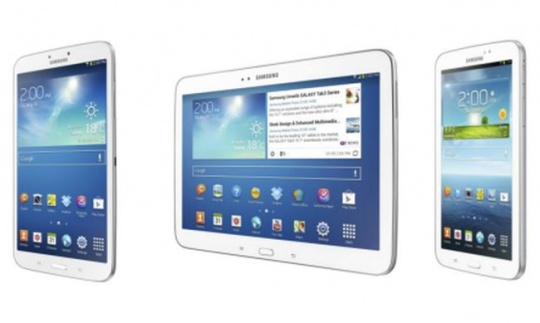
^ from: www.indiatimes.in - Here are the three tablets of the Samsung Galaxy Tab 3 Series.

Three tablets comprise the 3 series of Samsung's Galaxy Tab tablets. The Tab 3 series feature visual cues consistent with the Samsung Galaxy smartphones. Why fix what isn't broken- so Samsung would ask. If you are fond of Samsung products and Samsung quality, one will probably find very little to dislike about these tablets. Each of the tablets in the Tab 3 range all feature cameras at the front and back as well as a physical Home button. They have plastic backing and beveled sides. Each model features volume rockers and an IR Blaster for your tablet to become its own remote. Each model comes either in White or Golden Brown. Some non-WiFi versions may come in other colors, such as Midnight Black for a Verizon Wireless 4G/LTE version I looked up in researching this topic. Best of all, each of these tablets can take microSD cards of up to 64GB of capacity. These devices have WiFi access. Or if you have a mobile data plan, you may opt for 4G/LTE connectivity for these tablets from certain major carriers like Verizon Wireless. Suggested retail prices for the base models of each tablet are as follows (according to Samsung's official website):

• Samsung Galaxy Tab 3 7.0: $199.99 US Dollars
• Samsung Galaxy Tab 3 8.0: $299.99 US Dollars
• Samsung Galaxy Tab 3 10.1: $399.99 US Dollars

The Galaxy Tab 2 series is still offered in some stores for slightly lower prices than the current Galaxy Tab 3 series.


--- Samsung Galaxy Tab 3 Series ---

Here is a look at the three tablets (Facts and figures on each device taken from Amazon as well as from Samsung's official website.):


Samsung Galaxy Tab 3 7.0 Tablet.

Samsung Galaxy Tab 3 7.0
^ from: www.amazon.com - This is the latest version of Samsung's 7-inch tablet.

The Samsung Galaxy Tab 7-inch tablet features some of the lowest specs of the SGT3 range. It packs a 7-inch screen displaying material at 1024 x 600 WSVGA resolution. It features a 1.2 GHz dual-core processor. There is 1GB of SDRAM onboard along with an 8GB hard drive. Weighing at 0.68 lbs., it is the lightest of the three tablets. This tablet also has the least onboard memory with an 8GB hard drive. Its two cameras are a front-facing 1.3 megapixel camera and a 3-megapixel rear camera. It runs on Android 4.1 "Jelly Bean." It is the only one of the three to run with the Android 4.1 interface. Moderate to heavy usage of this tablet's non-replaceable 4000 mAh battery is good for about 5-8 hours of use according to videos I've seen online. Compared to the previous generation Samsung Galaxy Tab 2 7.0, the Tab 3 7.0 is very much thinner and shorter than its previous model. The Galaxy Tab 3 comes in two colors: White and Gold Brown. A 4G/LTE version of this tablet from Verizon offers the tablet in Midnight Black.

Some people have had kind of a concern of whether to stick with this version SGT3 7.0 tablet or go with the previous generation Samsung Galaxy Tab 2 7.0 tablet. Some people say the newer SGT3 7.0 is slower than the SGT2 tablet. I would personally want to have the SGT3 7.0 among the three tablets. Its portability and capabilities seem to fit my needs more.


Samsung Galaxy Tab 3 8.0 Tablet.

Samsung Galaxy Tab 3 8.0
^ from: www.amazon.com - An extra inch of screen, a more powerful processor, and better screen resolution make this better than the Tab 3 7-inch. However, it costs MUCH more than the SGT3 7-inch tablet.

How much of a difference does one extra inch make? The 8-inch SGT3 tablet has some better specifications compared to its 7-inch brother. It weighs one hundredth of a pound heavier at 0.68 lbs. In addition, it packs a 1.5 GHz dual core processor- more powerful than the 1.0 GHz processor in the 7-inch SGT3. 1.5 is also how many GB of SDRAM this device has. It has a 16GB hard drive. In addition to its extra inch of goodness, it has a screen resolution of 1280 x 800 in WXGA resolution that packs 189ppi. Unlike the 7-inch tablet, the 8-inch SGT3 runs on Android 4.2 "Jelly Bean."

The Samsung Galaxy Tab 8.0 is an extra inch too big despite its better statistics than the 7.0 tablet. I think the price is the real deterrent for me as to why I'd take on the 7-inch tablet more than the 8-inch tablet. The 7.0 fits better to me than the 8.0.


Samsung Galaxy Tab 3 10.1 Tablet.

Samsung Galaxy Tab 3 10.1
^ from: www.amazon.com - Samsung offers this 10-inch tablet.

If you want a full-featured big tablet, look no further than the Samsung Galaxy Tab 3 10-inch tablet. It has the same 1280 x 800 WXGA resolution and 16GB hard drive as the 8-inch SGT3 tablet. It also runs on Android 4.2 "Jelly Bean." However, it has the same memory as the 7-inch tablet- 1GB SDRAM. This tablet has the most powerful processor with its Intel Atom 1.6 GHz processor. As its name implies, it has a 10-inch (actually 10.1-inch) screen. So a tablet like this is major league territory if you use 10-inch tablet PCs.

I've seen some reviews on YouTube for the Samsung Galaxy Tab 3 10-inch tablet. Many of the reviews seemed to provide poor receptions for the 10-inch tablet. Part of me even still sides with the Samsung Galaxy Tab 2 10.1 2 tablet more than the SGT3 10.1 model, one reason mostly being because of the stereo speaker grills mounted at the front. If I were considering a 10-inch tablet, I probably would NOT get the SGT3 10.1 tablet. I may either get the previous Samsung Galaxy Tab 2 10.1, the Samsung Galaxy Note 10.1, or maybe a 10-inch tablet from another company.


There is your perspective on each of the different tablets of the Samsung Galaxy Tab 3 series.


--- Samsung Galaxy Tab 3 Series: Final Thoughts ---

Even if some of Samsung's offerings seem ancient and obsolete compared to most of its opposition, and even if it seems like their products don't do so well in various benchmark tests; Samsung still make solid products, and their Galaxy Tab 3 series is as solid as any other. One who wants a tablet PC would be foolish to pass up or neglect the tablet offerings from Samsung. These are stylish tablets that are very capable and very feature-rich. Anyone looking for decently-priced and capable tablets should consider the Samsung Galaxy Tab series, including the current Tab 3 series.

The one that I would want most of these three is the 7-inch tablet in white. Even if just to use a more up-to-date Android interface with a device much more practical than my Samsung Galaxy Player 4.2, the SGT3 7-inch fits my needs and my preferences for a tablet. It also satisfies my price preferences. The only thing I wouldn't be so sure of is whether or not I want to get a cover to protect it.

Even if certain benchmark tests say the Samsung Galaxy Tab 3 series is underwhelming compared to most of the competition (such as the Google Nexus 7), I still consider Samsung a quality brand. I do admire their products. I seem most comfortable with the package Samsung provides.


Cross-Promotion/Other Reading.

Here are some posts of mine related to this topic.

"Tablet Computers" (John's Blog Space)
^ This post is a general piece regarding tablet computers.

"The Samsung Galaxy Player Series" (John's Blog Space)
^ Long discontinued, these Android portable media players running on Android "Gingerbread" are featured in this blog post.

"Samsung Galaxy S III - First Impressions" (John's Blog Space)
^ The first time I offered first impressions on a smartphone was when I looked at the Samsung Galaxy S3. Here is an old post I did about this smartphone.

"Android Thoughts" (John's Blog Space)
^ This old post offers up my thoughts on the Android interface.


That's the end of this blog post, but I have one more section that is very optional for you to take a look at.


--- Samsung Galaxy Tab 3 Series ---

You may get these tablets on Amazon if you were interested in this post. Please take a look at the following items below for more information and to buy online:


FROM LEFT TO RIGHT:
• Samsung Galaxy Tab 3 7.0
• Samsung Galaxy Tab 3 8.0
• Samsung Galaxy Tab 3 10.1

Or for more, including non Wi-Fi models of the Tab 3 series and accessories for each tablet, check this link out: Samsung Galaxy Tab 3 on Amazon.


Other Sources...

More online sites to get your Tab 3 tablets and accessories for them...

• Samsung Galaxy Tab 3 on eBay
• Samsung Galaxy Tab 3 on Wal-Mart
• Samsung Galaxy Tab 3 on Best Buy
• Samsung Galaxy Tab 3 on TigerDirect.com
• Samsung Galaxy Tab 3 on Newegg.com


I would appreciate your business if you do find something good here. Happy shopping!


Are you fond of Samsung's tablets? You're welcome to comment on these items if you're interested. Thank you for reading!

"Like" me on Facebook, Follow JBS, Follow me on Bloglovin', and/or Contact Me via E-Mail!
Subscribe to John's Blog Space (JBS) Subscribe to John's Shop Space (JSS) Subscribe to John's Gran Turismo Space (JGTS) Subscribe to StyleSpace (SS)
read more...

Wednesday, September 12, 2012

Samsung Galaxy S III - First Impressions

John B. Marine | 9/12/2012 03:20:00 PM | | | | 1 Comment so far
I have no experience or interest in getting a smartphone. However, I had a chance earlier tonight to play with my brother's Samsung Galaxy S III (or Samsung Galaxy S3) after having looked at it. I didn't go too crazy with it because I didn't want to run up my brother's data rates. This First Impressions post has to do with the Samsung Galaxy S3. You may recall that I've talked about the Galaxy PLAYERS before, which are portable media players which lack cell phone features and cell phone data plans. This time- it's a real smartphone I'm talking about.

This is not a proper review. However, it is the first time I offer a review or first impressions on any kind of phone or smartphone.


--- The Samsung Galaxy S3: First Impressions ---

I have no smartphone experience, so don't look to me as any authority on smartphones. Here now is a look at the device I will make some first impressions on:

Samsung Galaxy S III
^ from: www.amazon.com - The latest in Samsung's massive universe of Galaxy products- the Samsung Galaxy S III.


Features.

Here are some features of the Galaxy S III (sources: Best Buy, Amazon, and other sources):
• 4G LTE available for high-speed downloads
• Android 4.0 ("Ice Cream Sandwich")
• 4.8" HD Super AMOLED 720p display
• S Voice functionality
• VGA front-facing camera; 8-megapixel rear camera
• dimensions (in inches) 5.4 × 3.0 × 0.2

For more features, here is a YouTube video on the Samsung Galaxy S III (click on the video link below if you can't view Flash):

^ "Official Samsung Galaxy S3, All About"


Basic Overview.

The Samsung Galaxy S III is a very beautiful device from the Korean consumer electronics giant. The S3 debuted on May 29, 2012. This Android phone operates on Android 4.0- better known as "Ice Cream Sandwich (or ICS)." It boasts capacities of 16 GB and 32 GB of storage along with 2 GB of RAM. The microSD slot allows for microSD cards with capacities as great as 32 GB (and maybe 64 GB) to be installed in addition to the already-available onboard storage. It is powered by a dual-core Qualcomm MSM8960 Snapdragon processor good for 1.5 GHz of processing power. One of its main competitors is another fellow Korean smartphone- the equally beautiful HTC One X.

The Samsung Galaxy S III's marketing point is on the fact this phone is "designed for humans and inspired by nature." This is evident in its curved and stylish design. There is a live wallpaper for the Galaxy S3 that features various water effects. Touching the screen with the watery live wallpaper will create a little ripple in the water along with a sound effect of something touching the water. Touching and dragging your finger across the screen creates a trail of water on the screen. Regardless, it is safe to say that this Android phone running on the "Ice Cream Sandwich" interface is as captivating to use as it is to look at.

Just like an ice cream sandwich, the S3 is sweet (but not tasty. Really. It's a smartphone, not a frozen snack. I don't recommend eating Android-powered smartphones despite the sweet names of their interfaces. Anyhow...). Using the Galaxy S III allows you to do many things. Among one of its many features is the S Beam feature, which allows you to share media from one Galaxy S3 tp another SGS3. You can also use the Samsung Galaxy S III to take 20 pictures at once using the S III's Burst Shot feature. I saw in a video that the S3 takes Burst Shot pictures at a rate of three pictures per second. So it's safe to say this smartphone is quite powerful and capable. It also has a feature called Smart Stay. Smart Stay keeps the display active until you are actually not using or looking at the device. Otherwise, if you have the screen switch off after a certain amount of time passes, you have to keep pressing or touching the screen or some button just to keep the device active. Smart Play stays on for as long as you're actually using and looking at the device so that you don't have to press a button or anything for the screen to switch off.

There are many more features to the Samsung Galaxy S III, but I just wanted to highlight on some of the many different features of the device.


Looks of the Galaxy S3 and Other Features.

Just looking at the Samsung Galaxy S III is a joy in itself. It boasts a very stylish profile all around. The S III has long been marketed as being "designed for humans and inspired by nature." The dimensions of the Galaxy S3 are (in inches) 5.4-inches long, 3-inches wide, and 0.2-inches high. It features a high glossy plastic backing as its back support. The front features a physical Home button along with two capacitive buttons on either side of the physical Home button. The left capacitive button is the Menu, and the right capacitive button is the Back button. The S3 comes in three colors- Marble White, Pebble Blue, and Garnet Red. There are also these color options: Amber Brown, Sapphire Black, and Titanium Grey; but I am not sure if these are offered on American-spec S3s. The Samsung Galaxy S III is available from five different carriers: AT&T, Sprint, T-Mobile, Verizon Wireless, and U.S. Cellular. Available color options for the Galaxy S3 depends on which colors are offered by the specific carrier.

Of course, how a phone looks has nothing to do with its performance. I just wanted to highlight on how lovely this phone looks.


Initial Thoughts and First Impressions.

For someone who has never used a smartphone before, I was mostly pleased with how the Samsung Galaxy S III functions. I never actually made a call with the Galaxy S3, but I mostly enjoyed using this device to try out the various apps and gauge its performance. Its operation is smooth and effortless. It is perhaps one of the loveliest-looking phones on the market today.

Remember that I did not make any phone calls or anything with the Samsung Galaxy S III since I was playing around with my brother's S3. I didn't want to run up any data fees or anything. Also... I'm not really a phone person to be honest.

I have no interest right now in going to a smartphone, but would I want the Samsung Galaxy S III as my first-ever smartphone (if interested)? I would probably say yes.


You can learn more about the Samsung Galaxy S III by going to the official global page of the Samsung Galaxy S III. Or for my American visitors, visit the Samsung Galaxy S III site for Samsung Mobile USA.


Remember that this blog post is NOT a review of the Galaxy S III. If you DO want proper reviews, however, I can help. Visit these sites for professional reviews and more information on the Samsung Galaxy S III:

• Samsung Galaxy S III Review on SlashGear
• Samsung Galaxy S III on gsmarena.com
• Samsung Galaxy S III review on NBCNews.com
• Samsung Galaxy S III Review (T-Mobile version) - PhoneDog


If you'd like to visit Amazon for the Samsung Galaxy S III, here are some items below to help you out. I tried to feature each item based on carrier. I would appreciate your business and cooperation if you do visit Amazon based on these items. Availability of each item may not last based on the initial posting of this topic:


FROM LEFT TO RIGHT:
• Samsung Galaxy S III 4G Android Phone - White, 16 GB, Verizon Wireless.
• Samsung Galaxy S III 4G Android Phone - White, 16 GB, AT&T.
• Samsung Galaxy S III 4G Android Phone - Blue, 16 GB, Sprint.
• Samsung Galaxy S III GSM Smartphone (Unlocked) - White, 16 GB.
• Samsung Galaxy S III International Version (Unlocked) - White, 16 GB.

Or, you may click on the link ahead of this sentence to shop around for your own S3: Samsung Galaxy S III on Amazon


Samsung Galaxy S III Sites by carrier (intended for USA audience only)...
• Samsung Galaxy S III - Verizon Wireless « for Verizon Wireless customers
• Samsung Galaxy S III - T-Mobile « for T-Mobile customers
• Samsung Galaxy S III - AT&T (Marble White) « for AT&T customers; two other colors offered on the site
• Samsung Galaxy S III (16 GB) - Sprint and Samsung Galaxy S III (32 GB) - Sprint « for Sprint customers
• Samsung Galaxy S III - US Cellular « for US Cellular customers


• Best Buy page on the Samsung Galaxy S III « all S3 models (including locked and unlocked models) offered on Best Buy


This is the first time I blogged about a smartphone. Considering how different it is to blog about a real smartphone as opposed to a phone-without-the-phone (like the Samsung Galaxy Player series I blogged about previously), this was a different experience for me to blog about. So I hope you enjoyed this piece. Thank you for reading!

"Like" me on Facebook, Follow JBS, and/or Contact Me via E-Mail!
Subscribe to John's Blog Space (JBS) Subscribe to John's Shop Space (JSS) Subscribe to John's Gran Turismo Space (JGTS) Subscribe to StyleSpace (SS)
read more...

Sunday, September 2, 2012

Samsung Galaxy Player Series - First Impressions

John B. Marine | 9/02/2012 10:15:00 PM | | | | 1 Comment so far
(UPDATED: September 9, 2012)

For the first time ever, I got to finally see and use the Samsung Galaxy Player range I've so become fond of. It was also the first-ever time I've used Android devices. I'm here to share first impressions with these devices. However, the majority of this post is on the 3.6 Galaxy Player from the Korean consumer electronics giant, Samsung.

LATEST UPDATE(S)/REVISION(S):

SEP 9 2012 - added a section on the SGP 5.0


--- Samsung Galaxy Player Series: First Impressions ---

I went to a Best Buy store to try out the Samsung Galaxy Player series. The SGP 3.6, 4.2, and 5.0 models were on display; but only the 3.6 model was working. The 4.2 and 5.0 models probably did not have their batteries installed. The 5.0 SGP's battery can not be replace (for what I know). So I didn't get to play-test the other models. I still was able to try out the 3.6 model, which I will base most of my first impressions on.


--- First Impressions: Samsung Galaxy Player 3.6 at a Glance ---

This is the model I will make the most mention to in my first impressions:

Samsung Galaxy Player 3.6
^ from: www.amazon.com - the Samsung Galaxy Player (3.6 model).

The Samsung Galaxy Player 3.6 model is the base model of the SGP range. Part of that base model persona means you have to deal with lesser-spec characteristics. That said, I don't think the 3.6 is as bad as what most people make it out to be. Some people talk about the SGP 3.6 like it is a bootleg iPod Touch.


Trying Out the Apps.

I tried out some of the different features.

• First off, I tried out the Music player. Preloaded are five songs from Samsung basically meant to give you your first songs on the device. Among the five songs is Samsung's theme song- "Over the Horizon." Functionality overall was smooth. You could skip ahead through songs easily. Most other players, you have to hold down the fast-forward or rewind keys/buttons to get to what you want to do. And half the time, you may accidentally end up restarting the original song or skipping ahead to another track.

• I later tried out the Video player. While I was able to load the video, I was somehow unable to play the video. The 3.6 Galaxy Player is not known for having impressive video-viewing quality. Even with this said, I was sadly unable to see the preloaded video on the device.

• Though the network connection was down at Best Buy, I used the Internet browser on the 3.6 Galaxy Player to see what that was like. The stock browser landed me on Samsung's Mobile home page. Text came in pretty nicely even for a 400 × 300 screen resolution. Text was clear to me. Since it was a mobile site, I felt that was the reason why I didn't get any results attempting to pinch-to-zoom using the browser. The downed network access disallowed me from seeing how other sites loaded.

• I used the Android App Drawer to see many of the other apps preloaded on the SGP 3.6 model. I attempted to play "Angry Birds" on the device. It was my first time ever playing Angry Birds. I tried out the very first level in the very first game. Funny enough, on my very first try, I cleared the level completely while having no idea what I was actually aiming at! More like beginner's luck. Controls seemed smooth as I played that game.

• One thing the Samsung Galaxy Player range has over the iPod Touch is FM Radio. The FM Radio requires you to have headphones in for you to utilize using it. Someone thought it was a good idea to jack up the volume to a ridiculously high volume. I eventually found a way to lower the volume as I put in my own headphones to listen to the device. The FM Radio app for the Samsung Galaxy Players ran smoothly and works very well. I was pretty impressed with its operation. A fellow named Ricky ("AskTheAndroidGuy" on YouTube) did a video on YouTube explaining the FM Radio feature. He mentioned that you had to have headphones put into the device to use the FM Radio. Otherwise, it wouldn't work. You could either listen to the FM Radio music with your headphones or with the external speakers. I did not attempt to use the 3.6's external speaker to listen to the FM Radio.

• The currently-available SGP models run on Android "Gingerbread." I used the pinch-to-zoom feature to see the other home screens at a glance. It was very interesting to see the other home screens and be able to choose one. I attempted to use the Google Voice Search, but because of the network being down, I was unable to get any results using it. You can set up a maximum of seven home screens for any of the Samsung Galaxy Players. I did not, however, attempt to add any widgets, folders, or apps.

• Unknown to me, I somehow accessed the camera feature. With a 2.0-megapixel camera with no flash, I know this camera was not going to be the replacement to my Sony Bloggie MHS-PM5. Should I happen to own a Samsung Galaxy Player and have access to WiFi connections, I would primarily use the camera for video chatting and for quickly sharing pictures on Facebook. I did not take a picture with the SGP 3.6, but I did toy around with trying to shoot a picture.


Holding and Touching the Galaxy Players.

So what about the other models? I tried to put the SGPs in my hand. The 3.6 model fit perfectly into my hand. The 3.6 is only about 0.2 of an inch both taller and wider than the iPod Touch. I was not at all offended on the plastic feel of the device overall. In fact, I fear I'd smudge and scratch up the device had it the same aluminum backing of the iPod Touch. It does feel very manageable and composed as you hold it in your hand. I even made a half-hearted attempt to slide the 3.6 into my pocket. It accidentally fell into my pocket disconnected. So I made sure to keep the device plugged in so that I didn't get arrested or kicked out of the store. Otherwise, it was a joy holding onto the 3.6 Samsung Galaxy Player.

I then tried to hold onto the 4.2 Galaxy Player. The 4.2 actually felt just right into my hands. It was big enough to fit in my hand for easy operation. However, it wasn't too big to where I felt like I had a handheld tablet in my hands (as opposed to a portable media player or a smartphone). Pressing the physical Home button felt good and responsive. I would not have much trouble trying to find the Home button compared to the two capacitive buttons. When I tried to pretend putting the 4.2 in my jean pocket, it seemed like I would have no problem using and carrying this device if I eventually get the Samsung Galaxy Player 4.2 model. My only disappointment with the 4.2 was that the model at the store was non-functioning. I would have had a field day trying to demo the 4.2 SGP.

Lastly, I tried to go with the 5.0 Samsung Galaxy Player. I feared the 5.0 SGP would be big in my hands, and I was absolutely right. I just don't see myself getting the 5.0 as my PORTABLE media player. Its size is too much for me. The physical buttons were responsive, and I was a bit surprised about the ease of trying to install a microSD card into the SGP 5.0's slot. It wasn't too much of a problem. The plastic feel of the 5.0 didn't disappoint me. Even if at the expense of not being as pretty as some other MP3 players, this one still does the job at being functional and more than enough for anyone wanting to enjoy various forms of media. I still don't see myself owning the 5.0 Samsung Galaxy Player even if money was a factor.

(OFF-TOPIC) If the 5.0 Samsung Galaxy Player was big, the 5.8 Samsung Galaxy Player- revealed at IFA 2012 in Berlin, Germany- is even bigger. The 5.8 looks more like a much larger Samsung Galaxy S III (or Samsung Galaxy Player S3) with a pair of front-mounted grill speakers like the 4.2 SGP has. I could only imagine trying to work with this device. And unlike the other SGP models, the 5.8 runs on Android "Ice Cream Sandwich" as opposed to "Gingerbread."


--- First Impressions: Samsung Galaxy Player 5.0 ---

(ADDED: September 9, 2012)

Meet the SGP 5.0:

Samsung Galaxy Player 5.0
^ from: www.amazon.com - The 5.0 Samsung Galaxy Player is the biggest of the US-available SGP models.


The Samsung Galaxy Player 5.0 was operational when I went to Best Buy recently. I figured the 5.0 would be massive in my hands. That's what I said previously in my initial post. While the 5.0 is big, it is actually not massive in your hands as you operate it. My only issue with the 5.0 is that it's too much for me as a PORTABLE media player. Its sound quality and picture quality are both top-notch. I just think it's too big for me to try to carry it around.

When I tried out some of the apps, I had a bit more luck and fortune using some of the other features. I used Google Voice Search to look around online. I was pleased that my voice was clear and that it was fairly accurate what I was trying to say.

The Samsung Galaxy Player 5.0 I used had some pictures and videos taken from the device's camera. I figured using the camera was going to be very good considering the SGP 5.0 has LCD flash while the other Galaxy Players don't. Some of the pictures and videos taken were of great quality. Just don't look at this to be your camera replacement, though.

This model is the top-of-the-line for a reason. Or in fact, many reasons. The device is really the top offering if you want a phone without a phone from Samsung. I don't hate the 5.0 in any such way- all I'm saying is that it's just too much for my media needs and for my portability.


--- First Impressions: Final Thoughts ---

Needless to say, I was pretty pleased with the Samsung Galaxy Player 3.6 upon initial impressions. I have very limited experience with the iPod Touch. So using the SGP 3.6 was something pretty welcome and interesting. I could really see myself using and enjoying the 3.6 and/or the 4.2 Samsung Galaxy Players. Please note that I want to try to get the 4.2 SGP; but as you've read earlier, the model at the Best Buy was not functioning. I would revel at the opportunity to play-test the 4.2 (and maybe even the 5.0) model Samsung Galaxy Players. However, my limited sampling of the 3.6 was more than adequate.

There is a reason why I've slowly become more fond of the Samsung Galaxy Player series now than I have in the past. I would always be in the Electronics section at WalMart (or Wal-Mart, as I've always known it) looking at and pretending I had an iPod Touch. I have absolutely nothing against the iPod Touch. However, the more I thought about the Samsung Galaxy Player and all it has to offer, I started to lean more towards Samsung and its range. I just seem more comfortable with all the SGP models have to offer as opposed to what Apple has long established with their iPod range (let alone the iPod Touch). The Samsung Galaxy Player 3.6 costs $50 US Dollars less than the base model iPod Touch, and it gives up loads of features that the iPod Touch has over the SGP 3.6 model. However, the 3.6 gives you just about all you need to enjoy media and other features without having to feel like you're paying more just to maintain the device rather than enjoy media (the primary purpose of such portable media players). That is one big reason why I started becoming more fond of the Samsung Galaxy Players rather than the iPod Touch.

I actually would see myself owning and being satisfied with the Samsung Galaxy Player series as my next portable media player. I would be happy if I had the 3.6 SGP, but I'd be even happier if I got the 4.2 Samsung Galaxy Player since the 4.2 meets more of my media needs than the other SGP models. The Samsung Galaxy Player 3.6 is not really as bad as most people make it out to be. Some just see the SGP 3.6 more like a poor man's iPod Touch. Like you are getting much less than you'd get with even a base model iPod Touch. While it is true you're giving up lots to the iPod Touch, you aren't giving up too much to where you feel cheated out of your money by buying a Samsung Galaxy Player as opposed to an iPod Touch. Also... why is it that hardly anyone complains about the iPod Touch as lacking the iPhone's features while most other people hate on Samsung's Galaxy Player range for lacking phone features?

So on first impressions alone, I would REALLY love to use and own any of Samsung's Galaxy Players- mainly the 4.2, but I wouldn't mind the 3.6 either. The 5.0 is also a tremendous model.


I am very thankful to have the opportunity back on September 1, 2012 to go to a Best Buy and use and see the Samsung Galaxy Player range. I wish I could use the 4.2 and 5.0 models, but I was more than impressed with the 3.6 SGP.

To learn more about the Samsung Galaxy Player series, please visit www.samsung.com/Galaxy_Player. And visit www.samsung.com for all things Samsung.


If interested, you can purchase a Samsung Galaxy Player through Amazon. Click on any of these to learn more about them as well as buy them on Amazon. I would gladly appreciate your business if you were to buy from Amazon. So please help support my work any way you can:


THIS LINE (from left to right):
• Samsung Galaxy Player (3.6 model).
• Samsung Galaxy Player (4.0 model).
• Samsung Galaxy Player (4.2 model).
• Samsung Galaxy Player (5.0 model).

Availablity of each item may depend. More Samsung Galaxy Player items on Amazon: Samsung Galaxy Player items on Amazon.


Other Sites.

If you want to buy your own Samsung Galaxy Player, there are more places than just Amazon where you can get your own! So be sure to give these sites a visit. These links may also include other items besides the Galaxy Players themselves, and they may even include items other than the Galaxy Player:

• Samsung Galaxy Player (eBay)
• Samsung Galaxy Player (Best Buy)
• Samsung Galaxy Player (Newegg.com)
• Samsung Galaxy Player (TigerDirect)


Hope this helps you all out some. Please help support my work any way you can.


Thank you for reading!

"Like" me on Facebook, Follow JBS, and/or Contact Me via E-Mail!
Subscribe to John's Blog Space (JBS) Subscribe to John's Shop Space (JSS) Subscribe to John's Gran Turismo Space (JGTS) Subscribe to StyleSpace (SS)
read more...

Thursday, August 16, 2012

YouTube App for the PlayStation 3

John B. Marine | 8/16/2012 08:00:00 PM | | | | Be the first to comment!
YouTube on the PlayStation 3 meant using YouTube XL. Now, there is a new PS3 app that lets you use YouTube on your PlayStation 3. The app is in its early stages. Therefore, any of my reviews or thoughts on it only apply to what it provides as of its first version. Any changes or modifications to the YouTube app after the date of this initial blog post (August 16, 2012 at 20:00 (or 8:00 PM Central [Daylight] Time) will not be reflected. This blog post is both a review AND a First Impressions assessment of the new YouTube app for the PlayStation 3.


--- YouTube App for the PlayStation 3 ---

The YouTube app for the PlayStation 3 is different from the YouTube XL app mostly made for TV. This app allows you to check out all of your favorite YouTube videos while also logging in to YouTube. You also get to enjoy checking out all of the latest videos as well as videos from your playlists and favorites. So all in all, you're looking at a more refined YouTube experience for your PS3.

At the moment, you can mostly just view videos and not do anything like... you know- upload videos, comment on videos, add videos to your playlists/favorites, and things like that. Things will likely change once YouTube starts refining the app some more.


--- Getting Started ---

To get started, you must download the YouTube app from the PlayStation Store. The download is free and takes up 22 megabytes of space on your PlayStation 3. Once it is loaded, all you have to do is install it and then go over to the TV/Video Services menu on your PS3's XMB. What happens next is that you must log in to allow YouTube to access your information. You will be given a code to input after you visit the link YouTube provides to you. Access that link to activate the YouTube app for your PS3, and then input the code given to you so you can use YouTube on your PS3. Once the code is registered, you will be allowed access to use the YouTube app automatically.

Those of you with mobile devices can use the PS3's YouTube app in conjunction with the PS3's YouTube app. Visit the link the app provides, and then input the code.


--- First Impressions ---

The app allows you to view the most recent content from your subscriptions, your playlists, your top videos, favorites, and more. You can even see the latest and most popular YouTube videos based on a number of categories. Your history of videos can also be accessed along with a look at your recent activity and a handful of videos recommended to you.


Controls.

Actually viewing videos is a pretty clean process.

• To access the main controls when watching a video, press X.

• You can rewind and fast-forward the video from this menu. Or to quickly rewind or fast-forward, press L2 to rewind and R2 to fast-forward.

• The YouTube Search menu is also part of the viewing experience. Press Triangle to perform a search. At any time, you can input a few letters, and YouTube will search for videos based on the search term you use.

• Pause the video by pressing Start.

• View any other videos by pressing L1 to view a previous video in a line, or R1 to view the next video. You can also press left or right either with your D-Pad or your left analog stick to do the same respective functions.

• Press Up or Down to cycle through the different menus and video collections available to you. Depending on certain menus, this may lag up your viewing of a certain video, so be careful and only use these menus when you really have to.

• Press Circle to stop the video and return to the menu you previously were on.

• The right analog stick does nothing. The L3 does nothing either.

• To exit the YouTube app, press the PS button (or press and hold the PS button) and go to "Quit."

Fairly straightforward.


Video Playback.

Videos appear to run very clean on the PS3. Granted I don't have the world's finest Internet connection, videos appear in amazing quality on the PlayStation 3. I am not real certain about being able to change video quality or if you'll always have the highest-peforming video play automatically, but I've been very impressed seeing how some videos seem to run at a faster and cleaner rate compared to viewing YouTube on a computer or on a mobile device.


--- YouTube App: Final Thoughts ---

YouTube did a great job with this app from what I've seen so far. The things I would want to see change would be to perhaps let you change the screen size so videos could better fit your TV or monitor. I would probably recommend being able to use the PlayStation 3's keyboard feature for easier searching rather than by using the standard gamepad. I use a USB keyboard for typing in text easier, so I'd like that functionality for better searching and perhaps even for extra video controls.

From this initial build, the YouTube app runs very well. My test run of this app allowed me to view videos very well.


Have you downloaded the YouTube app yet for your PlayStation 3? If not, at least this blog post gave you a little insight on the new app. Learn more about the YouTube app from YouTube's own blog: Game on: Get the new YouTube app for PlayStation 3 (YouTube Blog). Thank you for reading!

"Like" me on Facebook, Follow JBS, and/or Contact Me via E-Mail!
Subscribe to John's Blog Space (JBS) Subscribe to John's Shop Space (JSS) Subscribe to John's Gran Turismo Space (JGTS) Subscribe to StyleSpace (SS)
read more...

Monday, November 9, 2009

Gran Turismo PSP - First Impressions

John B. Marine | 11/09/2009 06:14:00 PM | | | | Be the first to comment!
Facebook friends, click here to see this blog and others in full quality!


Earlier on Saturday (11/7/2009), I had a chance to play this game on display at a Fry's store. This blog showcases how I felt about playing this game finally.


--- Introduction ---
People's opinions on this game range from this being a good game and this being a waste of money and time. I never had a chance to play this game until recently. I've only done a Single Race. Here's the setup:

Single Race Setup
Race: Single Race
Car: Pontiac Vibe GT
Track: Twin Ring Motegi - West Short Course (2 laps)


My PSP experience is extremely limited, so I'd have to learn on the fly how to operate the cars in a PSP racing game. I had my doubts, but the PSP's "analog" nub handles pretty well in my view. I could somewhat get a feel for the car in the corners. I ended up winning the two lap race there. With all the 100,000 Credits available to you when starting out, you could actually go out and purchase the best-performing sports car within the 100K Credit range. I mean, I could have went out and got me an NSX with this money. But really, I bought the 1999 Nissan Spec-R Aero in preparation for the drift trial. Unfortunately, my mom called, and I had to leave. So I never got to do a drift trial.

Graphics
The graphics in my brief run were pretty good considering this is was a portable device. I really loved to see the information on cars return as the Catalog option. You don't go out saving up money to upgrade your car into the ultimate racing machine. Instead, you can save cars (up to 30) as favorites. Favorites can be quick tuned for various driving dynamics.

Maybe the only real deterrent graphics-wise is that I'm not sure whether to like or not like that there were only four cars to a track. I noticed that when you go into a wall, there are sparks when you go into a wall. Nice little touch.


Control
I actually think the control is pretty good for what it is. The analog nub actually works nicely and feels almost every bit as good as with a DualShock, only not with as much handy control. It's still good for what it is. Bear in mind that I do not have a PSP, so everything will be completely foreign to me as far as PSP racing games go.


Gameplay
From the one Single Race I did, I could have done maybe five or ten laps to test the limits of my endurance and such. But since I didn't have much time, I just simply played that one race at a track I know I could do a quick race at. The gameplay seems every bit as intense as on a console GT. My Pontiac Vibe did pretty well in its race. It took me a while to win my first race in GT4. But in one play of Gran Turismo PSP, I won my first race.

Money is easy to get to. Rather than a whole world of cars available for you to purchase, you get certain manufacturers each day. Imagine having to go through this for GT5. I don't think this game is terrible in any way. I guess I was okay with Jay Leno's voice for this title, but I'd rather just keep things classic. The traditional starting line sounds are fine with me rather than having a human voice supplemented. Even some of the concept cars and those not usually sold in GT are available for purchase. I was never able to do multiplayer or anything like that.

You have no true tuning options. You have to designate a car as a favorite, then be able to Quick Tune them for races.


--- First Impressions Overall ---
I wish people didn't hate on this game so much. It seems fairly fun for what it is. I actually wanted to make a video asking if you would recommend me this game. And if I had a PSP, I'd like to spend more time to really play this game for what it is. But really, I'd rather not transfer my cars over to my (future) PS3 until I'm really ready. And even then, I'd rather just play this game as it is. Just because there is no proper Career Mode (many would argue that GT never had a proper career mode to begin with) doesn't mean this is a game to pass up.

What I like most about this game (at least the single race elements) is that this is more of a free-paced Gran Turismo title. You can't just hate on this because there are four cars to a track. You can't just hate on this because there's no proper sim mode. It's a light Gran Turismo game with all or most of the bells and whistles that have made this one of the greatest racing game franchises of all time. You owe it to yourself as a GT fan to play this game. After all, YOU are the ultimate reviewer. Don't just rely on gaming media to tell you otherwise. Take it from a GT fan- I actually would recommend this game. Where else are you going to get beautifully-detailed cars and tracks on a PSP disc? And also, don't be deterred that there's no damage. Don't let damage be the only reason to play ANY game, nor should you let it be the only reason to get a game. A game has to be great from top-to-bottom.

So I'd go get this game if you have a PSP and love to race.


If I had more time, I'd want to spend more time to check out Gran Turismo PSP. That's all from me here. Comment at will!


read more...
JohnMarineDesigns on TurboSquid

Would you like to donate to support my creative work for my creative works studio JohnMarineDesigns? If so, please show your support using this PayPal item:
I am now on Patreon! Support my creative work on Patreon today at: www.patreon.com/johnbmarine!
 
Copyright © 2015 John's Blog Space • All Rights Reserved.
Template Design by BTDesigner • Powered by Blogger